English
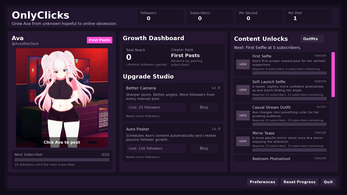
OnlyClicks is a lightweight productivity app designed to automate repetitive tapping tasks across Android, letting users record, edit and replay touch sequences with precision. It simplifies routine actions, speeds up workflows and offers granular timing controls so users can create reliable automation scripts without coding or complex setup.
OnlyClicks targets anyone who repeatedly performs the same touch interactions on their phone or tablet — testers, mobile gamers, data-entry workers, and power users. The app captures touch gestures, organizes them into reusable sequences and executes them accurately. It’s focused on simplicity: you don’t need prior programming experience to build effective automation flows.
At its heart, OnlyClicks provides three main tools: a recorder to capture taps and swipes, an editor to refine timings and positions, and a player to run sequences in loops or conditional modes. The recorder maps each interaction to a visual timeline; the editor allows precise adjustments, and the player supports scheduling and repeat counts for unattended execution.
Creating an automation task with OnlyClicks usually takes three steps: record a session, review and edit the recorded events, then execute the sequence. The built-in preview tool helps you validate each step before running it unattended. Advanced users can combine multiple sequences into playlists to handle longer workflows.
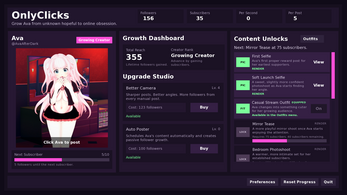
The interface balances clarity and functionality. Controls are grouped by task type so you can access recording, editing and playback options quickly. Visual cues show active taps and swipes during recording. Performance is responsive on modern devices; the app prioritizes smooth playback while minimizing background resource usage.
OnlyClicks gives you control over nearly every parameter of an action. Adjust coordinates down to the pixel, tweak press duration, and insert randomized delays to reduce predictability. These customization options make the app adaptable across different screen sizes and app versions, ensuring scripts remain functional after minor UI changes.
Common scenarios include automating repetitive UI tests, speeding through multi-step in-app actions, or performing routine maintenance tasks. Teams can use it to reproduce bugs consistently during testing, while individuals benefit from cutting down manual taps in apps that lack batch operations.
Users praise OnlyClicks for its straightforward setup and reliable execution. The learning curve is modest, and the editor gives non-technical users powerful control over task behavior. Its ability to run tasks reliably in the background, combined with a compact interface, makes it a solid choice for anyone looking to automate touch-driven activities.
Download, grant necessary accessibility or overlay permissions, then begin by recording a short session. The app guides you through permission steps and offers contextual help during editing. Within minutes you can move from recording to automated playback and start saving time on repetitive tasks.
Whether you need quick task automation or a practical way to streamline repetitive mobile interactions, OnlyClicks provides a balanced set of features that emphasizes ease of use without sacrificing control. Its toolkit supports both casual automations and more structured workflows for advanced users.
Cum in Out
Size:99.19M Casual2jbet Game
Size:12.94M CasualAlabell
Size:2016.37M CasualTrick or Ahri
Size:93.31M CasualRed snow
Size:216.55M CasualSumod.beta
Size:5.08M CasualTwo Weeks On
Size:123.18M CasualTightfault Revamp Edit
Size:1.14M CasualXSerum
Size:950.87M CasualDouble Homework - Remaster
Size:1310.88M CasualDevious Work : Demo
Size:92.25M CasualKnödel TD
Size:74.40M CasualApril 2024 Clash of Clans Update: Unveiling a Fresh Companion, Enhanced Levels, Chat Tagging, and Be
2024-04-16Arrival of Genshin Impact 4.6 Update: 'Embers of Two Realms, Twilight of Crimson'
2024-04-16V2.2 of the Farlight 84 update introduces an overhauled Season structure, fresh in-game currency, an
2024-04-16Monster Never Cry is now accessible on both Android and iOS mobile devices.
2024-04-18PUBG Mobile Teams Up with Bentley Motors: Luxury Cars, Exclusive Collectibles, and Beyond
2024-04-18March 2024 Free Redemption Codes for Honkai: Star Rail
2024-04-18