
English
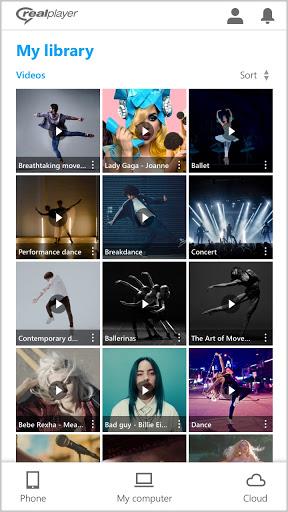
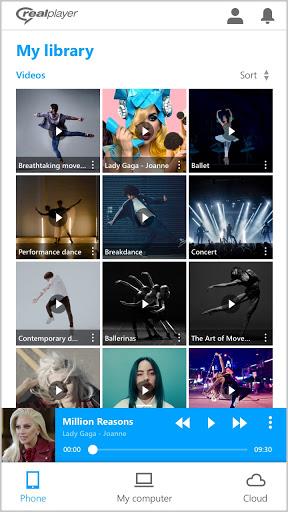
RealPlayer is the ultimate media player and downloader for video lovers everywhere. With the latest release, you can now reduce eye strain with Dark Mode, speed up or slow down videos, and easily login with Keychain. Seamlessly sync downloads and transfer videos between your phone and PC with just one click. Cast videos to your TV, access your RealPlayer library remotely, and stream videos offline. With subscription options for added features like cloud storage and DVD burning, RealPlayer has everything you need for a superior video experience. Available in multiple languages, this app is a game-changer for all your video needs.
⭐ Dark Mode: Reduce eye strain and enjoy better videos with this new feature.
⭐ Video Speed Control: Speed up or slow down the video you’re watching for a personalized viewing experience.
⭐ Keychain Login: Easily login with the Keychain feature for added convenience.
⭐ Folder Access: Access folders on your phone as you would on your PC.
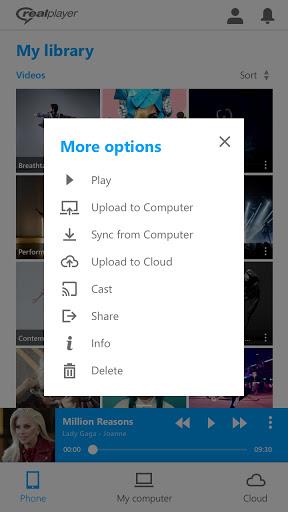
⭐ Sync Downloads: Seamlessly sync downloads between your phone and PC, making it easy to transfer videos.
⭐ Use Chromecast or AirPlay to cast videos from your phone to a bigger screen for a more immersive viewing experience.
⭐ Take advantage of secure remote access to access your RealPlayer PC library from anywhere.
⭐ Stream videos from your PC or RealPlayer Cloud to enjoy your favorite content on the go.
⭐ Sync videos to watch offline while traveling.
⭐ Back up your videos to the RealPlayer Cloud for easy access from any device.
RealPlayer is a versatile media player that offers a range of features to enhance your video viewing experience. With the ability to sync downloads between your phone and PC, access your RealPlayer library from anywhere, and stream videos on the go, this app is a must-have for any video lover. Try out RealPlayer today and take your video watching to the next level!

Car Horn
Size:8.82M ToolsAirFinder USB
Size:67.00M ToolsSystem Information Monitor
Size:9.48M ToolsAll Video Downloader
Size:6.13M ToolsQR Code Generator & Scanner
Size:26.70M ToolsAi NovaMind-gpt5.4 Gemini 3pro
Size:68.30M ToolsPower Clean - Files Cleaner
Size:23.00M ToolsX Videos - Video Downloader
Size:31.00M ToolsWiFi Connect Hub
Size:37.24M ToolsHermandades de Guadix
Size:20.82M ToolsSoliest VPN
Size:28.00M ToolsWalking Tracker
Size:32.30M ToolsApril 2024 Clash of Clans Update: Unveiling a Fresh Companion, Enhanced Levels, Chat Tagging, and Be
2024-04-16Arrival of Genshin Impact 4.6 Update: 'Embers of Two Realms, Twilight of Crimson'
2024-04-16V2.2 of the Farlight 84 update introduces an overhauled Season structure, fresh in-game currency, an
2024-04-16Monster Never Cry is now accessible on both Android and iOS mobile devices.
2024-04-18PUBG Mobile Teams Up with Bentley Motors: Luxury Cars, Exclusive Collectibles, and Beyond
2024-04-18March 2024 Free Redemption Codes for Honkai: Star Rail
2024-04-18













Comment
Pat McFarland
Very frustrating. I want to use RP as my audio app but that functionality is not available. Is there a timetable on the mp3 part of the app?
Jan 12, 2025 08:10:59
Adnan Shah
The worse experience I had with this app becuase the app lacks many features like folder view, subtitles download option etc... now deleted.....
Jan 11, 2025 17:00:45
RReneJOYCE Rene' Walkers
WrittenTheory of playback stored in my application, don't relax with this type of music. Reel to reel is also a option I created.
Jan 11, 2025 00:43:51
Tech Mobile
Disappointed App only support video files saved on mobile internal memory, SD card is not accessible. Audio files are not supported as well
Jan 09, 2025 18:08:30
MrJohn John
This app only works with audio files? I used real player years ago and it used both audio and video. I bought this thinking it used both.
Jan 09, 2025 16:55:38
Mack McGregor
I've used RealPlayer for years. It's gotten better with each year and now I would say is the best one of the best media players available.
Jan 09, 2025 16:44:32