
English
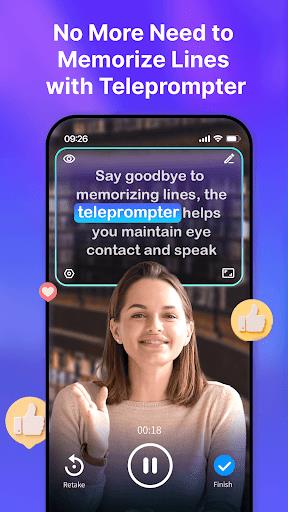
Whether you're looking to make your videos more accessible, reach a global audience, or simply enhance the overall quality of your content, Blink Captions by Vozo AI has got you covered! This innovative app utilizes cutting-edge AI technology to automatically add stylish captions and subtitles to your talking videos with impressive accuracy. With features like AI Translate, trendy caption styles, AI Trim, and AI Teleprompter, Blink Captions offers a wide range of tools to elevate your video content creation experience. From creating captivating music videos to delivering flawless scripts, this app is designed to make your life easier and your videos stand out. Give Blink Captions a try and unlock endless possibilities for your content!
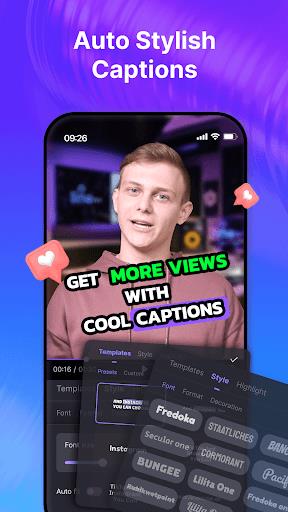
- AI Captions: Enhance your talking videos with automated, stylish captions and subtitles generated with -97% accuracy using speech-to-text technology. Customize captions at the sentence or batch level for a personalized touch.
- Lyrics Mode: Easily add stunning captions to your music videos by accurately transcribing song lyrics with just one click. Bring your music to life with Blink Captions' new feature.
- AI Translate: Expand your audience by translating captions to other languages instantly with one click. Choose from 17 mainstream languages and dialects to reach a wider viewer base.
- Trendy Captions Styles: Access 200+ preset caption styles, including fonts, colors, sizes, backgrounds, and animations, to make your talking videos eye-catching and engaging.
- AI Trim: Remove filler words and silent parts from your captions and videos effortlessly with one click. Streamline your editing process for a smoother talking video creation experience.
- AI Zoom and Highlight: Draw attention to specific areas in your video by automatically zooming in on highlighted sections at specified timings. Customize your captions to stand out and make an impact.
- Customize Captions: Ensure your captions match your video's tone and style by customizing them at the sentence or batch level for a cohesive look.
- Experiment with Styles: Explore different preset caption styles to find the one that best complements your video content and enhances its visual appeal.
- Utilize AI Trim: Keep your talking videos concise and engaging by removing filler words and silent parts with the AI Trim feature for a more polished final product.
- Highlight Key Moments: Use the AI Zoom and Highlight feature to emphasize important sections of your video and draw viewers' attention to specific details.
- Enhance Audio Quality: Improve the clarity of your talking videos by utilizing the AI Noise Reducer to reduce background noise levels and ensure clear audio delivery.
With Blink Captions by Vozo AI, you have a powerful tool at your fingertips to elevate your talking videos and engage with your audience on a whole new level. From AI-generated captions and subtitles to customizable styles and innovative features like AI Trim and AI Zoom, Blink Captions offers everything you need to create captivating and professional-looking content. Explore the possibilities and unleash your creativity with Blink Captions today!
Harmony Kit
Size:66.00M LifestyleNorskLuftambulanse
Size:121.20M LifestyleApexly - Apex Face
Size:52.00M LifestyleInterval Timer - Workout Log
Size:28.00M LifestyleLviv Croissants PL
Size:38.93M LifestyleDivya Clinic - Doctor
Size:85.21M LifestyleChange The Game
Size:13.00M Lifestyle銀色大門
Size:49.00M LifestyleSEM Perico
Size:15.00M LifestyleMLI App
Size:139.00M LifestyleMy Cura
Size:38.00M LifestyleA Backpacker
Size:22.00M LifestyleApril 2024 Clash of Clans Update: Unveiling a Fresh Companion, Enhanced Levels, Chat Tagging, and Be
2024-04-16Arrival of Genshin Impact 4.6 Update: 'Embers of Two Realms, Twilight of Crimson'
2024-04-16V2.2 of the Farlight 84 update introduces an overhauled Season structure, fresh in-game currency, an
2024-04-16Monster Never Cry is now accessible on both Android and iOS mobile devices.
2024-04-18PUBG Mobile Teams Up with Bentley Motors: Luxury Cars, Exclusive Collectibles, and Beyond
2024-04-18March 2024 Free Redemption Codes for Honkai: Star Rail
2024-04-18












Comment
Dr Tanvi Rajput
yes its good for editing,but i tried payment for 3 times bit subscription still not showing,waiting for the pro features to download my videos
Jan 13, 2025 16:21:47
Sayed Almosawi
Makes you work tirelessly to edit your project and only lets you know you need to pay to export your project after you're done editing. Quite scummy.
Jan 13, 2025 05:26:33
Ompal Singh
excellent application, how flip functions work in between when the video is being recorded.
Jan 12, 2025 16:32:00
William Purcell
Pretty tired of these bait and switch apps. They lure you in you spend time creating something and then at the very end they give you the one to hey pay us. It'd be a smarter and less offensive and irritating marketing tactics to allow them to upload one or two of their first creations but they want that money now. so I'm uninstalling when otherwise I pay for apps I enjoy that are well made but not this one now. thanks a lot.
Jan 12, 2025 16:07:22
AMNA AMNA
this is really AMAZING app that we can easily add caption in just few seconds
Jan 12, 2025 08:48:52
Ayush Kushwaha
Don't Install This App 1. When I open app, and click on plus icon in bottom. 2. I Get Auto Caption With Pro. 3. How I Caption My Video ? 4. It ended as soon as it started
Jan 11, 2025 17:50:53