
English
Introducing Screenshot Touch, the must-have Android application for all your screenshot and screen recording needs. With features like capturing by touch, recording video cast, web page scrolling, image editing, and more, Screenshot Touch is a versatile tool that is perfect for both personal and professional use. You can customize your capture options, organize your screenshots into multiple saving folders, and even remove ads with in-app purchasing. Plus, rest assured that your privacy is protected, as Screenshot Touch does not collect or share any data without your consent. Upgrade your screenshot game with Screenshot Touch today!
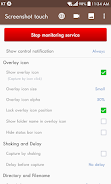
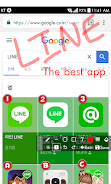
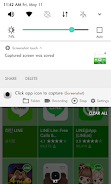
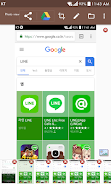
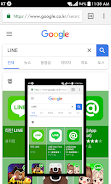
❤ **Capture by touch**: Easily take screenshots by tapping the Notification area, overlay icon, or shaking your device.
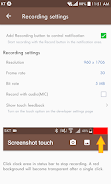
❤ **Record video cast**: Record screen activity to mp4 with customizable options such as Resolution, Frame rate, Bit rate, and audio settings.
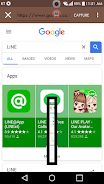
❤ **Web page scroll capture**: Capture entire web pages with the in-app web browser and two scroll capture methods.
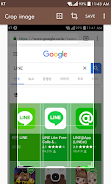
❤ **Image editing tools**: Edit screenshots with features like Image cropper, Drawing tools (Pen, Text, Shapes), and adjustable opacity.
❤ **Utilize capture options**: Customize settings like save directory, file format, jpeg quality, and capture delay to suit your preferences.
❤ **Organize screenshots**: Create multiple saving folders to categorize and group similar screenshots for easy access.
❤ **Enable persistent notification**: Keep the Screenshot Touch notification always visible for quick access to the app's features.
Screenshot Touch is a versatile and user-friendly app for capturing and editing screenshots on Android devices. With a range of features such as touch capture, video recording, web page scroll capture, and image editing tools, it offers essential functions for every user. Organize and customize your screenshots with ease, and enhance your mobile tutorial creation with voice recording capabilities. Download Screenshot Touch today for a seamless screenshot experience.
Modentity
Size:51.00M ToolsDroptima
Size:14.00M ToolsGlims - Live Web Widget Maker
Size:26.50M ToolsTibia Square
Size:51.00M Tools2248 Number Puzzle Launcher
Size:85.50M ToolsRoHS Smart Camera App
Size:35.00M ToolsSMSKey - Sanal Numara
Size:65.00M ToolsReceiptStacker
Size:32.00M ToolsPosturalHealthMonitoring
Size:12.00M ToolsDailyUnit Fvsm Converter
Size:4.00M ToolsRevtech Mobile
Size:53.00M ToolsTuneBoss Dealer Tools
Size:28.00M ToolsApril 2024 Clash of Clans Update: Unveiling a Fresh Companion, Enhanced Levels, Chat Tagging, and Be
2024-04-16Arrival of Genshin Impact 4.6 Update: 'Embers of Two Realms, Twilight of Crimson'
2024-04-16V2.2 of the Farlight 84 update introduces an overhauled Season structure, fresh in-game currency, an
2024-04-16Monster Never Cry is now accessible on both Android and iOS mobile devices.
2024-04-18PUBG Mobile Teams Up with Bentley Motors: Luxury Cars, Exclusive Collectibles, and Beyond
2024-04-18March 2024 Free Redemption Codes for Honkai: Star Rail
2024-04-18













Comment
Lee Ditkowsky
After update in wants to record video instead of taking a screen shot. And no matter what I toggle it will no longer take screen shots.
Feb 10, 2025 23:52:24
Aaron Smith
Helps save items that you want/need for short-term use. you are able to find items easily without having to make a separate folder, and you don't have to worry about accidentally deleting anything.
Feb 09, 2025 11:38:38
Ayesha Akter
difficult to understand and UI not user friendly.
Feb 08, 2025 05:36:19
Harold Roldankenjin Trinidad 1 (Roldhan)
Very much useful, I've tried similar apps, but I enjoyed using this app more and I'm a huge user of this app, so I'll change my rate on this app, I'd suggest editing the screenshot as well in the screenshot you took. This means that the editing tools would have been similar to photo editors or gallery apps.
Feb 08, 2025 03:27:40
D T
2024-0423 Sadly I have to lower from 5; understand ads but fullscreen or audio make this average. The last thing I need is a mini-video in my face after a capture. prior review... This is a great little screenshot app. It can stay out of the way when active or even be exited if you don't want it running in the background at all. It has a simple little editor makes it easy to make quick edits such as cropping and markups etc and it does video-cap too.
Feb 08, 2025 01:55:59
Visnu Gonzalez
Cool features, USELESS APP. Permission for every screenshot? Fix is impossible? Total B's. There's a boatload of SS apps that take all you want without asking for permission. What a joke. 0 stars.
Feb 07, 2025 17:17:51