
English
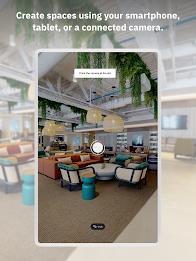
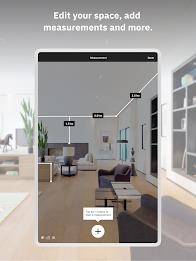
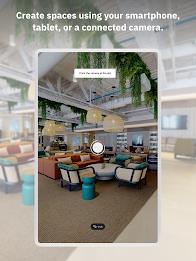
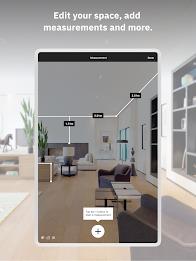
Matterport revolutionizes the way we experience physical spaces by allowing anyone to create a stunning and interactive 3D virtual tour with just a smartphone. Whether you're a homeowner looking to showcase your property, an architect planning a project, or a real estate agent trying to sell a space, Matterport's digital twin technology has you covered. Collaborate with professionals remotely, manage properties virtually, and avoid costly errors by measuring your space accurately. By bringing your spaces online, you can increase occupancy rates, attract more visitors, and streamline your workflow. Ready to transform your spaces into dynamic digital twins? Download Matterport now and get started for free.
❤ Immersive 3D Virtual Tours: Matterport allows you to create stunning 3D virtual tours of any physical space, from homes to high-rises to hotels. This immersive experience gives viewers a realistic sense of the space, making it ideal for real estate listings, hospitality businesses, and more.
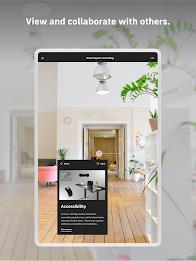
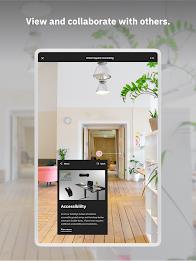
❤ Collaborative Capabilities: With Matterport's digital twin technology, you can collaborate with others inside the virtual space from anywhere in the world. This makes it easy to work with designers, contractors, and clients, streamlining communication and project management.
❤ Remote Construction Planning: Plan construction projects remotely, document daily site conditions, and send layouts to architects and designers from anywhere with Matterport. This feature is perfect for construction professionals looking to streamline their workflow and ensure accuracy.
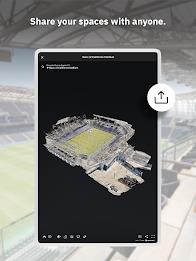
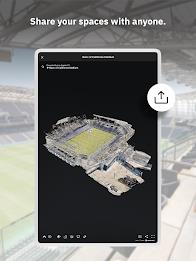
❤ Portfolio Management: Manage an entire portfolio of properties virtually with Matterport. Conduct site walkthroughs, view updated floor plans, and stage properties without ever having to be physically present. This is a great tool for property managers, real estate agents, and investors.
❤ Capture High-Quality Images: When creating a 3D virtual tour with Matterport, make sure to capture high-quality images to provide viewers with a clear and detailed representation of the space.
❤ Utilize Collaboration Tools: Take advantage of the collaborative capabilities of Matterport by inviting team members, clients, or contractors to explore and work within the digital twin. This can help streamline communication and enhance project efficiency.
❤ Plan and Manage Projects: Use Matterport to plan construction projects remotely, document site conditions, and manage properties in your portfolio. By utilizing all the features the app offers, you can work smarter and more efficiently than ever before.
Matterport is a powerful tool that allows you to create immersive 3D virtual tours, collaborate with others remotely, and manage construction projects and property portfolios with ease. With its user-friendly interface and advanced features, Matterport is a must-have for professionals in real estate, construction, and property management. Download Matterport now to experience the benefits of digital twin technology and take your buildings online.




Uber
Size:158.30M LifestyleНейроЧат
Size:58.00M LifestyleTruckTap
Size:79.00M LifestyleDailyLift
Size:62.16M Lifestyleskateable
Size:83.46M LifestyleRemote Control for TV
Size:22.60M LifestyleTout va bien - Daily Check-in
Size:23.12M LifestylePetsID
Size:98.21M LifestyleSnoozzles: Sleep Trainer & Log
Size:76.00M LifestyleImperial Fit Academia
Size:49.00M LifestyleTierbuch Hühner
Size:15.00M LifestylePachiviar
Size:51.00M LifestyleApril 2024 Clash of Clans Update: Unveiling a Fresh Companion, Enhanced Levels, Chat Tagging, and Be
2024-04-16Arrival of Genshin Impact 4.6 Update: 'Embers of Two Realms, Twilight of Crimson'
2024-04-16V2.2 of the Farlight 84 update introduces an overhauled Season structure, fresh in-game currency, an
2024-04-16Monster Never Cry is now accessible on both Android and iOS mobile devices.
2024-04-18PUBG Mobile Teams Up with Bentley Motors: Luxury Cars, Exclusive Collectibles, and Beyond
2024-04-18March 2024 Free Redemption Codes for Honkai: Star Rail
2024-04-18



















Comment
Andrew Taylor
Amazing tech but with bugs and a poor interface. App crashes, overheating (although I'm sure this is just processor intensive), no ability to do any editing of stitching in the base tier. There are bugs when repositioning scans and the whole scene just breaks and you get to start over. Tested on Samsung S23 Ultra.
Jun 09, 2025 17:05:58
Brandon O'Hara
There is a minor bug when rotate the display while working on a job. When the screen rotates, it backs out to the "Your jobs" page and any progress of a scan that was currently being processed does not save. It also does this exact thing even if you are just viewing a specific job. This doesn't clear all of the work, but still is an inconvenience since I have to rescan that point again.
Jun 09, 2025 15:54:31
Laurin OS
Not suitable to be used with a phone to get any decent measurements. Margin of error on a couple of test measurements was ~30%.
Jun 09, 2025 10:23:48
Dan Aguilar
This app has been such a time saver and the game changer for me!! On the rare occasion where it glitches out with the alignment, it's usually pretty easy to get it fixed and keep moving forward. I'm using it with my insta360 1-inch which has cranked out professional in results.
Jun 09, 2025 09:17:17
Matthew Wiseman
app use to better, now its just malware that kills your battery. get an iguide instead and thank me later.
Jun 08, 2025 21:06:54
Chris Bourque
Camera issue solved! If Matterport can't detect your camera, it's not Matterport causing it. For every 1 or 2 shots Matterport would lose connection to the camera and the only fix was to reboot the phone. Well, it turns out the cause was VMWare Intelligent Hub (my company's device management software). I uninstalled the VMWare Hub to use Matterport and it never had the issue again.
Jun 08, 2025 06:50:34