English
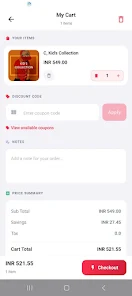
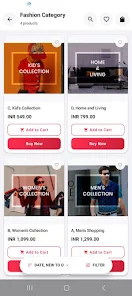
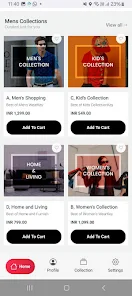
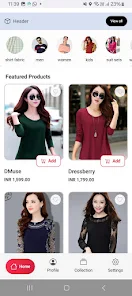
Appokart is a mobile preview utility designed for e-commerce store owners, designers and developers who need to see exactly how a storefront appears on a real Android phone before customers do. Appokart connects with your online store and renders the storefront front-end in a realistic phone viewport so you can quickly spot layout problems, verify product pages and test responsive behavior without repeatedly switching between desktop and device. This editor introduction explains how the app works, what to expect from the interface, and practical ways teams use Appokart to accelerate mobile QA and design checks.
The core strength of Appokart is its true mobile rendering: the app reproduces front-end layout, images and typography as they will appear on a shopper’s device rather than an approximate desktop simulation. Live updates reflect front-end edits in near real time so changes to product pages or theme files are visible immediately in the preview. Appokart also supports common device orientations and viewport sizes so you can confirm how breakpoints, grids and images respond when a visitor rotates their phone or switches between narrow and wide displays.
Connection is handled through a secure pairing workflow that links your store’s preview endpoint to the app on your phone; this keeps credentials and store data private while enabling instant front-end previews. The app establishes a lightweight session optimized for speed, minimizing lag while still encrypting traffic between the store and your device. Because Appokart focuses on front-end rendering, sensitive server-side operations remain on your store’s infrastructure and are not replaced by the preview tool.
Appokart reproduces normal mobile interactions so designers and testers can tap, swipe, scroll and use pinch‑to‑zoom to exercise product galleries, navigation menus and checkout flows. The interface emphasizes intuitive controls: switch device orientation with a single touch, adjust simulated pixel ratio to approximate different screen densities, and navigate between pages as a real customer would. These controls let you validate touch targets, mobile menu behavior and the discoverability of key content on small screens.
Appokart fits into an iterative workflow: designers push theme changes or staging updates, then immediately review the result on a device to validate layout and user experience. Teams often use the app during theme development, pre-launch QA, and quick regression checks after content updates. The preview cycle supports sequential validation — view a change, note any layout issues, revise on desktop, and refresh the preview — which shortens the feedback loop and speeds up progression from staging to production.
The app offers controls relevant to visual testing, such as selecting common viewport sizes and toggling orientation, so you can compare how different themes and settings affect the mobile presentation. Appokart surfaces rendering differences that matter to designers, including image scaling, font fallbacks and spacing, helping teams make informed adjustments to theme CSS and templates. Because the tool shows the actual front-end output, it helps catch issues that might otherwise be missed by desktop-only inspections.
Appokart is built to work with responsive front-ends and standard e-commerce themes; it reproduces the variations that arise across device sizes and touch interactions. Accessibility testing benefits from the realistic phone preview: adjust text scaling and review contrast on the device to ensure content remains legible for users with different needs. The app also caches recent previews to improve reload speed when network conditions are unstable, allowing you to continue inspecting layouts if connectivity is temporarily limited.
Use Appokart as part of a checklist-driven QA process: review critical product pages, add-to-cart flows and theme variations on multiple orientations, and repeat checks after each content or style update. Keep a naming convention for themes and staging instances so previews are easy to identify, and coordinate short review sessions where designers and developers walk through issues directly on the device to reduce miscommunication.
Appokart focuses on front-end, device-level previews and does not replace full cross-browser, server-side or performance testing. The app requires permission to connect to your store’s preview endpoint, and visual output can vary slightly across mobile browsers and operating system versions, so additional device- and browser-specific checks may still be necessary. For many teams, however, Appokart significantly reduces guesswork and speeds up QA by offering a fast, accurate mobile view during design and pre-launch stages.



Appokart
Size:57.00M ShoppingMickkayG Shop
Size:30.76M Shopping런치원
Size:29.23M ShoppingClosh Delivery Partner
Size:21.00M ShoppingFeliplini
Size:16.25M ShoppingPrice Tracker
Size:65.91M ShoppingBuysellee
Size:43.53M ShoppingMagofis Pro
Size:65.95M ShoppingSindepco FMCG
Size:31.42M ShoppingRey De La Calle
Size:57.48M ShoppingSarah Jewellers
Size:72.94M ShoppingDmusk
Size:48.68M ShoppingApril 2024 Clash of Clans Update: Unveiling a Fresh Companion, Enhanced Levels, Chat Tagging, and Be
2024-04-16Arrival of Genshin Impact 4.6 Update: 'Embers of Two Realms, Twilight of Crimson'
2024-04-16V2.2 of the Farlight 84 update introduces an overhauled Season structure, fresh in-game currency, an
2024-04-16Monster Never Cry is now accessible on both Android and iOS mobile devices.
2024-04-18PUBG Mobile Teams Up with Bentley Motors: Luxury Cars, Exclusive Collectibles, and Beyond
2024-04-18March 2024 Free Redemption Codes for Honkai: Star Rail
2024-04-18