English
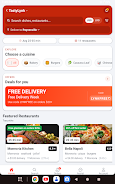
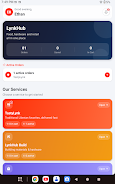
LynkHub is an all-in-one marketplace app that brings food, hardware, and retail shopping together. LynkHub lets you order meals, buy building materials, and browse everyday retail products without switching between multiple applications. LynkHub simplifies daily shopping, reduces clutter on your device, and centralizes orders from local vendors into a single, easy-to-use experience.
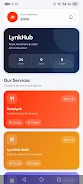
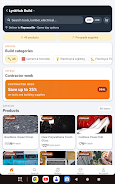
This editor introduction highlights what the app delivers in practical terms. The app integrates a meal ordering service (branded in-app as TastyLynk) alongside a construction-supply storefront (LynkHub Build) and a general retail marketplace, so users can move from breakfast to building materials to household items in one session. Product pages include photos, basic descriptions and pricing so shoppers can compare options before adding items to a shared cart. The unified checkout reduces repetition: one cart, one payment flow, and a single order summary for mixed-category purchases. The design focuses on speed and clarity rather than flashy effects, which helps when you need to make repeat purchases fast.
Navigation and controls were designed for touch-first mobile use. Start with the home categories or type a query into the search bar; refine results with filters for price, vendor distance, or item type, then tap to open a product or menu item. Add items to your cart with a single tap and adjust quantities from the cart screen before checking out. The checkout flow supports saved addresses and common payment methods so orders complete quickly. After placing an order you receive clear status updates and in-app messages that confirm acceptance, preparation, or dispatch. Vendor pages provide opening hours and basic contact options to confirm availability when needed.
Rather than game-style progression, LynkHub focuses on useful continuity: your past orders, saved favorites, and address shortcuts reduce time to reorder commonly bought items. The app learns basic preferences to surface frequently purchased categories and suggests items based on your history in a non-intrusive way. Users can create and name lists for projects or recurring needs—examples include a “Renovation Supplies” list for hardware orders and a “Weekly Meals” list for food. These conveniences create a sense of progression as the app becomes more tailored to how you shop over time.
The interface emphasizes readable typography, clear iconography, and straightforward page layouts so product information is easy to scan. Menu sections use simple thumbnails and concise labels to reduce cognitive load when choosing between meals or materials. Product pages prioritize essential details such as dimensions and unit pricing for construction items, and ingredient highlights or portion sizes for food items. The visual choices aim for quick decision-making—large call-to-action buttons, predictable placement of cart and search, and consistent vendor presentation across categories.
Users can customize common settings like notification preferences, preferred payment methods, and language or region settings where available. Accessibility considerations include adjustable text size, color-contrast friendly palettes, and compatibility with system-level screen readers for people who rely on spoken feedback. Touch targets are sized to accommodate one-handed use, and the app aims for clear labels and alternative text for images where vendors provide it, improving usability for a broader audience.
To keep the app useful when connectivity is intermittent, LynkHub caches recent categories, saved lists, and the last-viewed product pages so you can review essentials offline. Full ordering requires a network connection, but browsing and list preparation remain possible without continuous access. The app is optimized to limit background data use and reduce load times on slower connections, and a low-data option restricts high-resolution images to conserve bandwidth.
LynkHub earns repeat visits by grouping multiple shopping needs into one session: a homeowner might place a meal order for lunch, add a box of tiles to a renovation list, and pick up household supplies in the same checkout. Small contractors can simplify procurement for jobs by saving project lists and reordering commonly used materials, while busy families can rely on saved favorites and quick-reorder controls for routine shopping. The app’s value increases as local vendor participation expands in your area.
Availability of restaurants, suppliers, and retail partners varies by location, and some specialized or niche products may not be present on the platform. Prices and delivery options depend on individual vendors. For questions or assistance, the app includes in-app help and basic contact channels to reach customer support or vendor contacts. Feedback tools allow users to report missing items or suggest new vendors so the marketplace can grow in ways that reflect local demand.

LynkHub
Size:107.88M LifestyleRenovo
Size:14.00M LifestyleRapsy
Size:51.82M Lifestyle話題提案AI「トークサジェスチャー」
Size:41.00M LifestyleWest Highland Way
Size:30.00M LifestyleMBA Luxury Center
Size:48.97M LifestyleHouse of Shine
Size:89.00M LifestyleBridge Connect
Size:141.11M LifestyleIZI Recarga EV
Size:88.00M LifestyleAstraveda
Size:122.00M LifestyleFuel Insight
Size:31.00M LifestyleTasbeeh- Counter
Size:18.00M LifestyleApril 2024 Clash of Clans Update: Unveiling a Fresh Companion, Enhanced Levels, Chat Tagging, and Be
2024-04-16Arrival of Genshin Impact 4.6 Update: 'Embers of Two Realms, Twilight of Crimson'
2024-04-16V2.2 of the Farlight 84 update introduces an overhauled Season structure, fresh in-game currency, an
2024-04-16Monster Never Cry is now accessible on both Android and iOS mobile devices.
2024-04-18PUBG Mobile Teams Up with Bentley Motors: Luxury Cars, Exclusive Collectibles, and Beyond
2024-04-18March 2024 Free Redemption Codes for Honkai: Star Rail
2024-04-18