English
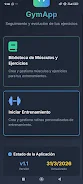
GymApp Control is a compact fitness management app designed to help you design, run and track workout routines with minimal fuss. GymApp Control brings together an exercise library, a flexible routine builder and a configurable rest timer so you can record sets, reps and weights, review full workout history and watch measurable progress over time. The app stores all data locally and runs offline, making GymApp Control a practical option for users who want a private, ad-free training tool with a simple one-time purchase model after a 15-day free trial.
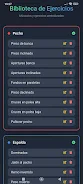
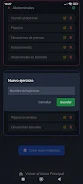
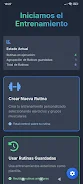
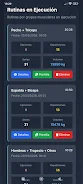
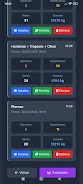
GymApp Control includes a library of more than 50 predefined movements and lets you create custom exercises and muscle maps to reflect the way you train. The routine builder is manual and intentionally simple: add exercises, set the number of sets, enter target reps and weight ranges, and include rest intervals for each entry. During a session the configurable rest timer provides sound alerts and notification options so you can stay on pace without constantly watching the screen. Every completed set is saved to a local workout history that feeds into built-in statistics and graphs to show load and rep progression over days and weeks.
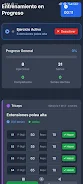
The interface focuses on one-handed gym use with large buttons and clear input fields for fast set logging. Controls are straightforward: tap to start a set, mark reps and weight with a few touches, pause or resume the timer, and swipe through exercises within a routine. Visual cues highlight the current exercise and remaining rest time so you can keep your focus on lifting. Notifications and sound alerts can be adjusted or silenced to suit different gym environments, and small haptic feedback on supported devices gives a subtle confirmation when sets are recorded.
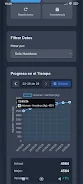
Progression in GymApp Control is driven by the data you record. The statistics view aggregates total load, average reps and volume for each exercise, and highlights personal records so you can spot improvements. Trend lines and week-to-week comparisons help you plan gradual increases in weight or reps following simple progressive overload principles. Because every session is archived locally, you can compare any two workouts, export a CSV backup for manual review or use the internal notes field to track how a particular cycle felt.
The app favors a clean, utilitarian design crafted for quick access during workouts: clear typography, concise screens and color-coded progress graphs reduce clutter and make important numbers visible at a glance. Routines are structured as sequences of exercises and sets rather than levels or stages, which keeps the app flexible for strength sessions, hypertrophy routines or simple maintenance workouts. You can save templates for repeatable sessions, so reusing a favorite routine takes a couple of taps and reduces setup time between visits to the gym.
Customization is built into the core workflow: add custom exercises, rename muscle groups, set unique rest intervals and store template routines that match your training split. Replay value comes from incremental goals and personal record tracking; many users build short-term challenges such as hitting a set rep target across multiple sessions or beating a previous load for a given exercise. Timed circuits and interval-based sessions are supported by the rest timer and manual sequencing, allowing you to design higher-intensity sessions without relying on external tools.
GymApp Control follows an offline-first approach so your logs stay on the device, improving privacy and making the app fast even without signal. This design also means there is no automatic cloud sync; transferring data between devices requires manual backup and restore of local files, which the app supports via export/import of backup files. Larger fonts, high-contrast elements and clear button targets help with accessibility, and adjustable notification and sound settings let you adapt the app to different gym environments.
GymApp Control intentionally avoids complex coaching features, community integrations or automatic program recommendations to remain lightweight and user-controlled. If you rely on cloud backups, social features or guided multi-week programs you may find the feature set limited, but for users who prefer a straightforward, private tool to log workouts and monitor progress, GymApp Control delivers an uncluttered experience. After a 15-day free trial all premium functions unlock and a single one-time payment of €6 grants permanent access, with no recurring subscription.
If you want a focused, offline-capable training log that keeps control in your hands and emphasizes clear, trackable progress, GymApp Control is worth trying during the free trial period.
Pizzaria do Erick
Size:19.12M LifestyleMy Hurricane Tracker Pro
Size:4.73M LifestylePushscroll
Size:61.25M LifestyleSmartWOD Timer
Size:26.75M LifestyleMeteum Weather
Size:63.84M LifestyleBestifyMe
Size:13.80M LifestyleWeatherPro
Size:48.30M LifestyleEmpower You: Unlimited Audio
Size:80.20M LifestyleAdobe Express
Size:107.80M LifestyleGeoZilla
Size:63.92M LifestyleONEWallet - Cards Wallet
Size:15.00M LifestyleFloor Plan Creator Home Design
Size:40.91M LifestyleApril 2024 Clash of Clans Update: Unveiling a Fresh Companion, Enhanced Levels, Chat Tagging, and Be
2024-04-16Arrival of Genshin Impact 4.6 Update: 'Embers of Two Realms, Twilight of Crimson'
2024-04-16V2.2 of the Farlight 84 update introduces an overhauled Season structure, fresh in-game currency, an
2024-04-16Monster Never Cry is now accessible on both Android and iOS mobile devices.
2024-04-18PUBG Mobile Teams Up with Bentley Motors: Luxury Cars, Exclusive Collectibles, and Beyond
2024-04-18March 2024 Free Redemption Codes for Honkai: Star Rail
2024-04-18