
English
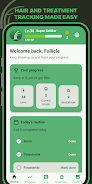
Follicle is a focused hair-growth tracker and progress photo app that helps you document changes over weeks and months. In Follicle you keep a private gallery, consistent photo tools and treatment logs together so long-term regrowth or transformation records are simple to maintain. This introduction explains how the app works, what controls and settings you can expect, and practical tips for getting reliable before-and-after comparisons.
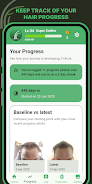
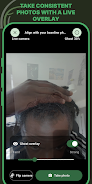
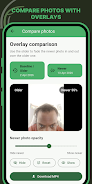
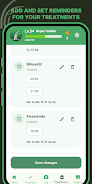
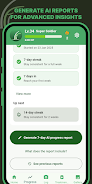
The app combines a private photo gallery, repeatable shot tools and treatment reminders to support organised tracking. A Ghost Overlay places a faint reference image over the camera preview so you can match angle and position on each capture; side-by-side comparisons and a visual timeline make it easier to spot gradual changes. Treatment logging and scheduled reminders help you maintain a routine, while basic analytics and downloadable AI-enhanced visual reports provide deeper insight into subtle improvements or declines. Export options let you save selected photos and reports for personal records or to share with a clinician.
Follicle’s camera interface focuses on repeatability rather than complex editing. You control overlay opacity, alignment guides and simple crop/framing tools to standardise each shot. The Ghost Overlay operates as a translucent layer over the live view so you can align hairlines, parts and angles consistently; the app preserves the overlay reference for future sessions. Capture controls are optimised for one-handed phone use and respect your device’s native camera settings to maintain image quality across sessions.
Progress is represented on a visual timeline where photos are arranged by date and grouped into review periods (weekly, monthly or custom ranges). The timeline highlights key photo milestones so you can quickly compare two points in time. Treatment entries become part of the record and are visible alongside photos, letting you correlate routine changes with visual results. AI-generated summaries produce downloadable reports that emphasise areas of change, though they are intended as visual aids rather than clinical diagnostics.
The app’s interface is designed to be clean and unobtrusive: neutral backgrounds keep attention on the images, while clear labels and large controls reduce friction during regular use. Customisation includes reminder schedules, overlay opacity and image naming conventions to match your preferred workflow. Follicle’s settings let you choose how photos are organised, whether dates are displayed prominently, and how many images appear on each timeline row so the app fits both quick daily checks and detailed monthly reviews.
Photos and treatment logs are stored in a private gallery on your device by default, keeping your records under your control. You can export selected photos and downloadable AI reports if you need to archive progress externally or share a set with a healthcare professional. The app avoids unnecessary online sharing by default; any backup or cloud option is presented as an explicit choice rather than a requirement.
Follicle supports offline operation for the core experience: you can take photos, view your timeline and log treatments without a network connection. Built-in reminders use local notifications so habit-support features work even when offline. Accessibility considerations include scalable text, high-contrast display options and straightforward camera controls to help users with different abilities capture consistent images reliably.
Consistent lighting, steady angle and the Ghost Overlay are the most important factors for meaningful comparisons. Use the same time of day and similar background to reduce visual noise, and enable reminders so captures happen at regular intervals. Tag treatments and add short notes to entries to preserve context about what was used or changed between sessions — this makes the timeline and AI summaries easier to interpret when you review progress later.
Follicle is primarily photo-based and depends on repeatable, well-aligned images to show meaningful progress. Analytics focus on visual summaries and AI-assisted reports rather than exhaustive clinical metrics, so results should be interpreted as supportive visual evidence rather than medical conclusions. Photo comparison accuracy improves with consistent use of the Ghost Overlay and regular logging, so long-term discipline will produce the most useful records.


Pizzaria do Erick
Size:19.12M LifestyleMy Hurricane Tracker Pro
Size:4.73M LifestylePushscroll
Size:61.25M LifestyleSmartWOD Timer
Size:26.75M LifestyleMeteum Weather
Size:63.84M LifestyleBestifyMe
Size:13.80M LifestyleWeatherPro
Size:48.30M LifestyleEmpower You: Unlimited Audio
Size:80.20M LifestyleAdobe Express
Size:107.80M LifestyleGeoZilla
Size:63.92M LifestyleONEWallet - Cards Wallet
Size:15.00M LifestyleFloor Plan Creator Home Design
Size:40.91M LifestyleApril 2024 Clash of Clans Update: Unveiling a Fresh Companion, Enhanced Levels, Chat Tagging, and Be
2024-04-16Arrival of Genshin Impact 4.6 Update: 'Embers of Two Realms, Twilight of Crimson'
2024-04-16V2.2 of the Farlight 84 update introduces an overhauled Season structure, fresh in-game currency, an
2024-04-16Monster Never Cry is now accessible on both Android and iOS mobile devices.
2024-04-18PUBG Mobile Teams Up with Bentley Motors: Luxury Cars, Exclusive Collectibles, and Beyond
2024-04-18March 2024 Free Redemption Codes for Honkai: Star Rail
2024-04-18