English
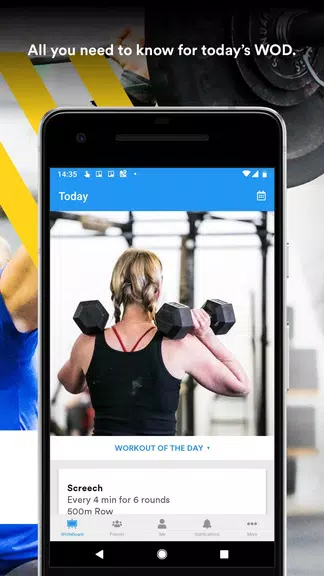
SugarWOD puts workout logging, coach programming and member communication into a compact mobile experience. SugarWOD opens with a simple onboarding: create a profile, connect to your gym, and the current workout appears at the top of the feed for one-tap access. The app is aimed at athletes and coaches who want reliable scorekeeping, clear programming, and an easy way to preserve training history without spending time on administration.
The app focuses on essentials that support consistent training: programmable WODs (workouts of the day), fast score and time entry, searchable workout history, and a personal records tracker. Coaches can publish daily programming with movement standards and attach demonstration videos or PDFs for clarity. Score entry supports Rx versus scaled notation and a short notes field so athletes capture context like modified loads or injury accommodations. Export options let coaches and athletes pull summary data into spreadsheets for offline analysis.
Every control is designed for busy environments where one-handed operation matters. Large numeric fields, preset timers, and quick toggles for load or scaling speed up entry between rounds. Video upload and comment fields are integrated into the same submission flow so a short clip, a quick note, and a score can be submitted together. Notifications are configurable so members receive updates about new programming, announcements, or leaderboard changes without unnecessary interruptions.
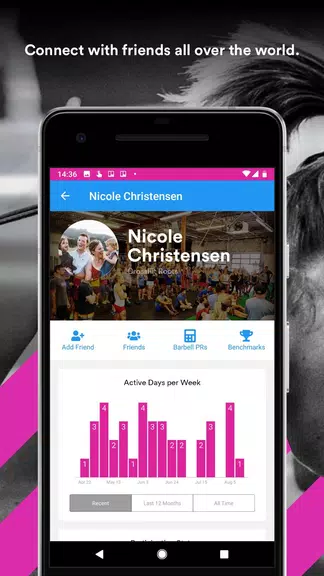
Progression in SugarWOD centers on consistent data capture and readable trends. Each entry is timestamped and records equipment, load, and any scaling notes. Built-in analytics highlight trends such as average times over selectable periods, rates of improvement for benchmark workouts, and frequency of sessions to show training consistency. The personal records module compiles best lifts and benchmark WOD performances so athletes and coaches can identify strengths, plateaus, and logical next steps for programming or technique work.
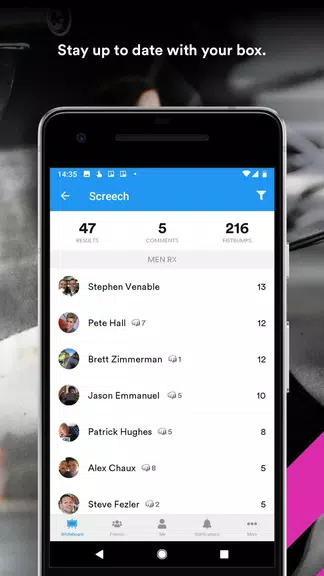
Community features are intended to motivate steady progress without adding complexity. Transparent leaderboards show rankings by workout, class, and division while comment threads let teammates acknowledge improvements or offer tips. Coaches can assign workouts to specific classes or groups and use leaderboard snapshots for friendly in-gym challenges. These systems emphasize accountability and engagement rather than competitive pressure, and they can be used selectively by gyms to shape culture.
Coaches control how workouts are displayed and tagged, with options to attach video, PDFs, or movement standards. Importing common workout formats and exporting summary data are supported for coaches who want offline record keeping. Select versions offer optional syncing with third-party fitness trackers to incorporate heart rate and session-time context; that sync varies by gym subscription. Cloud-backed storage preserves history across devices while providing straightforward export tools when detailed analysis is required.
The interface favors a clean, mobile-first aesthetic with high-contrast text, clear icons, and flexible font sizing to support readability during noisy, fast-paced sessions. Accessibility touches include large interactive targets for score entry, simplified layouts for screen readers, and color choices that maintain contrast. These design choices make logging and reviewing workouts faster and reduce friction for users with diverse needs.
Offline logging is supported so athletes can record results in low-connectivity environments and have entries sync automatically when a connection is restored. This ensures continuity in training records and reduces lost data after a session. The app’s sync behavior is predictable and designed to minimize conflicts when entries are added from multiple devices.
Begin by creating a profile and connecting to your gym roster, then explore today’s workout and practice score entry to understand notification behavior. Coaches should spend a few minutes tagging classes, adding movement standards, and attaching short demonstration clips to reduce post-workout clarifications. Regular use of short notes improves the quality of analytics, making trend reports and PR summaries more meaningful.
SugarWOD combines straightforward scorekeeping with practical programming tools so athletes and coaches can focus on training rather than administration. With consistent logging, clear visuals, accessible controls, and flexible export options, the app supports long-term tracking, reproducible trends, and simple community interaction for everyday gym life.
Pizzaria do Erick
Size:19.12M LifestyleMy Hurricane Tracker Pro
Size:4.73M LifestylePushscroll
Size:61.25M LifestyleSmartWOD Timer
Size:26.75M LifestyleMeteum Weather
Size:63.84M LifestyleBestifyMe
Size:13.80M LifestyleWeatherPro
Size:48.30M LifestyleEmpower You: Unlimited Audio
Size:80.20M LifestyleAdobe Express
Size:107.80M LifestyleGeoZilla
Size:63.92M LifestyleONEWallet - Cards Wallet
Size:15.00M LifestyleFloor Plan Creator Home Design
Size:40.91M LifestyleApril 2024 Clash of Clans Update: Unveiling a Fresh Companion, Enhanced Levels, Chat Tagging, and Be
2024-04-16Arrival of Genshin Impact 4.6 Update: 'Embers of Two Realms, Twilight of Crimson'
2024-04-16V2.2 of the Farlight 84 update introduces an overhauled Season structure, fresh in-game currency, an
2024-04-16Monster Never Cry is now accessible on both Android and iOS mobile devices.
2024-04-18PUBG Mobile Teams Up with Bentley Motors: Luxury Cars, Exclusive Collectibles, and Beyond
2024-04-18March 2024 Free Redemption Codes for Honkai: Star Rail
2024-04-18