English
Nhắc Tui is a lightweight reminder and task management app that helps users capture to-dos, schedule alerts, and organize daily routines. With quick-entry options, recurring reminders, and simple shared lists, Nhắc Tui aims to reduce friction in planning and keep priorities visible across busy schedules.
Nhắc Tui focuses on fast, practical reminders rather than heavy project management. It targets people who need a reliable way to remember appointments, bills, medication, or small chores without navigating complex menus. Notifications are configurable, and the app emphasizes clarity and speed when creating and managing items.
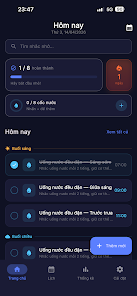
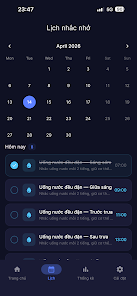
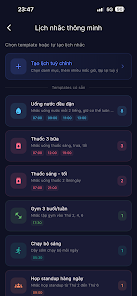
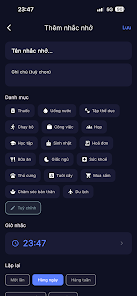
Set up begins by granting notification and (optionally) location permissions. From there, create a reminder with a title, time, repeat pattern and notes. Reminders appear in a clean timeline or grouped by list. When an alert fires, you can mark it done, snooze for a chosen interval, or edit details without opening a separate screen, which keeps interruptions brief.
Nhắc Tui supports calendar syncing so scheduled reminders can coexist with appointments. Integration options reduce duplicate entries across tools. You can also export lists or back up data to cloud storage, ensuring your reminders persist when switching devices.
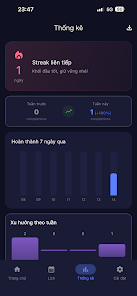
The interface is intentionally uncluttered: readable typography, clear color-coding for priorities, and a responsive layout that works on a range of screen sizes. Animations are subtle and purposeful, designed to provide feedback without draining battery. In tests, the app launched quickly and handled dozens of reminders without lag, suggesting efficient memory and CPU usage.
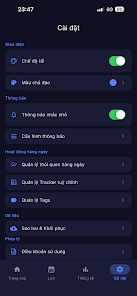
Customization choices let you tailor notifications, choose sound profiles, and apply themes. Font size and contrast settings improve readability. Voice input is available for hands-free entry, and simple gestures speed up common actions like completing or postponing reminders.
Privacy is addressed through local storage with optional encrypted backups. Nhắc Tui requests only essential permissions and gives users straightforward controls to revoke access or clear stored information. For shared lists, the app uses invite links or account-based collaboration with explicit consent for each participant.
Nhắc Tui is well suited to users who want a focused, dependable reminder app without the overhead of full-featured task managers. Busy parents, students juggling classes and deadlines, and professionals tracking recurring responsibilities will find it particularly helpful. The shared lists feature also makes it practical for small teams and households.
Installation is straightforward: download, grant required permissions, and create your first reminder. The learning curve is minimal, so you can start relying on Nhắc Tui within minutes. Regular updates add small refinements rather than radical redesigns, which helps preserve familiarity while improving reliability over time.
Lines Gold Pro - Icon Pack
Size:65.13M PersonalizationFlight Dark Pro - Icon Pack
Size:48.36M PersonalizationAres Light: Pastel Icon Pack
Size:79.87M PersonalizationDots Live Wallpaper - Battery
Size:8.44M PersonalizationChroma - Icon Pack
Size:51.41M PersonalizationOne UI Fluffy Icon Pack
Size:79.19M PersonalizationPixly Limitless Fluo Icon Pack
Size:110.46M PersonalizationPixly Professional Dark
Size:77.11M PersonalizationPixly Paint - Icon Pack
Size:125.78M PersonalizationWatch Faces by Watch Base
Size:9.40M PersonalizationPixly Dark 3D - Icon Pack
Size:106.58M PersonalizationLena Black - Glyph Icon Pack
Size:17.59M PersonalizationApril 2024 Clash of Clans Update: Unveiling a Fresh Companion, Enhanced Levels, Chat Tagging, and Be
2024-04-16Arrival of Genshin Impact 4.6 Update: 'Embers of Two Realms, Twilight of Crimson'
2024-04-16V2.2 of the Farlight 84 update introduces an overhauled Season structure, fresh in-game currency, an
2024-04-16Monster Never Cry is now accessible on both Android and iOS mobile devices.
2024-04-18PUBG Mobile Teams Up with Bentley Motors: Luxury Cars, Exclusive Collectibles, and Beyond
2024-04-18March 2024 Free Redemption Codes for Honkai: Star Rail
2024-04-18