English
Logic Grid Puzzles: Brain Game is a focused logic puzzle app designed for players who enjoy deduction, pattern recognition, and step‑by‑step reasoning. The app presents a clean, ad‑free base experience with 100 handpicked puzzles arranged to teach common logic techniques while providing satisfying challenge. Whether you prefer short, beginner puzzles or larger tables that require more careful cross‑referencing, Logic Grid Puzzles: Brain Game aims to be a distraction‑free environment for deliberate thinking and practice.
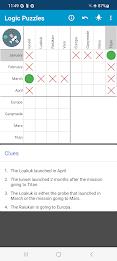
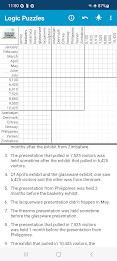
The puzzle collection includes a range of grid sizes, from compact 3x4 boards ideal for quick sessions to more complex 4x7 layouts that demand sustained attention. Each puzzle supplies a set of written clues and a blank grid where relationships are marked and eliminated until the full solution emerges. The app supports Auto‑X entry to speed up elimination tasks and a multi‑level Undo so you can try different hypotheses without losing your progress.
Smart Hints are provided to help you learn deduction patterns: when you choose a hint the system explains which clue or combination of marks points to the next logical step. Note that Smart Hints require an internet connection to analyze the current grid; the puzzles themselves can be played offline once downloaded. Adjustable text size and a Dark Mode option make the interface readable in a variety of lighting conditions and improve comfort for longer solving sessions.
Interacting with the grid is intuitive: tap to place a mark, long press to set a potential match or note, and double tap to clear a cell. Visual feedback highlights recent changes so you can track the consequences of a deduction. The app emphasizes keyboard‑free input and a low learning curve so new players can start solving puzzles immediately while experienced solvers benefit from faster entry tools and reliable Undo controls.
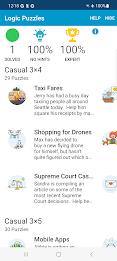
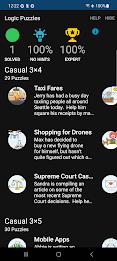
Puzzles are grouped by difficulty tiers that progress from beginner through intermediate to expert. Early levels focus on simple direct clues and single‑step deductions while higher tiers introduce multi‑clue reasoning, chained inferences, and larger grids that increase combinatorial complexity. This structured progression supports deliberate practice: you can build skill by completing all puzzles in a tier before moving up, or skip ahead to seek tougher challenges.
The visual approach is minimalist and functional, placing the grid and clues at the center of the screen. Fonts, contrast, and grid spacing are tuned for clarity and reduced eye strain. In addition to text size and Dark Mode, the app offers modest layout choices so users can prioritize clues or enlarge the working grid. The clean presentation reduces cognitive overhead and helps solvers focus on reasoning rather than decorative elements.
Every puzzle is crafted to have a single logical solution so replaying the same puzzle will be a study opportunity rather than a repeated surprise. To vary practice, puzzles come in different themes and structures that emphasize distinct deduction techniques. A subscription option enlarges the library to thousands of additional puzzles for long‑term variety, while the base set of 100 puzzles provides a substantial introduction to core logic methods.
Accessibility is considered through adjustable text, high‑contrast Dark Mode, and straightforward touch controls that reduce accidental inputs. The app prioritizes a calm solving experience with no ads in the free version, clear explanations for hints, and an Undo history that supports exploratory play. Clear labeling and an in‑app help section explain controls and common strategies so newcomers can learn at their own pace.
Most gameplay works offline after initial download: you can open puzzles, place marks, and use Undo without a network connection. Smart Hints, which provide contextual guidance by analyzing the current grid, require internet access. The free edition includes the core 100 puzzles while the subscription expands the archive for players seeking deeper, long‑term practice.
Logic Grid Puzzles: Brain Game is developed by Egghead Games and uses licensed puzzle content from Puzzle Baron. The team publishes privacy and terms documentation and offers email support for user questions and feedback. The app is suitable for anyone looking to practice logical reasoning, train problem solving, or enjoy calm, thoughtful puzzle sessions on mobile devices.

Pizzaria do Erick
Size:19.12M LifestyleMy Hurricane Tracker Pro
Size:4.73M LifestylePushscroll
Size:61.25M LifestyleSmartWOD Timer
Size:26.75M LifestyleMeteum Weather
Size:63.84M LifestyleBestifyMe
Size:13.80M LifestyleWeatherPro
Size:48.30M LifestyleEmpower You: Unlimited Audio
Size:80.20M LifestyleAdobe Express
Size:107.80M LifestyleGeoZilla
Size:63.92M LifestyleONEWallet - Cards Wallet
Size:15.00M LifestyleFloor Plan Creator Home Design
Size:40.91M LifestyleApril 2024 Clash of Clans Update: Unveiling a Fresh Companion, Enhanced Levels, Chat Tagging, and Be
2024-04-16Arrival of Genshin Impact 4.6 Update: 'Embers of Two Realms, Twilight of Crimson'
2024-04-16V2.2 of the Farlight 84 update introduces an overhauled Season structure, fresh in-game currency, an
2024-04-16Monster Never Cry is now accessible on both Android and iOS mobile devices.
2024-04-18PUBG Mobile Teams Up with Bentley Motors: Luxury Cars, Exclusive Collectibles, and Beyond
2024-04-18March 2024 Free Redemption Codes for Honkai: Star Rail
2024-04-18