English
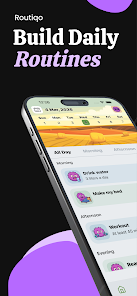
Routiqo – Habit Tracker helps people build, monitor, and maintain daily routines with a clear, approachable workflow that balances simplicity and flexibility. The first-run setup guides you to define short lists of high-priority habits, while the core screens focus on today’s actions so logging stays fast and low-friction. Designed for users who want measurable behavior change without heavy gamification, Routiqo – Habit Tracker emphasizes consistency through reminders, visual feedback, and lightweight progression tools that encourage steady improvement over weeks and months.
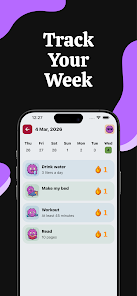
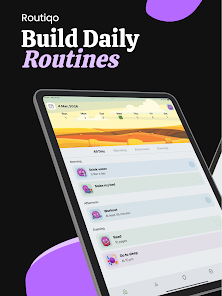
The app provides a compact feature set aimed at keeping habit work manageable. You can create unlimited habits and group them into multi-step routines such as a morning sequence or an evening wind-down. Each habit supports flexible scheduling, notes and tags for context, priority flags to surface important tasks, and a variety of reminder types from subtle badges to repeat alarms. A single dashboard aggregates streak counts, completion percentages, and recent activity, making it easy to spot which habits are holding and which need scheduling adjustments.
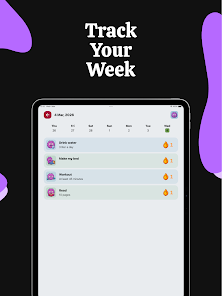
Logging is intentionally simple: tap to mark a habit complete or indicate partial progress for longer tasks, and use quick-add to record something in two taps when you’re on the move. Swipe gestures speed up editing, postponing, or clearing items without opening deep menus. Progression is based on measurable signals—streaks, completion rates, weekly and monthly consistency—and milestone rewards that mark long-term improvements rather than instant gratification. These systems help you set realistic streak goals, monitor gradual gains, and adjust targets as your schedule changes.
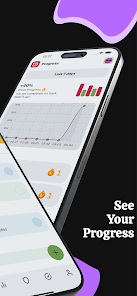
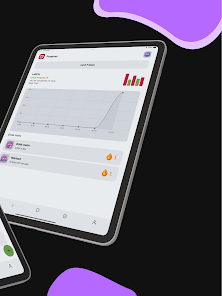
Visual feedback is a core part of the experience. Color-coded streak indicators, heatmaps, and trend charts translate daily logs into clear patterns so you can see when you perform best and where obstacles appear. Habit grouping creates an informal level structure: small clusters of related tasks form routines that can be completed as a batch, while templates let you copy common routine setups for different parts of the day. Export tools produce CSV reports for deeper analysis, and simple on-screen summaries surface the most actionable insights without overwhelming the main view.
Personalization options let you tailor the interface to your needs: adjustable color themes, font sizes, and spacing settings improve readability for long-term use and help with accessibility. The layout prioritizes clarity, with today’s habits front-and-center and history tucked into secondary views so you can focus on doing rather than digging through menus. Small touches—configurable quick-snooze, custom reminder sounds, and compact notification options—are included to reduce alert fatigue while preserving accountability.
Smart reminders can be set to trigger only when a habit is still undone by a chosen time, saving attention and reducing unnecessary pings. Notifications are configurable between subtle nudges and persistent alerts, and the app supports quick-snooze actions directly from the notification shade. Built as local-first software, the app keeps habit history on your device by default so you can work offline; optional encrypted backups and cross-device sync are available for users who want continuity across phones and tablets. Export and backup tools make it straightforward to keep copies of your data and to analyze progress offline in a spreadsheet.
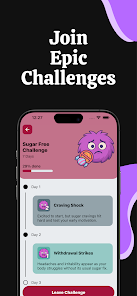
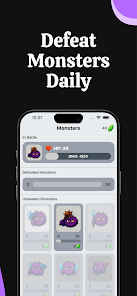
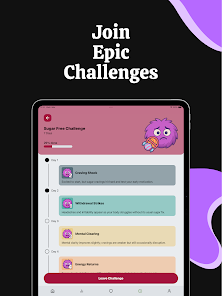
Long-term engagement is supported through repeatable challenge patterns rather than unpredictable rewards. You can set rolling 7-, 14-, or 30-day targets, define milestones that reflect progressive difficulty, and rotate or tweak habits to prevent boredom. Because logging is fast and the feedback is visual, the app encourages repeated use: small wins accumulate into meaningful behavior change, and the ability to refine reminders, groupings, and milestone thresholds keeps the experience fresh and relevant over months of practice.
Begin by choosing two to five habits and schedule realistic times or flexible windows for each. Use the dashboard after a week to check patterns, then refine reminder timing, priority flags, or groupings. Routine templates speed up setup for repeated sequences, and the local-first design ensures you can work offline while keeping the option of encrypted cloud backups. With a focus on clarity, minimal friction, and measurable progression, Routiqo – Habit Tracker is built to support sustainable habit formation without complexity.
Pizzaria do Erick
Size:19.12M LifestyleMy Hurricane Tracker Pro
Size:4.73M LifestylePushscroll
Size:61.25M LifestyleSmartWOD Timer
Size:26.75M LifestyleMeteum Weather
Size:63.84M LifestyleBestifyMe
Size:13.80M LifestyleWeatherPro
Size:48.30M LifestyleEmpower You: Unlimited Audio
Size:80.20M LifestyleAdobe Express
Size:107.80M LifestyleGeoZilla
Size:63.92M LifestyleONEWallet - Cards Wallet
Size:15.00M LifestyleFloor Plan Creator Home Design
Size:40.91M LifestyleApril 2024 Clash of Clans Update: Unveiling a Fresh Companion, Enhanced Levels, Chat Tagging, and Be
2024-04-16Arrival of Genshin Impact 4.6 Update: 'Embers of Two Realms, Twilight of Crimson'
2024-04-16V2.2 of the Farlight 84 update introduces an overhauled Season structure, fresh in-game currency, an
2024-04-16Monster Never Cry is now accessible on both Android and iOS mobile devices.
2024-04-18PUBG Mobile Teams Up with Bentley Motors: Luxury Cars, Exclusive Collectibles, and Beyond
2024-04-18March 2024 Free Redemption Codes for Honkai: Star Rail
2024-04-18