English
Gruapp - User streamlines community and project coordination by giving teams a central place to manage profiles, messages, and events. Designed for small groups and organizations, Gruapp - User combines intuitive member directories, activity feeds, and private messaging to simplify collaboration and keep everyone aligned.
Gruapp - User puts essential organizational tools into a compact, mobile-friendly interface. Members can create and update profiles, join groups, and follow activity feeds tailored to their interests. The in-app messaging supports one-to-one chats and group conversations, while event creation and RSVP tracking help teams schedule and attend meetings without fuss. Push notifications and digest emails keep members informed without overwhelming them.
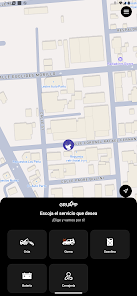
The interface favors clarity: a bottom navigation bar gives quick access to community feeds, messages, events, and your personal profile. Cards and concise summaries let you scan updates quickly, and search filters make it easy to find people, posts, or upcoming events. The design balances simplicity with useful detail so new users can start contributing on day one.
Gruapp - User adapts to different group sizes and workflows. Administrators can create multiple subgroups, control membership, and assign roles to streamline moderation. Members can follow specific topics or communities and receive only the updates they care about. Whether you need a place for volunteer coordination, project check-ins, or social announcements, the app supports predictable workflows and lightweight governance.
Group owners get a suite of customization tools to reflect their identity and rules. You can set visibility options for profiles, adjust who can post or approve events, and define privacy settings at the group level. Branding options allow the addition of a logo and a cover image, giving each group a distinct presence without complicating the user experience.
Built with Android performance in mind, Gruapp - User loads feeds quickly and minimizes battery impact through optimized background sync. Offline caching ensures essential content remains accessible when connectivity is spotty, and the app gracefully resumes synchronization when a connection is restored. Compatibility extends across a wide range of devices and Android versions, offering stable performance on both modern phones and older hardware.
Notifications are configurable at multiple levels. Users can mute specific threads, set quiet hours, or enable instant alerts for high-priority announcements. The messaging system supports attachments and inline links, making it practical to share documents, images, and event details without exporting to external apps. Admins can broadcast messages to entire groups for urgent updates.
Gruapp - User integrates with common calendar systems and can export event details to external calendars. Webhooks and API endpoints allow tech-savvy teams to connect the app to existing workflows, automating member imports or syncing event statuses. The integration layer keeps daily tasks centralized while allowing teams to extend functionality as needed.
Security-conscious design keeps member data protected through encrypted communication and role-based access controls. Privacy settings are transparent and easy to configure, so groups can opt for closed membership or public visibility depending on their needs. Regular updates include security patches and platform improvements to maintain a safe environment.
To get up and running, download the app, create a personal profile, and join or create a group. Onboarding prompts walk new users through essential actions like posting a first message, creating an event, or inviting teammates. With a short setup, Gruapp - User becomes the central hub for communication and coordination.
Small organizations, volunteer groups, hobby communities, and project teams will find the app especially useful. It reduces email clutter, provides a searchable record of past activity, and helps keep coordination visible and accountable. The modular design supports growth: as a group’s needs change, Gruapp - User can scale from a few active members to an engaged community without a complete reconfiguration.
Regular maintenance, clear group rules, and consistent use of features like events and tags will unlock the app’s full value. Administrators should establish moderation policies and encourage new members to complete their profiles for better discovery. With those habits in place, Gruapp - User becomes a reliable daily tool for staying connected, organized, and productive.

Speedometer: GPS Speed Tracker
Size:15.02M TravelSygic Travel
Size:31.00M TravelFamily Locator
Size:32.23M TravelBusBondhu – Where is my bus?
Size:45.00M TravelZambrone
Size:25.00M TravelNY POPS
Size:69.00M TravelBAE –AI Travel Agent & Flights
Size:0.00M TravelTide & Tee: Ostfriesland - App
Size:44.00M TravelSalzburg Verkehr Shuttle neu
Size:0.00M TravelHubert Drive
Size:17.00M TravelJewar Airport Info
Size:22.00M TravelXpressRide
Size:25.00M TravelApril 2024 Clash of Clans Update: Unveiling a Fresh Companion, Enhanced Levels, Chat Tagging, and Be
2024-04-16Arrival of Genshin Impact 4.6 Update: 'Embers of Two Realms, Twilight of Crimson'
2024-04-16V2.2 of the Farlight 84 update introduces an overhauled Season structure, fresh in-game currency, an
2024-04-16Monster Never Cry is now accessible on both Android and iOS mobile devices.
2024-04-18PUBG Mobile Teams Up with Bentley Motors: Luxury Cars, Exclusive Collectibles, and Beyond
2024-04-18March 2024 Free Redemption Codes for Honkai: Star Rail
2024-04-18