English
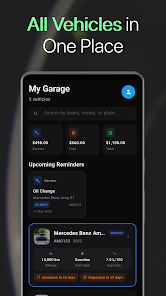
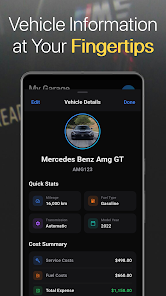
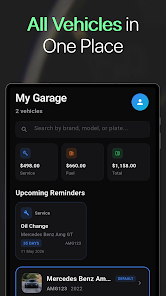
AutoCare - Smart Car Manager is a practical vehicle maintenance and recordkeeping app built for drivers who want a single, easy-to-use dashboard for service reminders, fuel tracking, and expense oversight. AutoCare - Smart Car Manager places upcoming services, recent trips, and summary charts up front so users can understand vehicle health at a glance and act before small issues become large repairs.
The app is organized around simple touch controls and clear data entry forms: add a vehicle profile with make, model and current mileage, tap to log a fill-up or service, and swipe cards on the home view to archive or snooze reminders. Widgets let you glance at the next due service from the Android home screen while notification cards provide fast actions such as calling a saved shop, opening a mapped route, or launching an export. Small controls like auto-filled date pickers, mileage presets and photo-attached receipts speed daily logging so routine use feels natural and efficient.
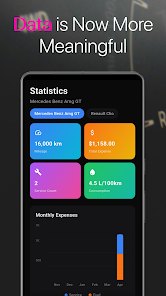
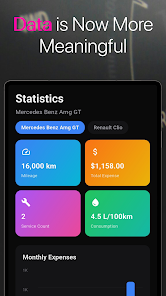
Rather than levels or points, progression in this app comes from accumulating maintenance history and cleaner trends over time. Each logged job and fuel entry improves the accuracy of projected service intervals and cost-per-mile calculations. As records grow, the analytics engine surfaces patterns such as rising fuel consumption or accelerating repair rates, which support better decisions about when to trade, repair, or upgrade a vehicle. Users can set multi-step goals — for example, reduce monthly maintenance spend or hit a target fuel economy — and monitor progress through monthly summaries and trend lines.
The visual approach favors legibility and quick scanning: clean typography, color-coded status markers for each vehicle, and compact cards for recent activity. Charts use consistent palettes to track fuel economy, expenses, and mileage so comparisons are immediate. Customization options include naming and icon selection for each vehicle profile, custom service categories, and the ability to tailor reminder rules so they match manufacturer schedules or personal preferences. Adjust display density and choose a compact or expanded dashboard layout to suit phone size and reading comfort.
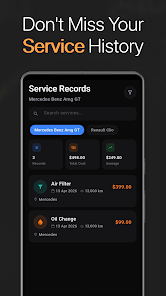
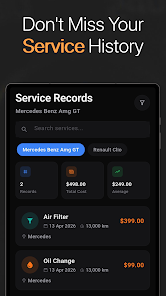
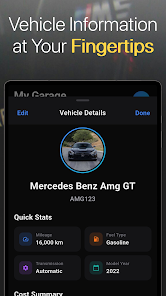
Each vehicle gets its own profile with a chronological maintenance log, grouped by service type and linked to receipts or diagnostic snapshots. Recurring tasks such as oil changes, tire rotations and inspections can be scheduled using time-based, mileage-based, or hybrid triggers, and each reminder links back to the full service entry for context. Technicians' notes and photos can be attached to specific jobs so a single timeline shows both what was done and why, which simplifies troubleshooting and resale documentation.
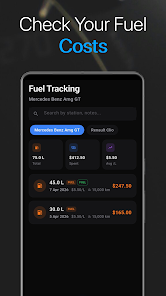
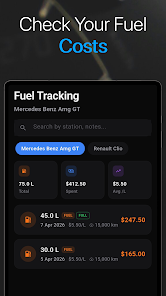
Fuel entries accept price, liters or gallons, and odometer readings to calculate instantaneous and average fuel economy. Expense entries can be categorized and attached to a vehicle or trip, making it straightforward to filter costs by period or category. Export tools create CSV or PDF reports for tax deductions, mileage reimbursement, or seller disclosure, and reports preserve attached receipt images for complete records. Trip logging supports business and personal tagging to separate reimbursable miles from private use.
For users with OBD-II adapters, the app can read basic diagnostic trouble codes and live parameters to add technical insight to a maintenance record. Bluetooth and Wi-Fi devices are supported where applicable, and an offline mode caches entries and photographs so nothing is lost when coverage drops; changes sync automatically when connectivity returns. Background sync is designed to be battery friendly and unobtrusive while keeping copies safe in the cloud or on local encrypted backups.
The app emphasizes straightforward language, adjustable text sizes, and a high-contrast option to assist drivers with different vision needs. Onboarding wizards guide new users through adding a vehicle, importing receipts, and setting initial reminders so the first setup is completed in minutes. A searchable in-app help center and customer support links help with migrations, troubleshooting, and backup restoration.
Getting started is quick: add a vehicle, record current mileage, attach any recent receipts, and create the first set of reminders. Regular use — logging fuel, noting services and updating dealer contacts — increases the accuracy of predictive intervals and reporting. AutoCare - Smart Car Manager remains useful long term by turning routine entries into actionable insights, helping drivers reduce unexpected downtime and get clearer visibility into true ownership costs.
SmartWOD Timer
Size:26.75M LifestyleMeteum Weather
Size:63.84M LifestyleBestifyMe
Size:13.80M LifestyleWeatherPro
Size:48.30M LifestyleEmpower You: Unlimited Audio
Size:80.20M LifestyleAdobe Express
Size:107.80M LifestyleGeoZilla
Size:63.92M LifestyleONEWallet - Cards Wallet
Size:15.00M LifestyleFloor Plan Creator Home Design
Size:40.91M LifestyleBoard Game Stats
Size:30.70M LifestyleI am - Daily affirmations
Size:118.20M LifestyleChinese Dictionary - Hanzii
Size:44.90M LifestyleApril 2024 Clash of Clans Update: Unveiling a Fresh Companion, Enhanced Levels, Chat Tagging, and Be
2024-04-16Arrival of Genshin Impact 4.6 Update: 'Embers of Two Realms, Twilight of Crimson'
2024-04-16V2.2 of the Farlight 84 update introduces an overhauled Season structure, fresh in-game currency, an
2024-04-16Monster Never Cry is now accessible on both Android and iOS mobile devices.
2024-04-18PUBG Mobile Teams Up with Bentley Motors: Luxury Cars, Exclusive Collectibles, and Beyond
2024-04-18March 2024 Free Redemption Codes for Honkai: Star Rail
2024-04-18