English
Pedometer: Step Counter is a lightweight Android app that tracks your daily steps, distance, calories burned and active time with minimal battery drain. Designed for casual walkers and fitness enthusiasts, Pedometer: Step Counter offers background tracking, automatic step detection and simple visual summaries to help you build healthier habits.
Pedometer: Step Counter focuses on accurate, continuous step counting without overwhelming you with complex settings. The app records steps in real time, converts them into distance and estimated calories, and keeps a daily history that you can review at any time. It runs quietly in the background and is designed to use low-power sensors to preserve battery life.
The step counter relies primarily on the built-in motion sensors of your Android device. It filters out small non-walking movements and applies thresholds to distinguish steps from other activity. Calibration options allow you to set your typical stride length to improve distance estimates. While no phone-based tracker matches a dedicated wearable exactly, careful filtering and optional calibration make Pedometer: Step Counter consistently reliable for everyday use.
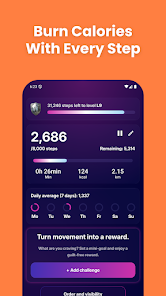
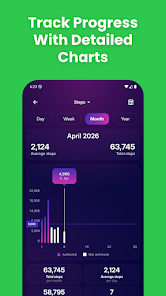
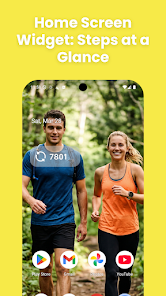
The interface is intentionally simple: a clean dashboard shows your current step count, progress toward goal, and a short graph of activity throughout the day. Navigation is straightforward so you can check totals during short breaks. Background operation means you only need to open the app for a quick review or to change settings, keeping the experience frictionless for busy routines.
One of the priorities behind Pedometer: Step Counter is low impact on battery life. The app uses event-driven sensor readings and efficient algorithms to limit continuous processing. There are power-saving settings that reduce sampling frequency when the screen is off, and an option to pause tracking automatically when the phone has been still for a long period. These measures help maintain accurate tracking without a noticeable drain.
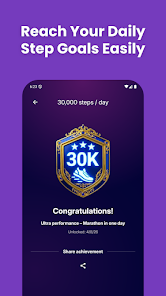
Personalization options include setting a daily step goal, adjusting stride length, and choosing units (kilometers or miles). You can opt into subtle reminders and select which metrics appear on the home screen. The app also supports exporting simple CSV logs for users who prefer to archive or analyze their raw numbers elsewhere.
Pedometer: Step Counter stores activity data locally on your device by default, and it requests only the permissions needed to access motion sensors and local storage. It supports a wide range of Android versions and runs well on both modern smartphones and older devices thanks to its efficient architecture.
Begin by granting the app access to motion data and choosing a step goal. Walk for a few minutes to let the sensor calibrate, then review the dashboard to verify counts and distance. Adjust stride length if the distance seems off; small tweaks usually deliver accurate results within a few short walks. For consistent long-term tracking, keep the app enabled in the background.
Keep your phone in a stable pocket or on a belt clip while walking for the most consistent readings. If you switch between different carry positions, brief calibration walks will help maintain accuracy. Use the history view weekly to set realistic targets, and try increasing your daily goal gradually to build momentum. Pedometer: Step Counter fits into daily life with minimal fuss, helping you make measurable improvements over time.
Pizzaria do Erick
Size:19.12M LifestyleMy Hurricane Tracker Pro
Size:4.73M LifestylePushscroll
Size:61.25M LifestyleSmartWOD Timer
Size:26.75M LifestyleMeteum Weather
Size:63.84M LifestyleBestifyMe
Size:13.80M LifestyleWeatherPro
Size:48.30M LifestyleEmpower You: Unlimited Audio
Size:80.20M LifestyleAdobe Express
Size:107.80M LifestyleGeoZilla
Size:63.92M LifestyleONEWallet - Cards Wallet
Size:15.00M LifestyleFloor Plan Creator Home Design
Size:40.91M LifestyleApril 2024 Clash of Clans Update: Unveiling a Fresh Companion, Enhanced Levels, Chat Tagging, and Be
2024-04-16Arrival of Genshin Impact 4.6 Update: 'Embers of Two Realms, Twilight of Crimson'
2024-04-16V2.2 of the Farlight 84 update introduces an overhauled Season structure, fresh in-game currency, an
2024-04-16Monster Never Cry is now accessible on both Android and iOS mobile devices.
2024-04-18PUBG Mobile Teams Up with Bentley Motors: Luxury Cars, Exclusive Collectibles, and Beyond
2024-04-18March 2024 Free Redemption Codes for Honkai: Star Rail
2024-04-18