English
Recipe Extractor transforms recipe PDFs, web pages, and photos into neat, editable recipes in seconds. Designed for home cooks and food professionals, Recipe Extractor pulls ingredients, instructions, and timings into a consistent format you can edit, scale, export, or share with family and colleagues.
Recipe Extractor scans digital and image-based sources to identify recipe components and convert them into structured text. It recognizes common culinary terms, measurement units, and timers, turning fragmented notes or cluttered web pages into clear ingredient lists and ordered steps. The app saves time spent typing and prevents mistakes caused by incomplete source material.
Smart parsing: The parser distinguishes ingredient names, quantities, and preparation notes so items appear consistently and are easy to edit. Unit normalization: Metric and imperial measurements are converted and standardized for easier scaling. Step ordering: Instructions are separated, numbered, and checked for logical flow.
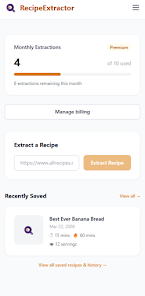
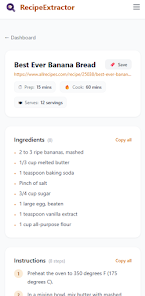
The interface focuses on a fast, minimal workflow: import, review, edit, and save. A preview pane shows parsed ingredients on one side and step-by-step instructions on the other, letting you correct misread items quickly. Shortcut gestures and context menus speed up common edits, and a history feature keeps track of past imports so you can revisit earlier versions.
Recipe Extractor is useful for meal planners who gather recipes from multiple sources, cooking instructors compiling class handouts, and food bloggers who need tidy ingredient lists. If you sell recipes or manage a small kitchen, the app helps standardize formats across a collection so every recipe follows the same structure for printing or publishing.
Built to run smoothly on a wide range of Android devices, the app processes text locally whenever possible to protect privacy. When cloud processing is required for complex layouts, the app optimizes uploads and provides progress indicators. The parsing engine is tuned to avoid common errors such as conflating quantities with preparation notes.
After extraction, you can adjust quantities, rename ingredients, and reorder steps. Tags and custom categories let you organize recipes by cuisine, dietary preference, or difficulty. Export options include plain text for copy-paste, a CSV for spreadsheet management, and direct sharing links for collaborators. Integration with popular note-taking and meal-planning apps makes Recipe Extractor a bridge between scattered source material and organized culinary workflows.
Recipe Extractor treats uploaded recipes with care. Local parsing keeps sensitive content on-device when feasible, and clear settings let you control whether documents are synced or stored in the cloud. Exported files are created on demand so you retain control over where your recipes are shared or backed up.
Open the app, tap Import, and choose a file or paste a URL to start. Recipe Extractor will display the parsed recipe instantly; use the inline editor to tidy any remaining details, then save to a collection or export. Built-in help and sample templates guide new users through common tasks like scaling and tagging.
Recipe Extractor reduces repetitive typing and helps you build a searchable, consistent recipe library faster. By automating extraction and offering smart editing tools, it frees time for cooking and creativity instead of manual transcription. With support for multiple formats and export choices, Recipe Extractor fits into most culinary and content workflows.


Pizzaria do Erick
Size:19.12M LifestyleMy Hurricane Tracker Pro
Size:4.73M LifestylePushscroll
Size:61.25M LifestyleSmartWOD Timer
Size:26.75M LifestyleMeteum Weather
Size:63.84M LifestyleBestifyMe
Size:13.80M LifestyleWeatherPro
Size:48.30M LifestyleEmpower You: Unlimited Audio
Size:80.20M LifestyleAdobe Express
Size:107.80M LifestyleGeoZilla
Size:63.92M LifestyleONEWallet - Cards Wallet
Size:15.00M LifestyleFloor Plan Creator Home Design
Size:40.91M LifestyleApril 2024 Clash of Clans Update: Unveiling a Fresh Companion, Enhanced Levels, Chat Tagging, and Be
2024-04-16Arrival of Genshin Impact 4.6 Update: 'Embers of Two Realms, Twilight of Crimson'
2024-04-16V2.2 of the Farlight 84 update introduces an overhauled Season structure, fresh in-game currency, an
2024-04-16Monster Never Cry is now accessible on both Android and iOS mobile devices.
2024-04-18PUBG Mobile Teams Up with Bentley Motors: Luxury Cars, Exclusive Collectibles, and Beyond
2024-04-18March 2024 Free Redemption Codes for Honkai: Star Rail
2024-04-18