English
Med Diary: Health Records is a personal medical organizer that lets you record prescriptions, symptoms, test results, and appointments in one secure place. It creates searchable entries, supports reminders and attachments, and simplifies sharing records with caregivers or doctors while keeping privacy controls front and center.
This app acts like a portable health journal designed for everyday and long-term care. Med Diary: Health Records centralizes disparate medical information—lab PDFs, medication schedules, vaccination history—so you can avoid scattered notes, missed doses, or last-minute searches before a visit. The goal is straightforward: fast access to accurate history when you need it.
The design focuses on practical features rather than bells and whistles. Expect support for quick entry of medications, the ability to log symptoms with timestamps, and a secure notes area for clinician instructions. Upload images of prescriptions or test results and tag entries for easier filtering. Reminders and calendar links turn logged items into actionable tasks.
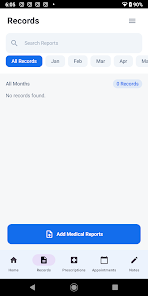
Getting useful data into the app is intentionally simple. You can create entries manually or attach documents and photos. Each record can include date, category, notes, and optional reminders. Search and filter tools let you surface relevant items—such as all cardiology tests or glucose readings—within seconds, which helps during appointments or emergencies.
Med Diary: Health Records includes permission settings and export options so you choose what to share and how. Share a single record via secure PDF or compile a timeline for a care team. Local device encryption and optional passcode or biometric locks are common safeguards; check settings to confirm how data is stored on your device and whether cloud sync is encrypted.
The interface aims for clarity: readable typography, clear action buttons, and a predictable navigation flow. Performance is typically smooth on modern devices, with quick database searches and fast attachment previews. If you manage large image libraries, occasional optimization settings can improve loading times and storage use.
Customize categories and reminder types to match your routine—set recurring medication alarms, schedule follow-ups, or mark records as important. Create templates for repeated visits or chronic-condition tracking to speed up data entry. Backups and export templates let you migrate information when changing phones or sharing history with a new provider.
People managing multiple prescriptions, caregivers tracking a family member, and anyone compiling a medical history before specialist visits will find the app especially helpful. It reduces the need to remember dates and doses and provides a clear timeline that clinicians can review without scanning through fragmented notes.
Installation is straightforward from your app store. After installing, allow necessary permissions for local storage and notifications to enable attachments and reminders. Start by creating a few key entries—current medications, recent labs, and an emergency contact—to make the app immediately useful.
Regularly back up your data and review permission settings. Keep attachments organized with clear filenames and dates. If you use cloud sync, confirm that encryption is enabled and that you understand where backups are stored. Periodic cleanup of outdated notes can improve search relevance and reduce storage demands.
Med Diary: Health Records is a utility-focused health companion that emphasizes organized records, easy sharing, and straightforward reminders. It’s designed to fit into everyday routines and clinical workflows, helping users present precise medical histories and maintain consistent care patterns with minimal overhead.
Pushscroll
Size:61.25M LifestyleSmartWOD Timer
Size:26.75M LifestyleMeteum Weather
Size:63.84M LifestyleBestifyMe
Size:13.80M LifestyleWeatherPro
Size:48.30M LifestyleEmpower You: Unlimited Audio
Size:80.20M LifestyleAdobe Express
Size:107.80M LifestyleGeoZilla
Size:63.92M LifestyleONEWallet - Cards Wallet
Size:15.00M LifestyleFloor Plan Creator Home Design
Size:40.91M LifestyleBoard Game Stats
Size:30.70M LifestyleI am - Daily affirmations
Size:118.20M LifestyleApril 2024 Clash of Clans Update: Unveiling a Fresh Companion, Enhanced Levels, Chat Tagging, and Be
2024-04-16Arrival of Genshin Impact 4.6 Update: 'Embers of Two Realms, Twilight of Crimson'
2024-04-16V2.2 of the Farlight 84 update introduces an overhauled Season structure, fresh in-game currency, an
2024-04-16Monster Never Cry is now accessible on both Android and iOS mobile devices.
2024-04-18PUBG Mobile Teams Up with Bentley Motors: Luxury Cars, Exclusive Collectibles, and Beyond
2024-04-18March 2024 Free Redemption Codes for Honkai: Star Rail
2024-04-18