English
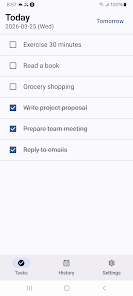
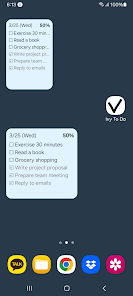
Ivy To Do - Task Checklist is a streamlined productivity app that helps you organize tasks, set priorities, and track progress with a minimalist interface. It combines quick entry, reminders, and clean lists to keep daily work and personal projects on schedule while reducing clutter and decision fatigue.
Ivy To Do - Task Checklist focuses on essentials so you can get more done with less friction. Create tasks in seconds, assign due dates, add notes, and mark priorities. The app supports recurring items, smart reminders, and a simple tagging system so you can filter tasks by context, project, or urgency.
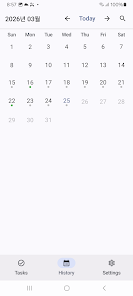
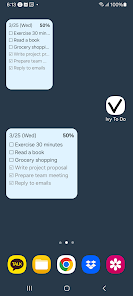
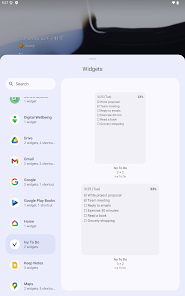
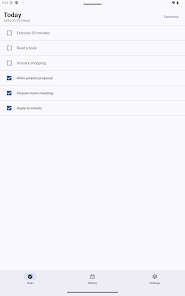
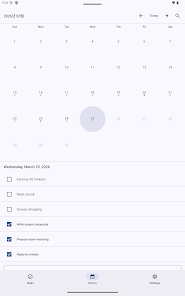
The design is intentionally clean: lists are front and center, with easy swipe gestures for completing or postponing items. Ivy To Do places primary actions within thumb reach, and contextual menus appear only when needed. This makes daily planning fast while avoiding visual overload. Users can switch between list, grouped, or calendar views to fit their preferred workflow.
Setting up Ivy To Do takes only a few minutes. Start by creating a few lists — for example: Inbox, Work, Home, and Errands. Add tasks quickly using the Quick Add box, then assign priorities and due dates. Enable notifications to ensure reminders arrive when you need them. For new users the app offers a short walkthrough that highlights core controls and gesture shortcuts.
Customization in Ivy To Do balances flexibility with simplicity. Choose from several color themes and compact or spaced list layouts. Use tags to create virtual folders without duplicating tasks, and reorder lists by dragging. For power users, filters can be combined to show, for instance, all high-priority work tasks due this week. These options let the app adapt to personal routines rather than forcing a rigid structure.
Ivy To Do supports practical integrations to streamline your day. Syncing with calendar apps and importing tasks from common formats keeps everything aligned across devices. Built-in statistics show completed tasks over time so you can spot patterns and adjust habits. Focus timers and a minimalist daily planner help separate deep work sessions from routine errands.
Designed with efficiency in mind, the app runs smoothly on a wide range of Android devices and uses minimal battery and memory. Local storage keeps basic functionality available offline, while optional cloud sync protects against data loss and keeps lists consistent between phone and tablet. Regular updates address performance improvements and compatibility with the latest Android releases.
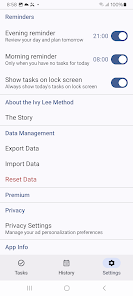
Privacy-conscious users will appreciate the app's clear approach to data. Task data is stored locally by default, and cloud sync is opt-in with encryption during transmission. Permissions are limited to what the app needs to function, such as notifications and optional calendar access. Export options allow you to back up and migrate tasks in common formats.
To maximize benefits from Ivy To Do, start each day by capturing quick tasks into an Inbox, then dedicate five minutes to triage: assign priorities and due dates. Use recurring tasks for weekly chores and the checklist mode to split big projects into manageable steps. Regularly review tags and filters to keep lists relevant and uncluttered.
For users who prefer a focused, no-frills approach to task management, Ivy To Do - Task Checklist delivers the core tools needed to stay organized without unnecessary complexity. It balances a lightweight interface with practical features that support both personal routines and professional responsibilities, making it a dependable companion for everyday productivity.
Pushscroll
Size:61.25M LifestyleSmartWOD Timer
Size:26.75M LifestyleMeteum Weather
Size:63.84M LifestyleBestifyMe
Size:13.80M LifestyleWeatherPro
Size:48.30M LifestyleEmpower You: Unlimited Audio
Size:80.20M LifestyleAdobe Express
Size:107.80M LifestyleGeoZilla
Size:63.92M LifestyleONEWallet - Cards Wallet
Size:15.00M LifestyleFloor Plan Creator Home Design
Size:40.91M LifestyleBoard Game Stats
Size:30.70M LifestyleI am - Daily affirmations
Size:118.20M LifestyleApril 2024 Clash of Clans Update: Unveiling a Fresh Companion, Enhanced Levels, Chat Tagging, and Be
2024-04-16Arrival of Genshin Impact 4.6 Update: 'Embers of Two Realms, Twilight of Crimson'
2024-04-16V2.2 of the Farlight 84 update introduces an overhauled Season structure, fresh in-game currency, an
2024-04-16Monster Never Cry is now accessible on both Android and iOS mobile devices.
2024-04-18PUBG Mobile Teams Up with Bentley Motors: Luxury Cars, Exclusive Collectibles, and Beyond
2024-04-18March 2024 Free Redemption Codes for Honkai: Star Rail
2024-04-18