English
Vont lets you add and style text on photos and videos quickly and with pixel-level control, combining a large font collection, motion text options, color palettes and intuitive layout tools so creators can produce titles, captions and social visuals without a steep learning curve. The app suggests font sizes and placement based on the composition of each image or clip, supports per-letter coloring, border and opacity adjustments, and offers animation speed and shadow settings that suit everything from subtle captions to bold motion titles. For anyone looking to streamline on-device text overlay work, Vont makes commonly used effects easy to reach while still allowing detailed manual edits.
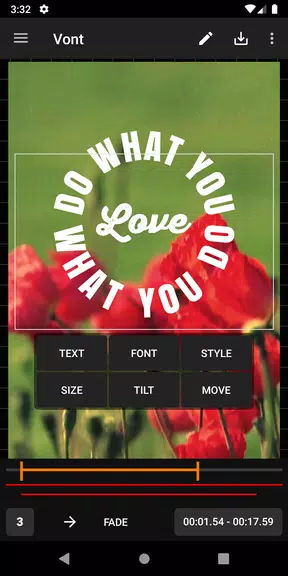
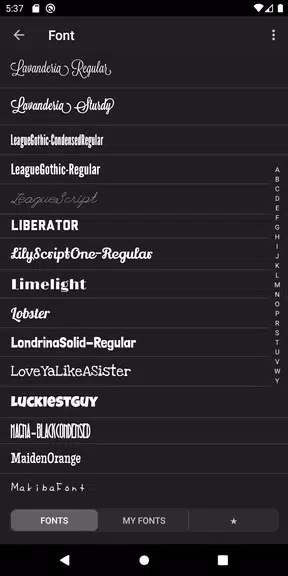
The feature set centers on typography and flexible layout: a broad font library that includes classic, display and script styles, automatic recommendations for size and alignment, per-letter color control and adjustable borders. You can arrange text in conventional lines or in creative patterns like ladders, circles or triangles, add contrasting background blocks for readability, and apply animated entry and exit behavior with speed controls. Color tools include palettes, gradient options and independent opacity sliders for fill and stroke, and shadow controls let you adjust offset, blur and darkness to suit different lighting and moods.
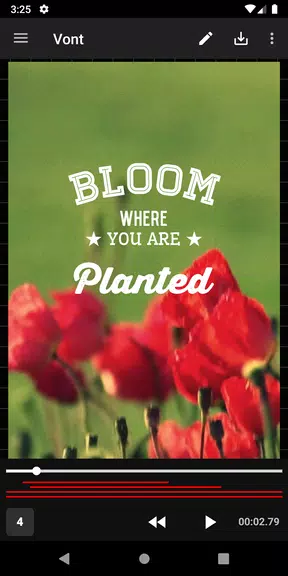
Editing is driven by touch and simple controls designed for rapid iteration. Drag to reposition, pinch to scale, rotate with two-finger gestures and use handles to fine-tune spacing. A per-letter editor lets you select individual characters for color or border treatment, and sliders provide immediate feedback for opacity, border thickness and shadow strength. Animation is managed with a speed control and a compact preview timeline that lets you scrub through motion and make small timing adjustments without leaving the main editor. Live preview keeps your adjustments visible against the media so you can judge legibility at a glance.
Saving and reusing your aesthetic choices is straightforward: you can create organized libraries and folders for favorite fonts, color combinations and effect presets, so consistent styling is fast to apply across multiple images or clips. The system supports naming and grouping of saved items, which helps when preparing a series of social posts or maintaining brand consistency. Local preference storage ensures your commonly used assets are available in new projects for efficient, repeatable workflows.
The design intent balances immediacy and depth: newcomers can rely on recommended sizes and placements to produce readable captions quickly, while experienced users can dive into detailed typographic controls for magazine-style layouts. As you work, the app encourages a natural progression from simple suggestions to manual fine-tuning, so your edits become more sophisticated without forcing you to master everything at once. The variety of artistic typefaces and granular controls make it possible to achieve distinct visual identities for different channels and audiences.
Readability features assist accessibility: adjustable background contrast, per-letter emphasis and generous shadow settings help captions remain visible across complex imagery and varied lighting. The editor is built to accommodate common aspect ratios and screen sizes, with on-screen previews that show how text will appear on vertical, square and horizontal formats. These design choices help creators prepare captions and titles that are easy to scan for viewers with different devices and viewing conditions.
Most core editing capabilities are available without a persistent internet connection, enabling on-the-go work when connectivity is limited. Fonts, saved effect libraries and local project data remain on your device so you can continue creating and refining layouts in offline scenarios. The straightforward, device-focused workflow keeps the primary tools responsive and accessible whether you are preparing a single image or a batch of social visuals.
There is a modest learning curve when you explore more complex typographic arrangements: achieving balanced compositions and consistent spacing across multiple aspect ratios may require manual tweaking and testing. For best results, preview designs on different screen sizes, lock key elements when you need consistent placement, and save presets once you find combinations that work so you can apply them quickly. Accepting that some detailed layouts need hands-on adjustment will help you move from basic captions to polished motion titles with confidence.
Recommended for content creators, social media managers, educators and anyone who needs precise, well-styled text overlays, Vont combines approachable suggestions with advanced typographic controls so you can produce clean captions, dynamic titles and distinctive visual text treatments efficiently and reliably.
Pushscroll
Size:61.25M LifestyleSmartWOD Timer
Size:26.75M LifestyleMeteum Weather
Size:63.84M LifestyleBestifyMe
Size:13.80M LifestyleWeatherPro
Size:48.30M LifestyleEmpower You: Unlimited Audio
Size:80.20M LifestyleAdobe Express
Size:107.80M LifestyleGeoZilla
Size:63.92M LifestyleONEWallet - Cards Wallet
Size:15.00M LifestyleFloor Plan Creator Home Design
Size:40.91M LifestyleBoard Game Stats
Size:30.70M LifestyleI am - Daily affirmations
Size:118.20M LifestyleApril 2024 Clash of Clans Update: Unveiling a Fresh Companion, Enhanced Levels, Chat Tagging, and Be
2024-04-16Arrival of Genshin Impact 4.6 Update: 'Embers of Two Realms, Twilight of Crimson'
2024-04-16V2.2 of the Farlight 84 update introduces an overhauled Season structure, fresh in-game currency, an
2024-04-16Monster Never Cry is now accessible on both Android and iOS mobile devices.
2024-04-18PUBG Mobile Teams Up with Bentley Motors: Luxury Cars, Exclusive Collectibles, and Beyond
2024-04-18March 2024 Free Redemption Codes for Honkai: Star Rail
2024-04-18