English
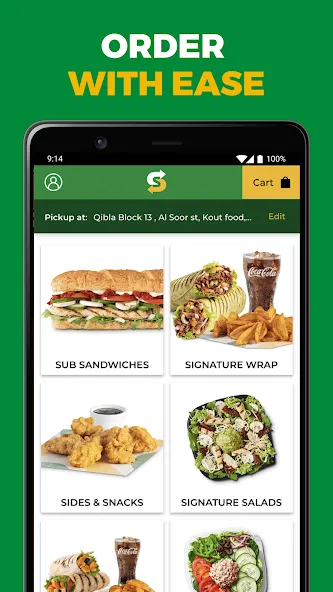
Local food delivery apps have become the default for quick meals and group orders, and Subway brings a focused approach to ordering from the sandwich chain via your Android device. The app maps nearby restaurants in real time, lets you tailor orders from subs to salads, and gives choices between courier delivery and picking up your meal yourself. Expect step-by-step navigation, live order tracking and direct messaging with the delivery driver, plus regular app-only offers that help stretch your budget when you order.
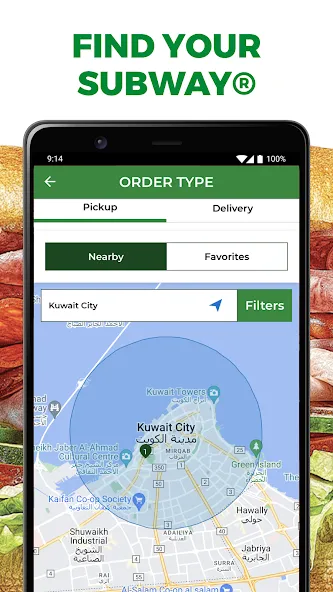
Real-time restaurant discovery: View locations close to you instantly and see which outlets are open and accepting orders right now.
Flexible order options: Build sandwiches, wraps and salads with custom ingredients, then choose delivery or self-collection at checkout.
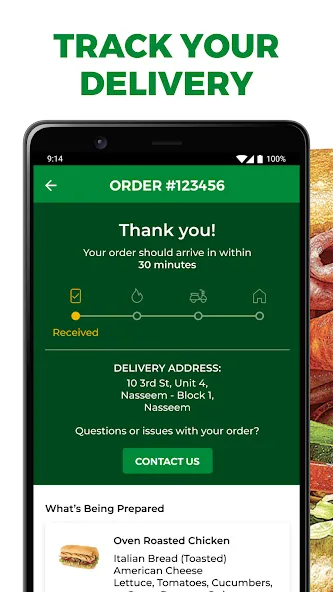
Live tracking and communication: Follow your order on a map, get status updates, and message the courier if you need to change delivery details.
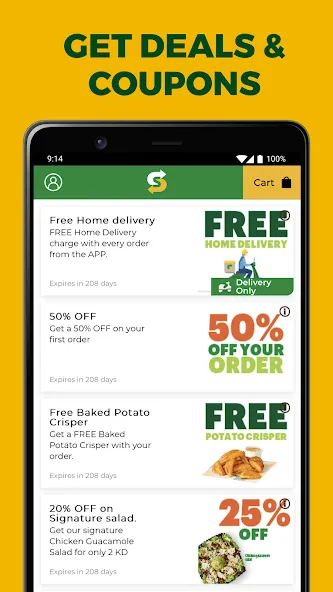
Mobile-only savings: Redeem coupons and limited-time deals that are updated frequently to lower the total bill.
Quick re-order: Save past orders for faster checkout when you want the same meal again without rebuilding it from scratch.
Delivery: Have fresh sandwiches brought to your address with estimated arrival times shown in the app.
Pick-up: Order ahead and collect at the restaurant counter, skipping queues and reducing wait time.
Catering services: Arrange platters and larger orders for meetings or events, with vegetarian and wrap platter choices available.
Promotions and coupons: Seasonal promotions and targeted discounts appear in the app to lower costs on selected items.
Account management: Track orders, view receipts and manage saved payment methods from your profile area.
Save favourite builds: If you often choose the same toppings, add that combo to favourites so you can re-order in two taps.
Compare delivery windows: If you need food fast, the app shows estimated times for nearby stores so you can pick the quickest option.
Use coupons thoughtfully: Check the offers panel before checkout; some deals require a minimum spend or only apply at certain locations.
Ideal for group orders: When coordinating lunch for colleagues, create one order and add multiple sandwiches to simplify billing and pickup.
I can’t log in. What should I do?
If you forget your username or password, tap 'Forgot your password?' on the login screen and follow the reset instructions sent to your registered email or phone.
What happened to the Subway gift card programme?
The Subcard loyalty and gift programme closed on 31 August 2026. Guests with an unexpired Gift Dollar balance at the time of a refund request may be eligible for reimbursement if the balance remains valid when they submit their claim.
Why choose Subway for catering?
Catering offers a convenient way to feed groups with a range of platters and dietary options. While restaurants take precautions to reduce cross-contamination, items are prepared on shared equipment and cannot be guaranteed gluten free.
How much notice is needed for a catering order?
Small catering orders can often be placed the same day through the app for up to a few platters. For larger or time-sensitive requests, contact the local restaurant directly and they will advise on availability.
Subway is a practical choice if you want a dedicated app for ordering sandwiches and catering with clear tracking and routine discounts; it streamlines pick-up and delivery, though menu availability and promotions can vary by location, so check your local restaurant details before placing large orders.
Subway
Size:24.48M ShoppingUtry.me
Size:65.41M ShoppingRajaOngkir
Size:3.28M ShoppingMCQ Rewards
Size:24.03M ShoppingMon Magasin U
Size:46.08M ShoppingTexnomart
Size:86.17M ShoppingShopee Lite
Size:30.01M ShoppingGoWabi
Size:31.16M ShoppingCDcare
Size:29.80M ShoppingCobasi
Size:123.09M ShoppingBack Market
Size:35.60M ShoppingShpock
Size:29.10M ShoppingApril 2024 Clash of Clans Update: Unveiling a Fresh Companion, Enhanced Levels, Chat Tagging, and Be
2024-04-16Arrival of Genshin Impact 4.6 Update: 'Embers of Two Realms, Twilight of Crimson'
2024-04-16V2.2 of the Farlight 84 update introduces an overhauled Season structure, fresh in-game currency, an
2024-04-16Monster Never Cry is now accessible on both Android and iOS mobile devices.
2024-04-18PUBG Mobile Teams Up with Bentley Motors: Luxury Cars, Exclusive Collectibles, and Beyond
2024-04-18March 2024 Free Redemption Codes for Honkai: Star Rail
2024-04-18