English
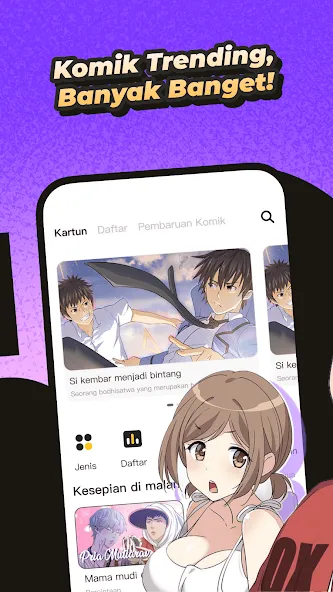
Read, swipe, enjoy: Komik Bahagia puts a huge comics shelf in your pocket and aims to make mobile reading smooth and personal. The app collects titles across many moods and tones, offers flexible page controls and image quality settings, and keeps material refreshed so you rarely run out of chapters to pick from. Whether you prefer fast-paced adventures or slow-burning slice-of-life stories, Komik Bahagia presents tools to tune the display and navigation for the way you like to read on your phone.
Install and open: Download the APK and launch the app to land on the main library screen where featured and new releases are shown.
Create or skip account: You can browse as a guest, but signing in preserves reading history and any preferences you set for images and layout.
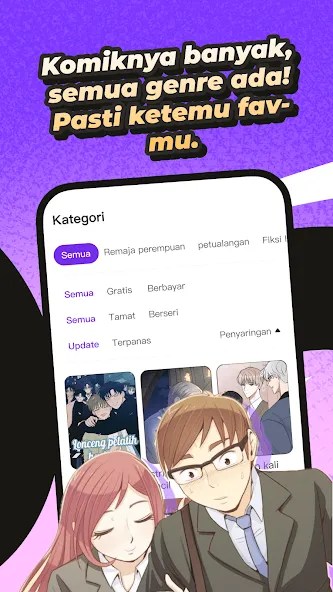
Find your first title: Use search, categories, and curated lists to locate a series; tapping a cover opens the reader where page controls and display modes are ready to use.
Expansive library: The catalog spans tens of thousands of entries so you can discover short one-shots, long-running serials, and niche genres without jumping between multiple apps.
Genre variety: Look through sections for romance, mystery, comedy, fantasy and more, making it easy to switch tone depending on your mood.
Adjustable reader settings: Brightness, image quality, reading layout and page-turn speed are all adjustable so you can balance clarity, battery use and smoothness while you read.
High-quality artwork: Pages are presented in full color with emphasis on clear linework and detailed panels so facial expressions and backgrounds read well on small screens.
Lower image quality on metered connections: If you are traveling or using limited mobile data, reducing image quality can keep chapters loading faster and cut data use.
Try different layouts for long sessions: Switch to vertical scroll or single-page view depending on whether you want to skim quickly or savor each panel; changing page-turn speed helps when you are binge-reading several chapters in a row.
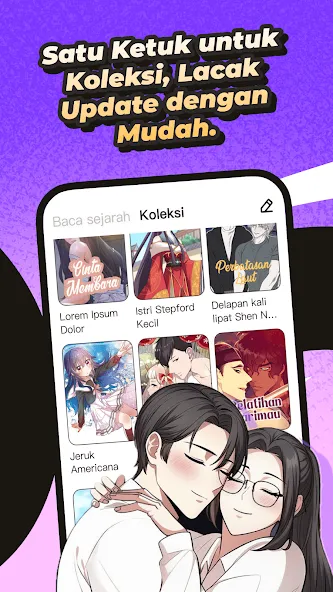
Follow series and use history: Mark titles you like so updates are easy to check; the app's recommendation cues will surface similar stories when you return.
Is Komik Bahagia free to use?
The app is free to download and grants access to a broad collection of titles; availability of specific chapters or editions can vary by region and publisher.
How often are new chapters added?
New content and chapter updates appear frequently, so serialized series are refreshed on a regular basis to keep readers engaged.
Can I change how pages display?
Yes. You can alter page layout, image quality and the transition speed between pages to suit your reading preference and device performance.
Komik Bahagia delivers a polished reading environment with a large and varied catalog plus reader controls that let you tailor visuals and pacing. It suits anyone who likes browsing many genres and shaping the experience to match their device and data limits. Features and content may shift with app updates or regional licensing, so availability can vary over time.


Pdf Drive
Size:6.47M News & MagazinesKomik Bahagia
Size:13.61M News & MagazinesThe News Brief
Size:48.58M News & MagazinesMara Akụkọ
Size:46.74M News & MagazinesRedReader
Size:9.11M News & MagazinesNovelah Lite
Size:65.04M News & Magazines20 Minutes
Size:75.91M News & MagazinesKomik Bahagia for VN
Size:14.35M News & MagazinesWWMT News 3
Size:122.25M News & MagazinesManhwaClan
Size:94.90M News & MagazinesCoffee Manga
Size:2.30M News & MagazinesYupmanga
Size:91.27M News & MagazinesApril 2024 Clash of Clans Update: Unveiling a Fresh Companion, Enhanced Levels, Chat Tagging, and Be
2024-04-16Arrival of Genshin Impact 4.6 Update: 'Embers of Two Realms, Twilight of Crimson'
2024-04-16V2.2 of the Farlight 84 update introduces an overhauled Season structure, fresh in-game currency, an
2024-04-16Monster Never Cry is now accessible on both Android and iOS mobile devices.
2024-04-18PUBG Mobile Teams Up with Bentley Motors: Luxury Cars, Exclusive Collectibles, and Beyond
2024-04-18March 2024 Free Redemption Codes for Honkai: Star Rail
2024-04-18