
English
Looking for a convenient way to connect and control your Android devices from anywhere? Look no further than RemoteView for Android Agent app! With this app, IT professionals and users can remotely access and control their Android devices from a PC or another mobile device, whether it's Android or iOS. It's perfect for managing digital signage, kiosks, ticketing machines, or simply sharing your mobile screen for demos or support. Plus, you can enjoy special features like screen sharing and remote control, file transfer in both directions, and even drawing directly on the mobile screen for clear notations. Don't miss out on this fast, reliable, and secure app - download the RemoteView for Android Agent now!
- Remote Control and Screen Sharing: Control and view Android devices remotely in real-time, from a PC or another mobile device.
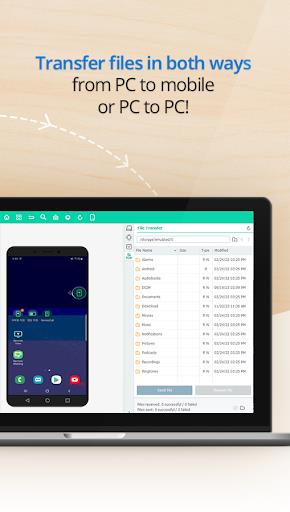
- File Transfer: Transfer files between the connected devices in both directions.
- Drawing and Marking: Annotate and mark up directly on the mobile screen for clear notations.
- Device Information Retrieval: View system information, current processes list, and installed apps on the connected mobile device.
- Additional Features (PC to Android): Send URLs from PC and record the entire session, including drawings.
- Fast, Reliable, and Secure Connection: Enjoy a fast and reliable connection with military-grade security features like 2-step verification, AES 256 bit encryption, and SSL communication.
RemoteView for Android Agent is a powerful app that enables IT professionals and users to connect and control their Android devices remotely, anytime and anywhere. With features like remote control, file transfer, drawing capabilities, and device information retrieval, this app provides a comprehensive solution for managing Android devices. The app offers a fast, reliable, and secure connection, ensuring a seamless user experience. Whether you need to control tablets from a smartphone, share your mobile screen for demos or support, or manage digital signage and other Android-based devices, it is the perfect tool. Download the app now and experience the convenience and versatility it offers.
Colorimeter
Size:5.45M ToolsChatBoost
Size:19.33M ToolsRemote Fire TV
Size:48.04M ToolsgetConf - Hidden Settings
Size:16.66M ToolsTracker Detect Pro
Size:10.39M ToolsWiFi Speed Test Pro
Size:8.11M ToolsGG Mouse Pro 2
Size:45.82M ToolsResource Monitor Mini Pro
Size:3.19M ToolsSmart Keyboard Pro
Size:23.22M ToolsMyScript Math: Solve & Plot
Size:108.76M ToolsText Repeater
Size:11.73M Tools3Dcalc+
Size:12.59M ToolsApril 2024 Clash of Clans Update: Unveiling a Fresh Companion, Enhanced Levels, Chat Tagging, and Be
2024-04-16Arrival of Genshin Impact 4.6 Update: 'Embers of Two Realms, Twilight of Crimson'
2024-04-16V2.2 of the Farlight 84 update introduces an overhauled Season structure, fresh in-game currency, an
2024-04-16Monster Never Cry is now accessible on both Android and iOS mobile devices.
2024-04-18PUBG Mobile Teams Up with Bentley Motors: Luxury Cars, Exclusive Collectibles, and Beyond
2024-04-18March 2024 Free Redemption Codes for Honkai: Star Rail
2024-04-18



















Comment
A Google user
Not free
May 20, 2024 08:47:16
A Google user
Good app I love it
May 17, 2024 03:14:12
A Google user
Finally I can control my S6 from office. It works great with Samsung phones.
May 16, 2024 19:45:55
Maja Arsovska
❤
May 13, 2024 20:11:42
A Google user
Doesn't support every device humbug
May 07, 2024 20:41:48