English
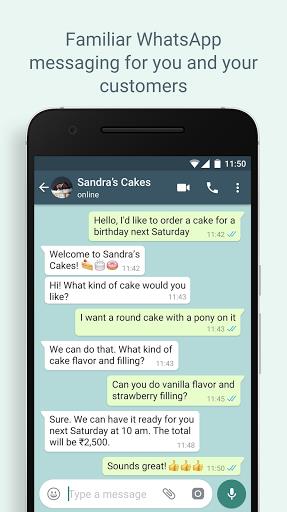
WhatsApp Business is the perfect tool for businesses looking to enhance their customer communication and presence. With features like a business profile, away messages, and the ability to use a landline number, you can provide valuable information and increase your responsiveness to customers. The app allows you to run both WhatsApp Business and WhatsApp Messenger on the same device, ensuring easy accessibility. Plus, with WhatsApp Web, you can seamlessly communicate with customers from your computer. Don't miss out on the opportunity to streamline your business messaging and grow your brand with the app.
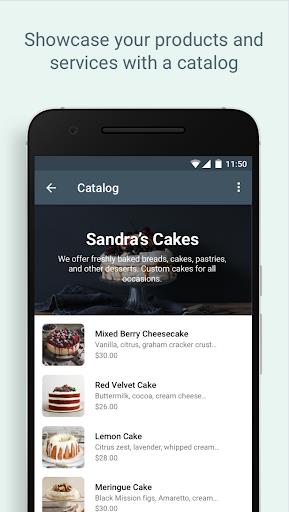
> Professional Business Profile: The app allows you to create a professional profile for your business, including key information like your website, location, and contact details. This helps customers easily find and connect with your business.
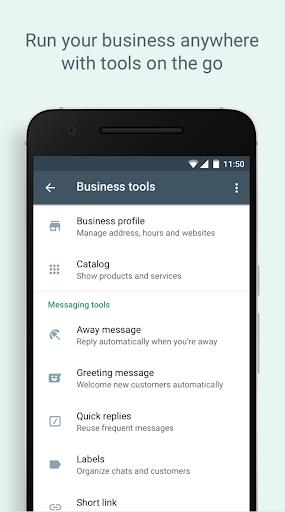
> Business Messaging Tools: With the app, you can use helpful tools like Away messages to let customers know when you're not available to respond. This shows your commitment to excellent customer service.
> Landline/Fixed Number Support: You can use the app with a landline or fixed phone number, making it accessible for all types of businesses. Customers can easily reach out to you using this number.
> Run Both WhatsApp Messenger and the app Simultaneously: With the app, you can have both the business and personal versions of the app installed on the same phone, each with their own unique phone number. This makes it convenient to manage both your personal and business communications on one device.
> Can I use both the app and WhatsApp Messenger on the same phone?
Yes, you can have both apps installed on the same phone, but each must be registered with a different phone number. This allows you to separate your personal and business communications effectively.
> Can I use the app with a landline or fixed phone number?
Yes, you can use the app with a landline or fixed phone number, making it accessible for businesses that do not have a mobile number. Customers can easily message you on this number.
> Can I restore chat backups from WhatsApp Messenger to the app?
Yes, you can restore chat backups from WhatsApp Messenger to the app. However, once you do this, you will not be able to restore them back to WhatsApp Messenger. It is recommended to keep a copy of your WhatsApp Messenger backup on your computer if you wish to go back.
WhatsApp Business offers a range of attractive features that can help your business communicate more effectively with customers. From professional business profiles to convenient messaging tools, the app is designed to streamline your interactions and help you grow your business. Whether you have a mobile or fixed phone number, the app has you covered. Its compatibility with WhatsApp Messenger and web browser ensures that you can easily manage your business communications across different devices. Upgrade to the app today and take your customer interactions to the next level.
LifeUp: Gamified To Do List
Size:17.35M ProductivityVPN Proxy Speed
Size:53.00M ProductivityAI Logo Generator (LogoWiz)
Size:41.50M Productivity3D Logo Maker
Size:39.30M ProductivityAI Chat: Ask AI Chat Anything
Size:42.20M ProductivityStars and Planets
Size:116.42M ProductivityImageMeter
Size:119.22M ProductivityHabitKit
Size:56.87M ProductivityMy Passwords Manager
Size:10.60M ProductivitymiMind
Size:48.30M ProductivityCute Note DDay Todo
Size:15.31M ProductivityCleverType AI Keyboard
Size:33.83M ProductivityApril 2024 Clash of Clans Update: Unveiling a Fresh Companion, Enhanced Levels, Chat Tagging, and Be
2024-04-16Arrival of Genshin Impact 4.6 Update: 'Embers of Two Realms, Twilight of Crimson'
2024-04-16V2.2 of the Farlight 84 update introduces an overhauled Season structure, fresh in-game currency, an
2024-04-16Monster Never Cry is now accessible on both Android and iOS mobile devices.
2024-04-18PUBG Mobile Teams Up with Bentley Motors: Luxury Cars, Exclusive Collectibles, and Beyond
2024-04-18March 2024 Free Redemption Codes for Honkai: Star Rail
2024-04-18