
English
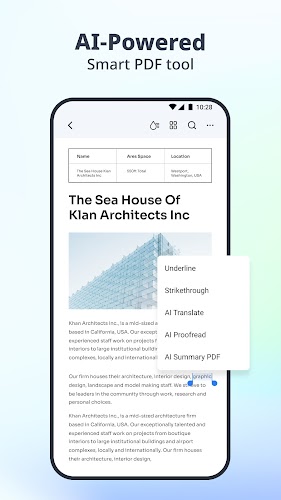
Revolutionize the way you work with PDFs using this all-in-one solution that combines editing, reading, scanning, converting, and more. With powerful AI capabilities at your fingertips, you can chat with your PDF, summarize content, and even have your documents proofread for errors in grammar and spelling. Edit PDFs like never before with features that mimic word processing software, and enjoy a seamless reading experience with Liquid Mode and Bookmarks. Convert files effortlessly, annotate with precision, fill out forms with ease, and securely store and share your PDFs across devices. Upgrade to a premium plan for unlimited access to advanced AI features and enhance your productivity today!
AI PDF
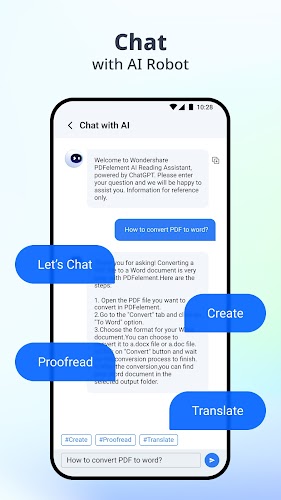
• Chat with PDF: Ask questions and get instant, accurate answers.
• AI PDF Summarizer: Generate key points, abstracts, and keywords.
• AI PDF Rewriting: Proofread and enhance PDF content accuracy.
Edit PDF Like Word
• Edit text and images directly.
• Easily navigate and adjust font size or spacing.
Professional PDF Reader
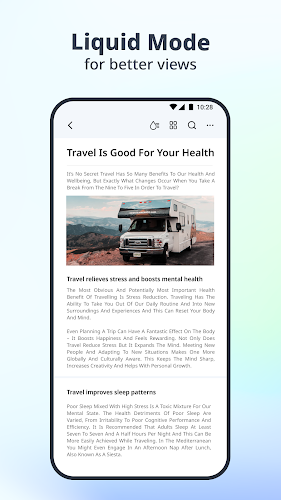
• Liquid Mode for the best reading experience.
• Intuitive navigation with Bookmarks.
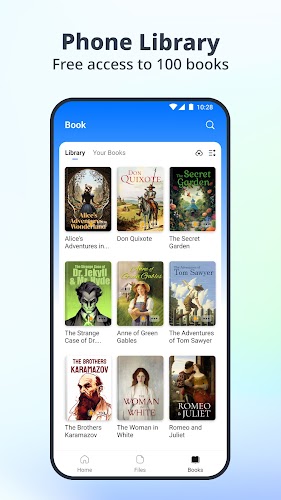
• Access to 8800+ original English books.
• Listen to PDFs with customizable settings.
Scan and OCR
• Scan and digitize paper documents.
• Extract text for searching and editing.
• Easily scan multiple pages into one document.
PDF Converter
• Convert PDF to Microsoft Word, Excel, PPT, and more.
• Convert PDFs to high-resolution images.
• Create PDFs from various document types.
Annotate PDF
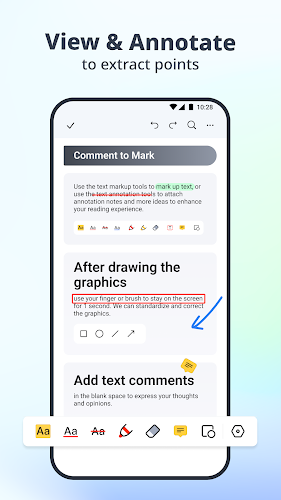
• Add text, shapes, arrows, and more.
• Highlight text for study purposes.
• Popular comment styles to stand out.
Create PDF
• Custom Templates for blank, lined, grid, and more.
• Import images directly or scan paper documents.
• Customize paper size and orientation.
Compress & Merge PDF
• Reduce PDF size without losing quality.
• Combine PDFs, images, and files into one.
• Organize, rotate, merge, split, and rearrange pages.
Fill and Sign
• Fill out PDF forms with interactive fields.
• Add text, images, or e-signatures easily.
Store & Share PDFs
• Upload to PDFelement Cloud for access from any device.
• Set passwords for security.
• Share via social media, link, email, or QR Code.
Experience the power of PDFelement-PDF Editor & Reader with its seamless AI capabilities that enhance every aspect of your PDF experience. From intelligent chat features to advanced editing tools, PDFelement offers a comprehensive solution for all your PDF needs. With its user-friendly interface and extensive range of features, PDFelement is the ultimate PDF solution for professionals, students, and anyone in need of a reliable PDF editor. Install PDFelement-PDF Editor & Reader now and unlock endless possibilities for PDF editing, reading, scanning, converting, and sharing.
MEK Zeiterfassung
Size:53.00M ProductivityPython Tutorial (Simplified)
Size:19.00M ProductivityDealerPromoter
Size:152.00M ProductivityV2Text
Size:13.48M ProductivityBrainSpark: Science Quiz
Size:22.58M ProductivityKelgué ia
Size:21.42M ProductivityGoalDigger
Size:9216.00M ProductivityNSB Merchant Etawah
Size:72.00M ProductivityOlhar Quarteira
Size:29.20M ProductivityNöbetÇi
Size:37.76M ProductivityPassport
Size:39.00M ProductivityUrl Shortner & Qr Code
Size:12.18M ProductivityApril 2024 Clash of Clans Update: Unveiling a Fresh Companion, Enhanced Levels, Chat Tagging, and Be
2024-04-16Arrival of Genshin Impact 4.6 Update: 'Embers of Two Realms, Twilight of Crimson'
2024-04-16V2.2 of the Farlight 84 update introduces an overhauled Season structure, fresh in-game currency, an
2024-04-16Monster Never Cry is now accessible on both Android and iOS mobile devices.
2024-04-18PUBG Mobile Teams Up with Bentley Motors: Luxury Cars, Exclusive Collectibles, and Beyond
2024-04-18March 2024 Free Redemption Codes for Honkai: Star Rail
2024-04-18















Comment
Karl Sunogan
I hope theres a feature to add calculations or formulas to PDF and make the PDF fillable. I am gonna buying it!
Jan 25, 2025 21:07:41
Viano innocent
no enough words can describe my pleasure about this app. just reduce your price please. grear app.
Jan 25, 2025 16:23:29
SAURABH VERMA
Best PDF editor with all professional features at a minimal one time cost.
Jan 25, 2025 04:08:51
Ashok Alexander
This is a good app for pdf. It has variety of features that make it convenient for use.
Jan 24, 2025 23:59:10
Wolfgang Behrentin
The app is fine and is running smoothly. Found the share option finally
Jan 24, 2025 13:55:41
Melvin Orellana
I would need better image quality of pdf files converted to jpeg to increase the score
Jan 23, 2025 06:05:27