English
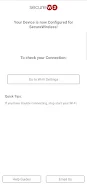
Easily and securely connect to your organization's Wi-Fi network with just one simple setup using the SecureW2 JoinNow app. After a quick installation of your organization's Wi-Fi configuration settings, your device will connect through a secure, encrypted connection every time. All you have to do is keep the app on your device, and you'll never have to worry about connecting again. Just remember, deleting the app will remove the configuration settings, so it's important to keep it on your device. For Android users, setting a screen PIN lock is necessary to ensure smooth connectivity. If you encounter any issues, check out our Common Issues page or read our Privacy policy for more information. Visit our website to learn more about the services SecureW2 offers.
❤ Hassle-Free Setup: With SecureW2 JoinNow, you only need to run the app once to securely connect to your organization's Wi-Fi network. The app will handle the rest, making it a convenient and hassle-free process.
❤ Secure Connection: Your device will connect to the network through a secure, encrypted connection, ensuring that your data remains safe while you are connected to the Wi-Fi network.
❤ Automatic Configuration: The app will automatically download your organization's Wi-Fi configuration settings and install them on your device, saving you time and effort in manually setting up the connection.
❤ What happens if I delete the app? Deleting the app will remove the Wi-Fi configuration settings from your device, causing an interruption in your Wi-Fi connection. It is recommended to keep the app installed on your device.
❤ Why do I need to set a screen PIN lock? Google's Android device policy requires a screen PIN lock to be enabled once your device is configured for connection to secure wireless networks. This is to ensure the security of the connection.
❤ Where can I find help with any issues? If you encounter any problems or have questions about the app, you can check out the Android Common Issues page provided by SecureW2 for assistance.
SecureW2 JoinNow offers a hassle-free and secure way to connect to your organization's Wi-Fi network. With automatic configuration and a secure connection, you can trust that your data is protected while enjoying seamless connectivity. Keep the app installed on your device to ensure uninterrupted access to the Wi-Fi network. For more information and assistance, visit the SecureW2 website.




Scoutier - Email Outreach
Size:4.00M ProductivityVideoStitch
Size:1.00M ProductivitychacoのToDo
Size:80.00M ProductivityBank Holiday Calendar
Size:40.00M ProductivityLovelyPDF - Image to PDF
Size:152.00M ProductivityChildren’s Stories – Perila
Size:0.00M ProductivityPersonality AI
Size:48.00M ProductivityBenissanó info
Size:18.30M ProductivityChronexa OnTime
Size:57.00M ProductivityMeerut WMS
Size:23.00M ProductivityMyMedVault
Size:22.00M ProductivityAkıllı Stüdyo
Size:21.00M ProductivityApril 2024 Clash of Clans Update: Unveiling a Fresh Companion, Enhanced Levels, Chat Tagging, and Be
2024-04-16Arrival of Genshin Impact 4.6 Update: 'Embers of Two Realms, Twilight of Crimson'
2024-04-16V2.2 of the Farlight 84 update introduces an overhauled Season structure, fresh in-game currency, an
2024-04-16Monster Never Cry is now accessible on both Android and iOS mobile devices.
2024-04-18PUBG Mobile Teams Up with Bentley Motors: Luxury Cars, Exclusive Collectibles, and Beyond
2024-04-18March 2024 Free Redemption Codes for Honkai: Star Rail
2024-04-18