
English
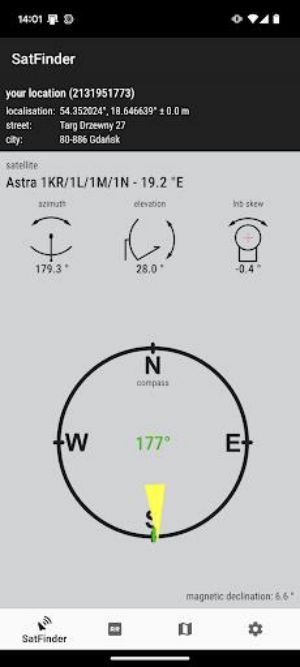
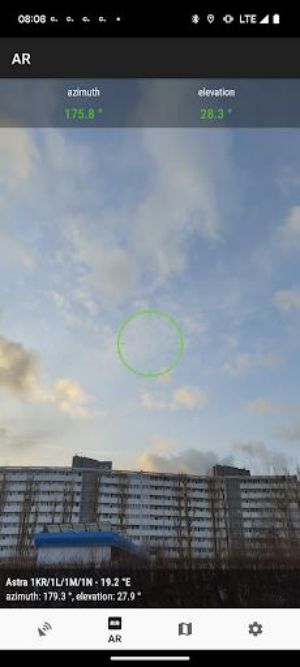
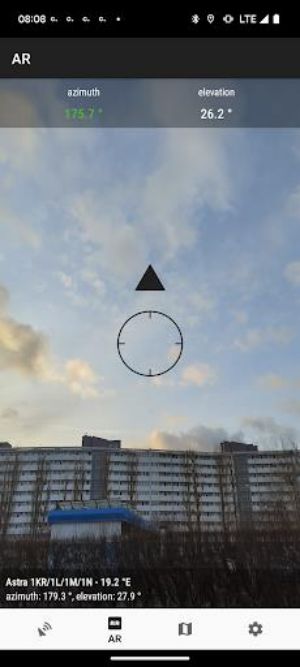
Set up your satellite dish with ease using this handy tool. With the help of GPS, it provides precise azimuth, elevation, and LNB tilt data for your location and chosen satellite. The numeric and graphical representation on google maps makes it easy to understand. Use the built-in compass for accurate satellite azimuth and even take advantage of augmented reality for a visual guide. Just make sure to enable GPS and Internet on your phone, select your desired satellite, and let SatFinder do the rest. Say goodbye to complicated setups and hello to hassle-free satellite dish installations.
User-Friendly Interface: SatFinder has a simple and intuitive interface, making it easy for users to navigate and set up their satellite dish without any hassle.
Augmented Reality Feature: SatFinder uses augmented reality to show users where the satellite is located in their camera view, making it easier for them to point their satellite dish in the right direction.
Accurate Calculations: SatFinder provides precise azimuth, elevation, and LNB tilt angles for the user's location and chosen satellite, ensuring a successful satellite dish setup.
Compass Functionality: The built-in compass helps users find the proper satellite azimuth, making it easier to align their satellite dish with the satellite signal.
Does SatFinder require an internet connection to function?
- Yes, SatFinder requires both GPS and internet connection to accurately determine the user's location and provide satellite information.
Can SatFinder be used indoors?
- It is recommended to use SatFinder outdoors or near windows to receive a more accurate GPS signal.
How do I calibrate the compass?
- Users should calibrate the compass on their device each time they use it to ensure accurate azimuth readings.
With its user-friendly interface, augmented reality feature, accurate calculations, and compass functionality, this app is a must-have tool for anyone looking to set up their satellite dish quickly and efficiently. Say goodbye to tedious manual calculations and let this app guide you to the perfect satellite signal in no time. Download SatFinder now and experience the convenience of satellite dish setup at your fingertips.
KingRoot
Size:12.50M ToolsMonitora View
Size:276.10M ToolsFlashlight - Torch & Modes
Size:18.59M ToolsBirthday Reminder
Size:1.80M ToolsBYKKO Serv
Size:4.69M ToolsFilezy.
Size:40.60M ToolsEsma-ül Hüsna
Size:6.98M ToolsCHM Viewer
Size:50.00M ToolsRideAlong
Size:25.51M ToolsCrochet
Size:162.48M ToolsAndroid Info Master
Size:23.80M ToolsRSS Reader
Size:19.00M ToolsApril 2024 Clash of Clans Update: Unveiling a Fresh Companion, Enhanced Levels, Chat Tagging, and Be
2024-04-16Arrival of Genshin Impact 4.6 Update: 'Embers of Two Realms, Twilight of Crimson'
2024-04-16V2.2 of the Farlight 84 update introduces an overhauled Season structure, fresh in-game currency, an
2024-04-16Monster Never Cry is now accessible on both Android and iOS mobile devices.
2024-04-18PUBG Mobile Teams Up with Bentley Motors: Luxury Cars, Exclusive Collectibles, and Beyond
2024-04-18March 2024 Free Redemption Codes for Honkai: Star Rail
2024-04-18
















Comment
A Google user
not working ... dth names not working for today
Aug 25, 2025 17:35:14
A Google user
Thank you great place to park my pacific shpere ****
Aug 25, 2025 12:02:27
A Google user
it doesn't have yahsat 1a satellite
Aug 25, 2025 05:33:33
A Google user
Badd app not work
Aug 24, 2025 20:26:15
Abbas Shabani
you have to pay to achieve pro settings
Aug 24, 2025 04:09:10
mickeyz
Well done! Excellent app!
Aug 23, 2025 14:19:26