English
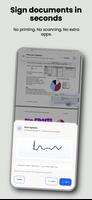
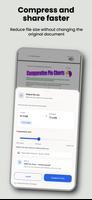
PDF Editor & Sign – VeloPDF is a compact PDF tool that helps you edit, sign, annotate, and manage PDF documents on Android. PDF Editor & Sign – VeloPDF preserves layout while letting you modify text, add signatures, and fill forms. PDF Editor & Sign – VeloPDF is designed for straightforward document tasks and secure local file handling.
The app operates on-device for most actions so you can save edited PDFs locally or share them through other apps. Permissions are limited to the features you use, such as storage access for opening and saving files and camera use for scanning pages if enabled. Review in-app options to control file handling and backups.





PDF Editor & Sign – VeloPDF
Size:75.30M ProductivityRimbo
Size:89.00M ProductivityNudge – ADHD Planner & Focus
Size:69.00M ProductivityBgGPT
Size:32.90M ProductivityMy Mummy Australia
Size:17.00M ProductivityVibeTime
Size:7.00M ProductivityGraylin
Size:40.00M ProductivityDAD Poker - AI Poker Coach
Size:56.00M ProductivityAI Chart Analyzer - Trading AI
Size:49.00M ProductivityRoda Mais Coop
Size:28.00M ProductivityAtila
Size:40.70M ProductivityReceipt Manager
Size:37.00M ProductivityApril 2024 Clash of Clans Update: Unveiling a Fresh Companion, Enhanced Levels, Chat Tagging, and Be
2024-04-16Arrival of Genshin Impact 4.6 Update: 'Embers of Two Realms, Twilight of Crimson'
2024-04-16V2.2 of the Farlight 84 update introduces an overhauled Season structure, fresh in-game currency, an
2024-04-16Monster Never Cry is now accessible on both Android and iOS mobile devices.
2024-04-18PUBG Mobile Teams Up with Bentley Motors: Luxury Cars, Exclusive Collectibles, and Beyond
2024-04-18March 2024 Free Redemption Codes for Honkai: Star Rail
2024-04-18