English
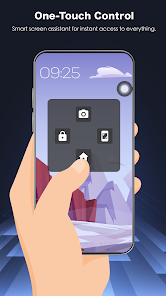
Assistive Touch 2026 provides a customizable floating shortcut panel for Android, helping you navigate faster, protect physical buttons and access apps and system settings with a single tap. The persistent on-screen button includes virtual Home, Back and Recent controls, volume keys and quick toggles for Wi-Fi, Bluetooth, flashlight, rotation, brightness, location, airplane mode and screenshots, which is useful on large screens and for one-handed operation.
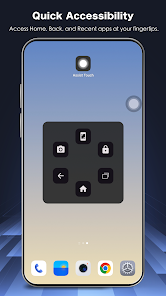
Assistive Touch 2026 places a compact floating button that gives one-touch access to virtual Home, Back, Recent apps and volume controls to reduce wear on hardware.
Quick access settings let you toggle Wi-Fi, Bluetooth, flashlight, screen rotation, brightness, location services, airplane mode and capture screenshots directly from the panel.
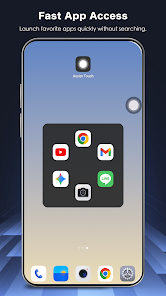
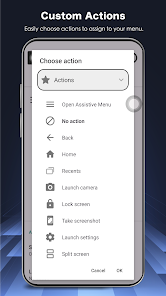
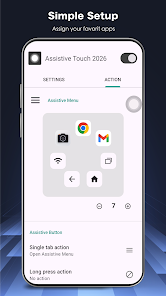
Quick launch shortcuts allow you to add frequently used apps to the floating menu so they are available from any screen.
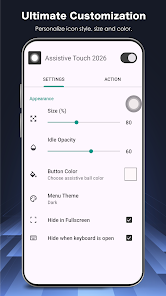
Full customization options let you choose icon styles, panel colors, size and transparency so the control fits your theme and workflow.
The app uses the Accessibility Service API to perform global actions (Back, Home, Recent, Lock) and the developer states it does not collect or share personal data via this service.
Assistive Touch 2026 can help extend the life of physical buttons by providing reliable on-screen alternatives.
Designed for large screens and one-handed use, it makes common tasks quicker and reduces the need to open multiple menus.
Lightweight and responsive, the app is built to run smoothly with minimal battery impact.
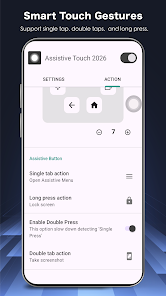
Simple, intuitive settings make it straightforward to set up and adjust to personal preference.
The app requires enabling the Accessibility Service API to perform global actions, which some users may be hesitant to grant.
The floating panel remains on screen and may obscure content if it is not positioned or adjusted to your preference.
PICKZ AI-AI LOTTERY NUMBERS
Size:32.00M ToolsAssistive Touch 2026
Size:10.00M ToolsRobox Counter : RBX Calc
Size:28.00M ToolsExplorer 2026 - Task Manager
Size:43.00M Tools포케챔스
Size:43.15M ToolsModoo File Converter
Size:14.00M ToolsPawDoo
Size:43.49M ToolsNaam Jap Counter
Size:47.41M ToolsKoala Swift Pass Ignite
Size:16.00M ToolsKoi Mend Idle Slow
Size:16.00M ToolsUltimate VPN
Size:15.43M ToolsAlarm Clock: Timer & Stopwatch
Size:15.00M ToolsApril 2024 Clash of Clans Update: Unveiling a Fresh Companion, Enhanced Levels, Chat Tagging, and Be
2024-04-16Arrival of Genshin Impact 4.6 Update: 'Embers of Two Realms, Twilight of Crimson'
2024-04-16V2.2 of the Farlight 84 update introduces an overhauled Season structure, fresh in-game currency, an
2024-04-16Monster Never Cry is now accessible on both Android and iOS mobile devices.
2024-04-18PUBG Mobile Teams Up with Bentley Motors: Luxury Cars, Exclusive Collectibles, and Beyond
2024-04-18March 2024 Free Redemption Codes for Honkai: Star Rail
2024-04-18