English
Cleaner Mate is a compact Android utility that helps you reclaim storage and manage your device with straightforward tools for junk removal, large-file cleanup, photo compression, and basic battery information. Designed to be lightweight and easy to navigate, Cleaner Mate focuses on clear actions and visible results so you can free space without wading through complex settings.
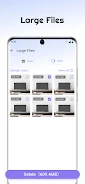
The app offers a focused set of functions: a junk file scanner that separates caches and temporary items by category, a large file scanner that highlights oversized media and documents by file size, a batch photo compression tool that reduces image file size while aiming to retain visual quality, and a simple battery information panel that surfaces usage statistics. Each function presents findings in groups rather than a long unstructured list, so you can act on similar items together. Cleaner Mate also supports a single-tap cleanup flow for routine maintenance while still allowing manual review before anything is removed.
Cleaner Mate performs quick or deeper scans depending on your choice. The quick scan targets obvious cache and temporary files and completes in a short time, while the deeper scan examines storage for large items and unreferenced files. Results are grouped by type and by size, and thumbnails or file details appear where relevant to help you decide what to keep. Compression tasks run locally on your device to produce new, smaller image files or to replace originals based on your confirmation. Progress indicators and estimated space savings appear during operations so you can monitor results without guessing.
The interface emphasizes clear controls: tap-based actions, straightforward toggles for selecting entire groups or individual files, and preview screens that show image quality before you apply compression. Sorting and filter options let you view files by size, date, or type to prioritize what to remove. Cleaner Mate keeps interactions predictable and minimizes interruptions by requiring explicit confirmation for destructive actions. The app is optimized for touch navigation, with large tappable areas and concise labels that make it simple to perform common tasks quickly.
Cleaner Mate does not gamify maintenance, but it does support a sensible progression for reclaiming storage: start with a quick junk sweep to recover small amounts of space, then use the large-file scanner to identify big wins. Compressing photo libraries can produce substantial savings depending on the image formats and existing compression levels. Over repeated use, the app helps maintain a leaner device by making regular checks simple; users often observe a steady reduction in clutter when they combine quick cleanups with occasional deep scans.
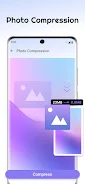
Photo compression in Cleaner Mate is designed with control in mind. You can preview sample images after compression to evaluate visual quality before applying changes across a batch. Compression ratios depend on image resolution, format, and content—photos with lots of fine detail will compress differently from screenshots or low-contrast images—so results vary. The tool emphasizes perceptual quality, aiming to lower file size while keeping images visually acceptable for everyday viewing and sharing.
The battery information view provides basic metrics such as recent usage patterns and an overview of which apps or functions are consuming power, making it easier to pair storage management with simple battery checks. Cleaner Mate is designed to operate offline and performs scanning and compression on-device; no online account is required for the core cleanup features. This local processing helps protect your data privacy and lets you use the app without a network connection.
Cleaner Mate aims for readability and ease of use across a range of devices. The layout uses clear typography and distinct iconography so options are easy to distinguish, and it responds to system accessibility settings such as larger text. Basic customization includes choosing between compact and detailed list views and adjusting compression preference sliders to favor either quality or space savings, giving users control over the trade-offs.
To scan and clean effectively, Cleaner Mate requests permission to access your files and storage. This access is necessary to identify candidates for removal and to perform compression tasks. The app requires user confirmation before deleting content and presents file details and previews to reduce the risk of accidental removal. Because all operations happen locally, you maintain control over which files are changed or deleted.
Install Cleaner Mate, grant the requested storage permissions, and run a quick scan to see immediate opportunities to free space. From there, try the large-file scan and a small batch photo compression to understand how much you can reclaim; use manual selection when you want fine-grained control. Cleaner Mate is intended as a straightforward, everyday tool to keep your Android device running with more free storage and clearer organization.



Cleaner Mate
Size:23.20M ToolsTranslate All Language
Size:14.64M ToolsJoker's Carousel
Size:11.00M ToolsCoral Pale Quokka Lynx
Size:15.00M ToolsClyoXVPN
Size:109.04M ToolsPerfect Trans
Size:19.60M ToolsTTUtil
Size:22.06M Toolscoin dash: jump quest
Size:24.40M ToolsVTX Proxy
Size:23.82M ToolsIMB MAX
Size:19.50M ToolsPhoto Recover Pro
Size:39.32M ToolsFutemax Futebol Ao Vivo
Size:23.65M ToolsApril 2024 Clash of Clans Update: Unveiling a Fresh Companion, Enhanced Levels, Chat Tagging, and Be
2024-04-16Arrival of Genshin Impact 4.6 Update: 'Embers of Two Realms, Twilight of Crimson'
2024-04-16V2.2 of the Farlight 84 update introduces an overhauled Season structure, fresh in-game currency, an
2024-04-16Monster Never Cry is now accessible on both Android and iOS mobile devices.
2024-04-18PUBG Mobile Teams Up with Bentley Motors: Luxury Cars, Exclusive Collectibles, and Beyond
2024-04-18March 2024 Free Redemption Codes for Honkai: Star Rail
2024-04-18