English
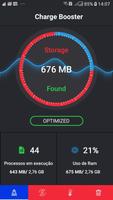
Smart Budget Tracker is presented here as a compact device maintenance tool rather than a personal finance app; Smart Budget Tracker helps you reclaim storage, reduce notification clutter, and measure performance improvements with a simple, focused interface. The name may suggest budgeting, but this build intentionally concentrates on cleaning unnecessary files, clearing app caches, and freeing RAM to make your phone feel more responsive without complicated settings or cloud access.
The broom-style cleaner performs a staged scan that separates visible media, temporary files, and app cache remnants so you can review what will be removed before any changes are made. When a scan completes the app displays grouped results with clear descriptions, allowing manual selection of individual files or entire categories prior to sweeping them away. This manual review step minimizes accidental deletions and gives you control over what stays on the device.
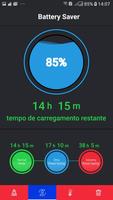
The integrated notification cleaner is designed to reduce on-screen clutter after you read messages or dismiss alerts. It lists recent notifications from apps and lets you clear groups in one action, helping to keep the notification shade concise while retaining important items until you explicitly remove them. Controls are explicit and local to your device; the cleaner does not require an internet connection to work.
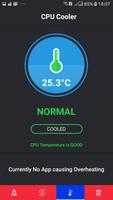
The RAM freeing accelerator focuses on closing background tasks and clearing volatile memory to improve short-term responsiveness. Before and after running acceleration you can use the built-in speed test to sample device responsiveness. The speed test runs a brief set of checks, reports comparative numbers at the moment of testing, and visually highlights any improvement in throughput or latency so you can judge immediate gains from a single cleaning pass.
The app favors clear, touch-friendly controls with large action buttons and readable labels so common operations are quick to learn. Typical interaction follows a three-step flow: scan, review, and clean. Each stage reports progress and explains what the tool is doing using plain language rather than technical jargon. Manual selection is a deliberate design choice: users can pick only the caches and files they trust the app to remove, which reduces the chance of removing something needed by a specific app.
Visual style is minimalist and functional, with iconography that helps identify file types and a color scheme meant to keep focus on the task rather than on flashy animations. Accessibility considerations include adjustable text scaling controlled by the system font settings and clear contrast for buttons and status indicators, making the app usable for a broader audience. Because all cleanup actions operate on local storage, Smart Budget Tracker works offline and does not rely on remote servers to perform its core functions.
The included speed test provides a straightforward before-and-after comparison: run the quick benchmark, perform the RAM freeing or file sweep, then run the benchmark again to see immediate differences. Results are presented as simple values and a short explanatory note to help you interpret whether the change was significant. This session-based comparison can guide repeated cleanings when you want to test different settings or targets, but the app does not send diagnostics off-device and does not require an account to view results.
Smart Budget Tracker clears storage space by removing redundant files and cached data, which can reclaim significant free space on devices that accumulate temporary files over time. The notification cleanup feature reduces on-screen distraction without hiding important messages permanently, and the RAM accelerator can improve short-term responsiveness for apps that are sensitive to available memory. The interface prioritizes safety by letting users choose precisely which items to delete rather than forcing a blanket removal.
Some cleaning operations intentionally require manual selection, so users looking for fully automated, scheduled maintenance may find this approach less convenient. The acceleration functionality targets RAM and immediate responsiveness; it does not perform deep, system-level optimizations or change kernel-level settings. Because the app operates locally and focuses on straightforward maintenance tasks, it does not include cloud backups, user accounts, or automated online reporting of performance metrics.
Overall, Smart Budget Tracker is best suited for people who want a lightweight, offline-capable utility to tidy files, manage notifications, and run a simple performance check without complex configuration. If you prefer explicit control over what the app removes and want a compact tool to make your device feel snappier in everyday use, this build offers a practical, easy-to-understand set of maintenance tools that are safe and transparent in operation.

My Resume Maker
Size:24.97M ToolsSmart Notepad
Size:108.73M ToolsFuraha Baraka Farms
Size:50.99M ToolsSmart Budget Tracker
Size:40.91M ToolsDiablo BT
Size:18.83M ToolsTV Brasil - TV ao Vivo
Size:20.81M ToolsPetmo
Size:71.21M Toolstodo
Size:31.22M ToolsCleaner Mate
Size:23.20M ToolsTranslate All Language
Size:14.64M ToolsJoker's Carousel
Size:11.00M ToolsCoral Pale Quokka Lynx
Size:15.00M ToolsApril 2024 Clash of Clans Update: Unveiling a Fresh Companion, Enhanced Levels, Chat Tagging, and Be
2024-04-16Arrival of Genshin Impact 4.6 Update: 'Embers of Two Realms, Twilight of Crimson'
2024-04-16V2.2 of the Farlight 84 update introduces an overhauled Season structure, fresh in-game currency, an
2024-04-16Monster Never Cry is now accessible on both Android and iOS mobile devices.
2024-04-18PUBG Mobile Teams Up with Bentley Motors: Luxury Cars, Exclusive Collectibles, and Beyond
2024-04-18March 2024 Free Redemption Codes for Honkai: Star Rail
2024-04-18