English
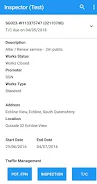
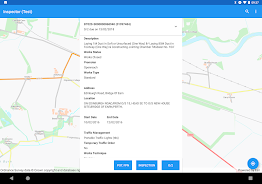
Inspector is a mobile utility designed for registered teams who must capture official inspection outcomes from the field and commit them to a centralized registry. Inspector helps field staff and auditors submit inspection result transactions with minimal friction by offering a focused entry experience, clear validation, and direct integration with the hosted service that maintains the authoritative records. Access to the system requires coordination with the support team and an assigned account from the hosted service, ensuring that only authenticated users can submit or modify registry entries.
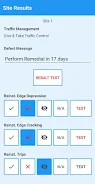
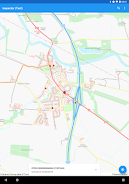
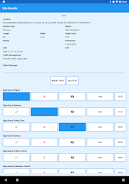
The core purpose of the app is to make recording inspection result transactions straightforward and auditable. Forms are presented as guided data entry screens where required fields, conditional questions and validation rules reduce errors at the point of capture. Users can attach photos, add GPS coordinates and timestamps, and include short notes to provide context for each inspection result transaction. Drafts can be saved locally, reviewed and finalized before submission; once submitted, entries are transmitted to the central registry where they become part of the official record maintained by the hosted service.
Controls are intentionally simple: touchscreen-driven forms with clear labels, inline validation messages and progress indicators for multi-step checks. The app supports a natural progression from draft to submitted and acknowledged states, so teams can track whether a transaction is pending review or has been accepted into the registry. Status indicators and a chronological history let inspectors see recent activity and follow up on outstanding items without returning to paper notes. For supervisors, the interface surfaces recent submissions, their status and any attached evidence to support audits.
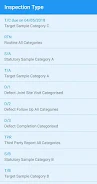
The visual design emphasizes clarity and legibility: a high-contrast layout, logical grouping of related fields and responsive form controls that adapt to different screen sizes. Administrators of the hosted service can provide customized form templates and checklists that reflect local inspection standards, so field teams capture the exact data required. Accessibility options include adjustable text size and support for screen readers where available, helping users with diverse needs complete inspections reliably. The app also supports basic localization for labels and messages when the hosted service supplies translated templates.
Since inspections often occur in areas with limited connectivity, the app provides offline capture with encrypted local storage. Users can complete multiple inspection result transactions while offline and review or edit drafts before syncing. When a connection is available the app automatically queues and transmits submissions to the hosted registry, handling retries and reporting any conflicts or validation failures so users know whether a transaction was accepted or needs correction. Network-efficient uploads minimize data usage by transmitting only new or changed content and attachments.
Inspector is built for repeated, routine use rather than one-off interactions. Inspectors will find the app useful day after day because it reduces repetitive paperwork and preserves a searchable digital trail of outcomes. Submitted inspection result transactions are maintained with full timestamps and metadata to support audits and traceability. Depending on the hosted service configuration, records can be exported from the registry for offline review or compliance reporting, and the app’s structured data entry makes those exports consistent and reliable.
Because Inspector writes to an authoritative hosted registry, registration and role-based access control are required to protect data integrity. The hosted service team manages onboarding, account activation and template distribution so administrators retain control over who may submit official results. This design means the application is not a public-facing consumer tool; it is intended for organizations that require centralized, authenticated capture of inspection result transactions. Teams that need a secure, streamlined way to log inspection outcomes will find Inspector effective, provided they coordinate account setup through the hosted service support channels.



Guinn Auction
Size:28.17M FinanceInspector
Size:23.40M FinanceGrably
Size:65.01M FinanceLD2 Service
Size:31.40M FinanceGenee Dispatcher
Size:33.92M FinanceSmart Move Des Moines
Size:34.85M FinanceAuria Expertise
Size:97.12M FinanceMOVO HR
Size:10.13M FinanceKashemnagar Hospital
Size:62.79M FinanceManwab Driver
Size:27.81M FinancePlural
Size:168.40M FinanceClicapp
Size:16.04M FinanceApril 2024 Clash of Clans Update: Unveiling a Fresh Companion, Enhanced Levels, Chat Tagging, and Be
2024-04-16Arrival of Genshin Impact 4.6 Update: 'Embers of Two Realms, Twilight of Crimson'
2024-04-16V2.2 of the Farlight 84 update introduces an overhauled Season structure, fresh in-game currency, an
2024-04-16Monster Never Cry is now accessible on both Android and iOS mobile devices.
2024-04-18PUBG Mobile Teams Up with Bentley Motors: Luxury Cars, Exclusive Collectibles, and Beyond
2024-04-18March 2024 Free Redemption Codes for Honkai: Star Rail
2024-04-18