English
SweepFlowGo is a compact maintenance and home screen tool designed to help you reclaim storage space, remove redundant files, and keep Android devices running smoothly. SweepFlowGo combines simple one-tap cleanup routines with an optional launcher interface so you can reach utilities and favorite apps from a streamlined home screen. The app is intended for users who want quick, sensible maintenance without a steep learning curve; installing the launcher may rearrange icons on your current home screen, but all apps remain installed and you can switch back to your previous launcher at any time.
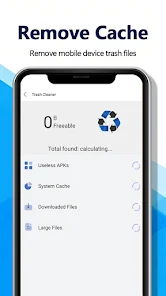
SweepFlowGo detects redundant items and offers guided cleanup suggestions that avoid complex menus or technical jargon. Its cache clearing utility removes temporary data created by apps, which often frees up space and reduces background slowdowns. The storage organizer groups large files, temporary data, and rarely used items into clear categories so you can review what to remove without guesswork. The built-in launcher gives quick access to maintenance tools, frequently used apps, and shortcuts, making routine housekeeping part of your daily workflow. The core features are free and supported by unobtrusive ads.
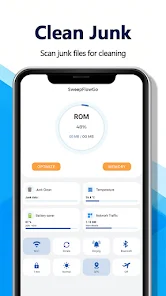
Cleanups in SweepFlowGo are driven by straightforward detection rules and preview screens. When you run a scan, the app lists candidate files and caches grouped by type and estimated space savings. You can tap a group to see the specific items and deselect anything you want to keep. Cleanup is completed with a single confirmation step, and the app reports space reclaimed and recent activity so you can track results. This conservative approach minimizes the risk of deleting something important while still addressing common causes of storage bloat.
The controls in SweepFlowGo are intentionally minimal: swipe through the launcher pages, tap to open utilities, and use one-tap scan and cleanup buttons for routine tasks. New users are guided through a quick setup that explains how to set the launcher as default, how to review scan results, and how to restore their previous home screen if desired. Contextual tips are shown the first few times you use each feature so you can learn the workflow without reading long manuals. Touch targets and simple labels keep interactions predictable across phones with different screen sizes.
Rather than a traditional game progression, SweepFlowGo encourages steady improvements in device performance through repeatable maintenance cycles. The app surfaces recommendations based on your usage patterns — for example, large media files you haven’t opened in months or apps with persistent cache growth — and helps you remove them in stages. Over time, following the suggested actions reduces storage fragmentation and keeps launch times snappier; this gradual progression rewards consistent upkeep rather than one-off optimizations.
SweepFlowGo uses a clean, minimal visual design that emphasizes legibility and fast access to controls. Icons and text are sized for easy reading and the launcher supports a few basic layout choices so you can prioritize tools or apps on the home screen. Color contrasts and spacing are chosen to make lists and action buttons clear at a glance. While it is lightweight by design, the app still offers simple customization options for grid density and shortcut placement so you can make the interface feel familiar.
The app is built to work offline for all primary maintenance functions: scanning local storage and clearing cache do not require an internet connection. Basic accessibility support is included with clearly labeled controls and logical navigation order for screen readers. SweepFlowGo is intentionally conservative with memory and CPU usage so it performs well on older or low-end devices. Because it focuses on routine tasks rather than deep system modifications, it remains compatible with most Android environments without requiring elevated permissions beyond what’s necessary for cleanup and launcher operation.
Replay value comes from integrating SweepFlowGo into a regular device care routine: periodic scans and quick cleanups keep storage manageable and help prevent slowdowns. The app is not intended as an advanced optimizer for power users who need low-level tuning or diagnostic tooling; it focuses on approachable, safe housekeeping. Ads support the free version but are kept minimal to avoid disrupting maintenance workflows. If you prefer, you can remove the launcher and continue using only the cleanup utilities while retaining the same core functionality.
Before running a large cleanup, review the scan results and deselect any files you want to keep. If you decide to try the launcher, allow a moment for your home screen to reorganize and use the guided steps to set preferences. Regular weekly or monthly scans are a simple habit that yields noticeable improvements over time. SweepFlowGo aims to be a practical, low-friction tool for everyday device care while keeping control in the user’s hands.

Neo Clean
Size:32.78M ToolsSweepFlowGo
Size:141.00M ToolsBestek
Size:46.63M Tools绿茶VPN
Size:60.68M ToolsAutenticador
Size:33.37M ToolsRustavoil
Size:55.66M ToolsCH Chat Ai
Size:10.53M ToolsOneLiker
Size:28.15M ToolsKLEMU
Size:98.35M ToolsWiFi Commander
Size:63.36M ToolsNezHub
Size:19.30M Tools3D Model Viewer
Size:9.35M ToolsApril 2024 Clash of Clans Update: Unveiling a Fresh Companion, Enhanced Levels, Chat Tagging, and Be
2024-04-16Arrival of Genshin Impact 4.6 Update: 'Embers of Two Realms, Twilight of Crimson'
2024-04-16V2.2 of the Farlight 84 update introduces an overhauled Season structure, fresh in-game currency, an
2024-04-16Monster Never Cry is now accessible on both Android and iOS mobile devices.
2024-04-18PUBG Mobile Teams Up with Bentley Motors: Luxury Cars, Exclusive Collectibles, and Beyond
2024-04-18March 2024 Free Redemption Codes for Honkai: Star Rail
2024-04-18