English
Neo Clean is a lightweight cleanup utility for Android designed to help you reclaim storage and keep files organized with a few simple taps. Neo Clean scans your device for temporary data, app caches, leftover APKs, ad and log files, and highlights large or duplicate items so you can decide what to remove. The app puts emphasis on fast, manual cleanup: run a scan, review grouped results, select what you want to remove, and confirm deletions to recover space without unexpected changes.
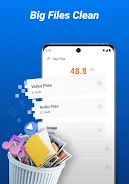
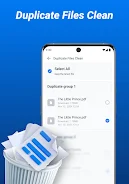
The core features of Neo Clean include a junk cleaner that locates temporary files and cache remnants, a module that lists leftover APKs and common ad or log files, and tools that surface oversized and duplicate files for removal. A big files view shows items larger than a configurable threshold so you can target the largest space consumers first. The screenshot cleaner helps you find and remove redundant or unwanted images, and a battery details view provides basic status information if you want to check power usage while cleaning. All scans are presented in clear groups so you can act category by category rather than digging through folders.
Neo Clean performs quick scans that categorize results into meaningful types: caches, temporary items, installation packages, screenshots, duplicates, and large files. After a scan completes you can tap into any category to inspect individual entries, preview files when appropriate, and use simple selection controls to mark items for deletion. The workflow is intentionally manual—Neo Clean requires you to review and confirm deletions to reduce the risk of removing important personal files. Progress indicators and size estimates appear during scans so you understand how much space may be reclaimed before you commit.
The interface in Neo Clean is designed to be straightforward and uncluttered: primary actions are reachable with single taps, and lists are organized by category and size to make decision-making faster. Typical controls include tapping to open details, tapping selection checkboxes to mark items, and swiping or using back navigation to return to previous screens. Confirmation dialogs and clear file labels help prevent accidental removals, and the app keeps interactions short so you can complete a cleanup session in a few minutes on most devices.
Rather than a game-style progression, Neo Clean provides a repeatable maintenance routine that helps you maintain free space over time. Each session follows a predictable progression: scan, review, select, and confirm. Repeated use gradually reduces clutter and makes future scans faster because fewer temporary files accumulate. Users who adopt a weekly or monthly cleanup habit will typically notice more stable free space and less storage-related slowdown.
The visual approach of Neo Clean focuses on clarity: readable text, clear section labels, and iconography that indicates file types and sizes. The app avoids dense technical jargon and presents file sizes in understandable units so global users can make informed choices. Accessibility considerations include large touch targets and simple navigation paths; the straightforward layout benefits users who prefer minimalism or who are less familiar with device file systems.
Neo Clean operates on local storage and file metadata, which means it performs cleanup tasks without requiring online accounts or continuous network access for its basic functions. The app is intended as a lightweight utility with a small footprint, so it targets devices that need manual space management rather than deep system-level optimizations. Compatibility notes and basic battery info are available within the app to help you decide when to run larger scans.
Neo Clean focuses on user-level file cleanup and does not perform deep system-level tuning or background performance optimizations. It intentionally asks for user confirmation before deleting files to reduce the risk of removing important content. Users should review scan results before confirming deletions, and understand that advanced maintenance tasks such as kernel-level optimization, app reconfiguration, or automated scheduled cleaning are beyond the scope of this utility. Neo Clean is best used as a straightforward tool to tidy storage and remove common leftover files safely.


Neo Clean
Size:32.78M ToolsSweepFlowGo
Size:141.00M ToolsBestek
Size:46.63M Tools绿茶VPN
Size:60.68M ToolsAutenticador
Size:33.37M ToolsRustavoil
Size:55.66M ToolsCH Chat Ai
Size:10.53M ToolsOneLiker
Size:28.15M ToolsKLEMU
Size:98.35M ToolsWiFi Commander
Size:63.36M ToolsNezHub
Size:19.30M Tools3D Model Viewer
Size:9.35M ToolsApril 2024 Clash of Clans Update: Unveiling a Fresh Companion, Enhanced Levels, Chat Tagging, and Be
2024-04-16Arrival of Genshin Impact 4.6 Update: 'Embers of Two Realms, Twilight of Crimson'
2024-04-16V2.2 of the Farlight 84 update introduces an overhauled Season structure, fresh in-game currency, an
2024-04-16Monster Never Cry is now accessible on both Android and iOS mobile devices.
2024-04-18PUBG Mobile Teams Up with Bentley Motors: Luxury Cars, Exclusive Collectibles, and Beyond
2024-04-18March 2024 Free Redemption Codes for Honkai: Star Rail
2024-04-18