English
Music Player Mp3 : Offline is a lightweight, local audio player designed to play your stored music without needing an internet connection; it appears as a reliable choice for users who prefer fast startup and straightforward playback. The app automatically scans device storage for audio files and presents them in familiar categories so you can start listening immediately even when you are offline. This introduction will walk through how Music Player Mp3 : Offline handles library organization, playback controls, and the everyday listening experience so you know what to expect before you install.
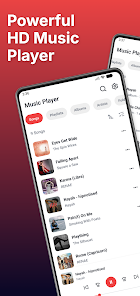
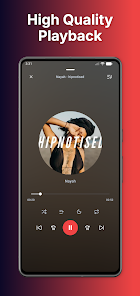
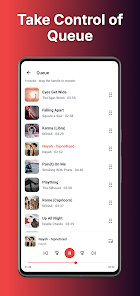
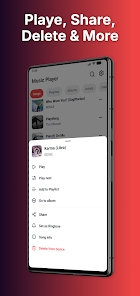
Music Player Mp3 : Offline organizes tracks by songs, albums, artists and folders, making it easy to locate a single file or browse an entire collection. The player supports building and editing custom playlists, letting you create mixes for commuting, workouts, or downtime and reorder tracks by drag-and-drop or simple edit controls. Background playback continues while you use other apps, and notification and lock-screen controls make it convenient to skip, pause or resume without opening the full interface. The app emphasizes clear, high-quality sound output and consistent playback behavior across different Android devices.
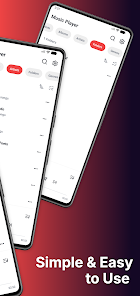
The interface is intentionally clean and modern, using straightforward lists and clear typography so album artwork and track details remain easy to read. Album covers and metadata are displayed where available, and the layout keeps playback controls accessible at the bottom of the screen so you can browse without losing sight of the currently playing track. The design avoids clutter and aims for quick access to frequent actions like shuffle, repeat and playlist creation, providing a predictable experience for new and experienced users alike.
Playback controls follow standard Android media conventions so your headset, Bluetooth device or car controls will respond as expected. In-app controls include play/pause, skip forward and back, seek by timeline, and simple playlist management. Notification and lock-screen controls allow immediate interaction when the device is locked or when you are switching between tasks, and the app preserves playback state so you return to the same position after interruptions like calls or short system restarts.
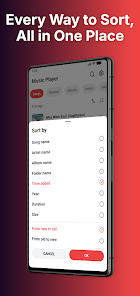
When you first open Music Player Mp3 : Offline it performs a scan of local directories to index audio files and group them into logical sections. Sorting and filtering options let you view tracks by artist or album, and folder view helps users who organize music by directories. The app reads common metadata tags so titles, album names and artist credits appear correctly where files include that information. This structure supports collections that grow over time and helps you maintain order without manual editing of every file.
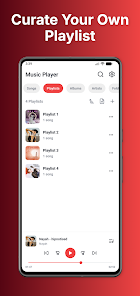
Playlists are a central way to personalize listening. The app lets you create new playlists, add or remove tracks, and reorder entries to craft a specific flow. Because everything is local, playlists reflect the files on your device and update when you add new songs to the storage. This local approach keeps playlist management fast and reliable even when you’re offline or in low-coverage areas.
Offline capability is the defining feature: all playback happens from files stored on the device, which means the app does not depend on internet bandwidth or subscriptions. Background playback is engineered to conserve resources while keeping audio stable, and notification controls help with accessibility by offering simple, large targets for common actions. The app’s lightweight footprint reduces the chance of slowdowns on older phones, making it a practical choice for users who value dependable local playback over streaming features.
Advantages include fast startup, minimal resource use, and a straightforward way to manage and play local music; Music Player Mp3 : Offline keeps the focus on consistent playback and library clarity rather than online services. Limitations are intentional: the app does not provide online streaming, cloud synchronization, or web-based content discovery. You will need your audio files saved on the device for playback, and any missing metadata or album art may require external tools to correct.
The overall user experience centers on simplicity and predictability, with reliable background playback and familiar controls that encourage long-term use. Regular listening sessions, reorganizing playlists, and updating your local library give the app enduring replay value for people who maintain a personal music collection. For users who prefer an uncluttered, offline player that respects local file ownership and straightforward controls, Music Player Mp3 : Offline is a practical choice.
Music Player Mp3 : Offline
Size:96.00M Media & VideoXlX Video Downloader & Player
Size:25.55M Media & VideoVEC Radio
Size:56.92M Media & VideoWMBG Radio
Size:24.18M Media & VideoRádio Web Tempo de Mudança
Size:19.59M Media & VideoPotiguar Mix
Size:56.55M Media & VideoGuess the Chords
Size:154.20M Media & VideoIPTV BLINK PLAYER
Size:11.70M Media & VideoVibesnap
Size:33.93M Media & VideoNova Rio FM
Size:58.77M Media & VideoFT Video Downloader
Size:20.60M Media & VideoRádio Plantão de Notícias RP
Size:14.63M Media & VideoApril 2024 Clash of Clans Update: Unveiling a Fresh Companion, Enhanced Levels, Chat Tagging, and Be
2024-04-16Arrival of Genshin Impact 4.6 Update: 'Embers of Two Realms, Twilight of Crimson'
2024-04-16V2.2 of the Farlight 84 update introduces an overhauled Season structure, fresh in-game currency, an
2024-04-16Monster Never Cry is now accessible on both Android and iOS mobile devices.
2024-04-18PUBG Mobile Teams Up with Bentley Motors: Luxury Cars, Exclusive Collectibles, and Beyond
2024-04-18March 2024 Free Redemption Codes for Honkai: Star Rail
2024-04-18