
English
OnePlayer is a lightweight media player for Android that handles audio and video in a compact interface. It supports multiple codecs, smart playlists, and subtitle integration while keeping battery use low. Ideal for users who want a straightforward, powerful playback app without unnecessary clutter.
OnePlayer focuses on stable playback and easy library management. It reads local storage and external SD cards, detects media automatically, and builds playlists from folders or individual files. The app emphasizes fast load times and consistent decoding across a wide range of formats, so users spend less time troubleshooting and more time watching or listening.
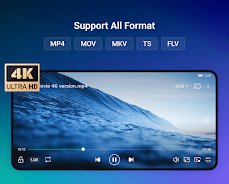
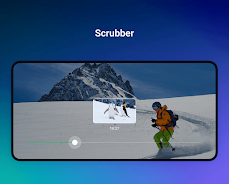
The playback engine balances software decoding with hardware acceleration when available. Hardware-assisted rendering reduces CPU load and improves battery life, while software decoding remains as a fallback for unsupported streams. Seek accuracy and frame pacing are solid, and the player minimizes stutters even on high-resolution files by caching intelligently.
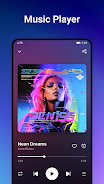
Built-in audio tools include a configurable equalizer, bass boost, and channel balance. OnePlayer provides gapless playback for albums and supports high-bit-rate audio files. Users can switch between audio tracks and set playback speed without altering pitch, a useful feature for podcasts or language learning.
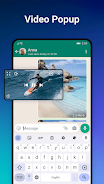
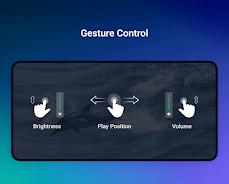
The design keeps controls within thumb reach. A minimal home screen shows recent files, playlists, and a quick-access folder browser. While compact, the interface exposes advanced options such as audio track selection, subtitle synchronization, and video aspect ratio adjustments without burying them in nested menus.
OnePlayer lets users tune the experience. Change the theme to match system dark mode, enable or disable automatic resume, and choose how playlists are sorted. For users who curate large libraries, folder-level settings and per-playlist playback options add flexibility.
Subtitle fonts, size, color, and positioning can be set globally or adjusted in real time. The player supports multiple subtitle files for the same video and allows quick switching. Video scaling modes—fit, fill, stretch—are available alongside a zoom slider for precise framing.
Installing OnePlayer is straightforward: grant storage permissions, scan for media, and it will populate the library. The app is compatible with a broad range of Android versions, and its modular architecture means it runs well on both phones and tablets. Regular updates improve codec support and add small usability refinements.
Users appreciate OnePlayer for its pragmatic balance of power and simplicity. It performs reliably with large libraries, adapts to varied file types, and keeps the interface uncluttered. Whether you want a no-frills audio player or a versatile video app with subtitle tools, it covers essential needs without overwhelming options.
For anyone seeking a stable, efficient media player on Android, OnePlayer is worth trying. It mixes performance-focused internals with approachable controls and enough customization to satisfy casual listeners and power users alike. Expect steady playback, sensible defaults, and the ability to tailor the app to your media habits.


MEME Maker: MEME Creator
Size:49.65M Media & VideoInstory Story Video Maker
Size:31.79M Media & VideoDrum Pads 24 - Beats and Music
Size:31.00M Media & VideoRadioTunes
Size:25.30M Media & VideoWiseplay
Size:38.13M Media & VideojetAudio HD Music Player Plus
Size:22.60M Media & VideoTABLA: India Mystical Drums
Size:27.35M Media & VideoOnePlayer
Size:128.00M Media & VideoDeep Bass Booster & Subwoofer
Size:4.30M Media & Videoedjing Mix
Size:70.40M Media & VideoWorld Radio FM Online
Size:24.00M Media & VideoPianoMeter – Piano Tuner
Size:9.42M Media & VideoApril 2024 Clash of Clans Update: Unveiling a Fresh Companion, Enhanced Levels, Chat Tagging, and Be
2024-04-16Arrival of Genshin Impact 4.6 Update: 'Embers of Two Realms, Twilight of Crimson'
2024-04-16V2.2 of the Farlight 84 update introduces an overhauled Season structure, fresh in-game currency, an
2024-04-16Monster Never Cry is now accessible on both Android and iOS mobile devices.
2024-04-18PUBG Mobile Teams Up with Bentley Motors: Luxury Cars, Exclusive Collectibles, and Beyond
2024-04-18March 2024 Free Redemption Codes for Honkai: Star Rail
2024-04-18

















