English
SV File Manager is a compact, privacy-focused file manager for Android that helps you organize, view and protect files stored on your device. The app combines fast browsing, instant search and ZIP archiving with built-in media and document viewers, APK handling and AES-256 encryption inside a clean Material Design interface. SV File Manager is suitable for everyday tasks such as cleaning up downloads and managing media as well as for power-user workflows like APK backup and encrypted file storage.
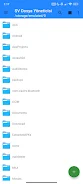
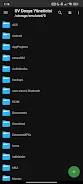
The core navigation centers on straightforward folder browsing with options to create, rename, move, share and delete items. Multiple view modes let you switch between a compact list and a more visual card layout depending on your preference, and instant search scans the current folder quickly so you can locate items without delay. Selection and batch actions are supported so you can operate on several files at once, and long operations such as large file moves or ZIP compression show progress indicators to keep you informed during lengthy tasks.
SV File Manager includes integrated media players and document tools so you can preview content without leaving the app. The music player shows basic metadata and supports common audio formats, while the video player uses a modern playback engine compatible with MP4, MKV and WebM and offers full-screen viewing and quick seek controls. Images open in a viewer with pinch-to-zoom and an option to set pictures as home or lock screen wallpaper. For documents, you can open PDFs and convert individual pages to PNG images, or edit plain text and HTML with simple word and character counters and a WebView preview for quick checks.
Compression support focuses on ZIP files with both create and extract functionality, including progress tracking so large archives don’t feel opaque. APK handling is built in: the app can install APK and APKS packages from local storage and can back up installed apps along with package details for later reinstallation or archival. These tools are designed for offline, on-device use so you maintain control of app files without requiring cloud services.
AES-256 encryption is available to protect sensitive files on the device. Encrypted files are stored locally and can only be decrypted with the correct password, which means private data remains under the user’s control. The app intentionally avoids ad trackers and network-dependent features, prioritizing a privacy-minded, ad-free experience suitable for users who need secure, offline file operations.
The interface is lightweight and customizable: choose light, dark or system theme modes, pick from several accent colors and change folder icon sets to match your visual preferences. These options help you create a consistent look across the app and the rest of the system. Because the UI follows Material Design principles, it integrates with Android system font scaling and accessibility settings so users can adjust text size and display contrast using platform controls rather than forcing proprietary accessibility modes.
SV File Manager is designed to work fully offline and to handle large folders efficiently; routine operations are optimized for speed so everyday file organization remains responsive. Progress indicators and clear status messages reduce uncertainty during complex tasks. Known limitations include support for ZIP as the only compression format and a stated list of tested video formats such as MP4, MKV and WebM, so very uncommon or proprietary archive and media types may not be supported. Encrypted files depend on a user-chosen password, so it is important to keep that password safe because lost credentials cannot be recovered by the app.
This app is useful for casual users who want a clean, no-friction file browser as well as for more advanced users who need APK management, local backups and strong on-device encryption. SV File Manager strikes a balance between simplicity and depth: the everyday file tasks remain easy to perform while advanced features are available without requiring cloud accounts or network permissions.
Quick Percent Calculator
Size:17.83M ToolsClack Forge
Size:47.01M ToolsSV File Manager
Size:6.49M ToolsFitIndex: BMI Calculator
Size:18.00M ToolsNitrox Essentiels
Size:32.49M ToolsTower Oak Shrew Tapir
Size:16.00M ToolsPhone Cleaner
Size:11.36M ToolsTryJesus
Size:92.02M ToolsPhotoRescue Plus
Size:42.47M ToolsMarsh Virid Dark Zeal
Size:16.00M ToolsAloha
Size:64.30M ToolsLynx Khaki Use Key
Size:16.00M ToolsApril 2024 Clash of Clans Update: Unveiling a Fresh Companion, Enhanced Levels, Chat Tagging, and Be
2024-04-16Arrival of Genshin Impact 4.6 Update: 'Embers of Two Realms, Twilight of Crimson'
2024-04-16V2.2 of the Farlight 84 update introduces an overhauled Season structure, fresh in-game currency, an
2024-04-16Monster Never Cry is now accessible on both Android and iOS mobile devices.
2024-04-18PUBG Mobile Teams Up with Bentley Motors: Luxury Cars, Exclusive Collectibles, and Beyond
2024-04-18March 2024 Free Redemption Codes for Honkai: Star Rail
2024-04-18