English
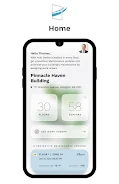
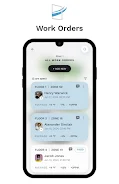
Cassie is an app designed for building managers and maintenance teams to monitor indoor air quality and manage repair requests from a single, consistent interface. Cassie surfaces real-time air quality readings, historical trends and alerting so operators can quickly assess ventilation and pollutant levels across floors and rooms. With straightforward tools for creating, assigning and tracking work orders, Cassie helps teams convert environmental data into action without needing separate spreadsheets or ticketing systems.
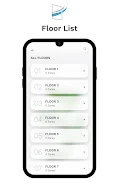
The app combines continuous air quality monitoring with integrated maintenance workflows: sensor data streams are presented alongside a work order queue so a single view shows both what’s wrong and what’s being done about it. Users can define threshold-based alerts, view trend charts to spot recurring issues, and attach photos or notes to individual tasks for clearer diagnosis. Cassie supports multiple site profiles, letting you switch between buildings, floors and zones while keeping data organized by location. A built-in audit log records status changes and timestamps to improve accountability and reporting.
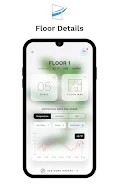
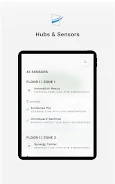
Cassie collects readings from compatible sensors and building management systems and consolidates them into a normalized dashboard. Real-time indicators use simple color coding and brief summaries to highlight safe versus concerning conditions, while detailed views reveal numeric values, historical charts and sensor metadata. When a reading crosses a configured threshold or a user reports a problem, the app can generate a work order that includes the affected location, severity, suggested actions and any supporting images or notes. Work orders can be assigned to staff, scheduled, and updated as tasks progress toward completion.
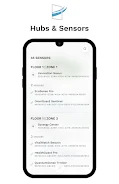
The interface favors direct manipulation and minimal training: swipeable lists, one-tap report creation, and contextual filters let users find sensors and tasks quickly. Touch controls allow fast reassignment or status updates, while search and tag filters make it easy to locate historical incidents. Push notifications and optional email alerts keep staff informed of new assignments or critical air quality excursions. Cassie’s menus are organized to reduce friction for technicians on mobile devices and for managers reviewing fleet-wide summaries on tablets or desktops.
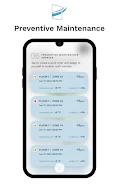
Rather than game-style progression, Cassie provides a practical task lifecycle that supports prioritization and continuous improvement. Work orders flow through defined statuses—reported, assigned, in progress and resolved—with timestamps and owner history to track throughput. Managers can set priority rules, create recurring inspection templates for preventive maintenance, and generate basic performance reports that show resolution times and recurring problem areas. These patterns help teams improve response speed and reduce repeat incidents over time.
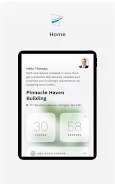
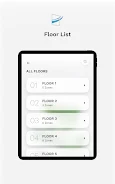
Cassie emphasizes clarity: dashboards use a neutral color palette with accent colors for alerts, readable charts with zoom and time-range selection, and compact lists for quick scanning. Administrators can customize site maps and floor plans to reflect building layout, define sensor groupings, and set custom alert thresholds per zone. Widgets on the home view are configurable so different roles—facility managers, technicians or health and safety officers—see the metrics most relevant to their work.
The app includes features to support diverse users and unstable network conditions. Text sizes and contrast settings improve readability, and screen-reader-friendly labels are included for primary controls. Cassie caches the most recent sensor readings and queued work orders so technicians can view information and create or update tasks while offline; changes are synchronized automatically when a connection is restored. The app also provides a low-bandwidth mode that limits data polling frequency to conserve cellular data on remote maintenance routes.
Instead of entertainment-style challenges, Cassie offers structured inspection checklists and recurring audits that create operational cadence and measurable goals. Repeating inspection templates, escalation rules for unresolved critical alerts, and historical trend analysis give teams reasons to revisit data and refine processes. The combination of recurring tasks, clear audit trails and accessible historical charts provides ongoing value and encourages regular use as teams work to improve indoor air quality over months and years.
Cassie delivers the most value when integrated with compatible air quality sensors and building systems; without those feeds, some real-time capabilities are reduced. The app’s effectiveness also depends on active maintenance workflows and timely task resolution by staff. Supported deployments typically require basic integration setup and sensor provisioning to ensure location mapping and thresholds align with your facility’s needs.

Real Cash: Watch & Earn Reward
Size:37.00M FinanceAIMZ
Size:95.59M FinanceCassie
Size:19.80M FinanceFinFlow AI- Money Manager
Size:26.00M FinanceOuest Conseils et moi
Size:32.72M FinanceInspectPro
Size:30.56M Finance都市設計連合
Size:23.17M FinanceTrak’n’Trac
Size:62.00M FinancePMII Swan
Size:36.57M FinanceSumka Capitalvisor
Size:23.00M FinanceDG EXPERTS
Size:87.10M FinanceHPJV Solicitors
Size:75.75M FinanceApril 2024 Clash of Clans Update: Unveiling a Fresh Companion, Enhanced Levels, Chat Tagging, and Be
2024-04-16Arrival of Genshin Impact 4.6 Update: 'Embers of Two Realms, Twilight of Crimson'
2024-04-16V2.2 of the Farlight 84 update introduces an overhauled Season structure, fresh in-game currency, an
2024-04-16Monster Never Cry is now accessible on both Android and iOS mobile devices.
2024-04-18PUBG Mobile Teams Up with Bentley Motors: Luxury Cars, Exclusive Collectibles, and Beyond
2024-04-18March 2024 Free Redemption Codes for Honkai: Star Rail
2024-04-18