English
Stuffrite is a personal budgeting app focused on envelope-style money management and forward-looking projections. With Stuffrite you set up virtual envelopes for bills, savings goals and everyday spending, schedule recurring items, and use an interactive projection engine to see how decisions today affect your balances in the weeks and months ahead.
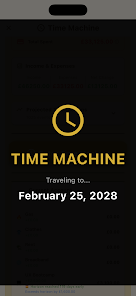
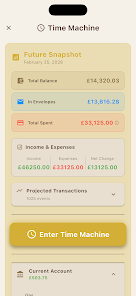
The core idea in Stuffrite is the envelope: each envelope represents a purpose and holds assigned funds. Create envelopes for rent, utilities, groceries, an emergency fund or a specific purchase; fund them manually or with simple automation rules. Scheduled bills and repeating habits are shown in the projection so the app can calculate future balances. The Time Machine projection is interactive: change a planned purchase, alter a recurring amount or shift a due date and the projection updates immediately so you can compare outcomes. An optional Account Mirror Mode lets selected envelopes reflect the balances of linked accounts, reducing the “ghost money” problem while preserving your ability to keep discretionary envelopes separate from bank balances.
Stuffrite’s interface is designed for quick, confident actions. The main workspace lists your envelopes and shows an overall balance overview, with tap-based controls to move money, create transfers or schedule items. Drag-style gestures let you move funds between envelopes on paydays and a Pay Day screen streamlines distributing income across multiple envelopes at once. Scheduling uses a clear form where you choose amount, recurrence and target envelope; edits apply immediately and the Time Machine recalculates projections. Common actions like recording a transaction, adjusting a due date or pausing automation are reachable in one or two taps so routine work stays efficient.
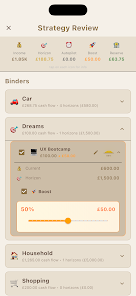
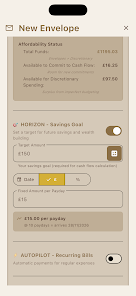
Progress in Stuffrite is goal-oriented rather than game-like: you advance by funding envelopes, hitting savings targets and reducing debt. Named goals, or Horizons, accept automated or ad-hoc transfers and display progress bars and timeline estimates that show how many pay cycles remain until a target is met. Practical challenge systems include debt paydown schedules and savings streaks that reward consistent contributions; difficulties are adjustable by changing transfer amounts or cadence. These mechanics create measurable momentum, turning small regular actions into visible financial progress.
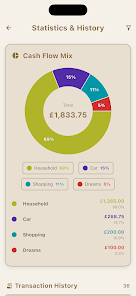
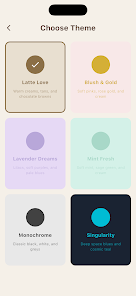
The visual design emphasizes clarity and low cognitive load. Envelopes can be customized with icons or emojis and assigned specific colors so you can scan your finances quickly. Visual summaries include an inflow/outflow wall, a compact debt tracker and small trend charts that show monthly flows. Typography is readable and controls are spaced to reduce clutter. Customization options focus on usability—icon and color choices, compact chart configurations and envelope sorting—so the interface adapts to how you like to work without unnecessary decoration.
Workspace Mode allows sharing selected envelopes with a partner or household member without exposing your entire account list. Shared envelopes sync between chosen devices for the selected workspace while private accounts remain local to your device. Stuffrite follows a local-first design: your financial data is stored primarily on-device, the service does not sell personal data or serve ads in the workspace, and sharing is explicit and limited to the envelopes you select. This model balances collaboration with control over what others can see.
Because Stuffrite keeps data local-first, most day-to-day tasks work offline: recording transactions, moving money between envelopes and viewing projections are available without a network connection. When you reconnect or use a workspace sharing link, the app synchronizes only the chosen items. The on-device projection engine and compact data model help keep the app responsive on lower-end hardware by minimizing background network work and relying on efficient local computations for charts and forecasts.
Accessibility is built into the interface with readable contrast, scalable text and concise labels suitable for screen readers. Controls are sized for comfortable tapping and the app avoids overly dense layouts for users with focus or vision needs. Inline help and tooltips explain concepts such as Account Mirror Mode, Autopilot transfers and Horizons so new users can learn through use rather than long manuals. These choices make Stuffrite approachable for a wide range of users and use cases.
Stuffrite requires some initial setup: creating envelopes, scheduling bills and defining habits makes projections meaningful but takes a short onboarding effort. Linking real accounts for Account Mirror Mode is optional and recommended only if you want real-time parity between envelopes and bank balances. Cross-device syncing is limited to explicit shared workspaces unless you use the app’s sharing features. To get started, create envelopes for your largest recurring items—rent, utilities, groceries—use the Pay Day tool to distribute income and try a short-term Horizon to see projection impacts. Enable Autopilot gradually and review projections periodically; consistent small actions and occasional rebalancing keep your plan effective without constant micromanagement.

PaGasty
Size:14.00M FinanceEasy Invest
Size:33.00M FinanceStuffrite
Size:52.00M FinanceMonnei: Budget Expense Tracker
Size:90.00M FinanceReal Cash: Watch & Earn Reward
Size:37.00M FinanceAIMZ
Size:95.59M FinanceCassie
Size:19.80M FinanceFinFlow AI- Money Manager
Size:26.00M FinanceOuest Conseils et moi
Size:32.72M FinanceInspectPro
Size:30.56M Finance都市設計連合
Size:23.17M FinanceTrak’n’Trac
Size:62.00M FinanceApril 2024 Clash of Clans Update: Unveiling a Fresh Companion, Enhanced Levels, Chat Tagging, and Be
2024-04-16Arrival of Genshin Impact 4.6 Update: 'Embers of Two Realms, Twilight of Crimson'
2024-04-16V2.2 of the Farlight 84 update introduces an overhauled Season structure, fresh in-game currency, an
2024-04-16Monster Never Cry is now accessible on both Android and iOS mobile devices.
2024-04-18PUBG Mobile Teams Up with Bentley Motors: Luxury Cars, Exclusive Collectibles, and Beyond
2024-04-18March 2024 Free Redemption Codes for Honkai: Star Rail
2024-04-18