English
Battery Pulse: Status Monitor puts a clear, data-driven lens on your device's power behavior so you can understand battery health, charging habits and which apps consume the most energy. Battery Pulse: Status Monitor reads real-time sensor values such as voltage and temperature, records long-term charging and discharging cycles, and presents this information in charts and logs designed for practical decision making rather than gimmicks. If you want to set conservative charging thresholds, identify runaway background processes, or simply understand how daily usage affects longevity, this app gives you an accurate, usable picture of battery performance.
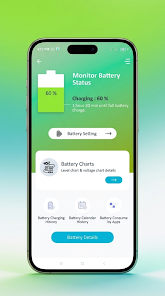
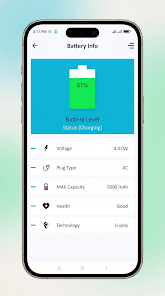
Real-time diagnostics show the current charge level alongside precise voltage, temperature and the battery technology type. Measurements are refreshed continuously so you can watch how a single app or a charging session affects device parameters in real time.
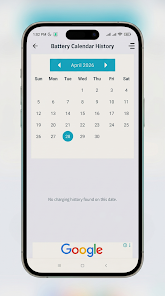
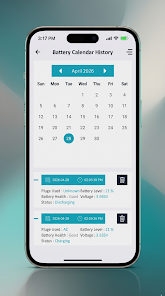
Comprehensive charging and discharging history captures every session with timestamps and duration. Historical logs are organized by day and by charge cycle so you can compare recent behavior with past baselines and spot gradual changes that indicate deteriorating health.
App-level consumption analysis highlights which applications and background services are drawing the most power. This diagnostic view helps you decide whether to restrict background activity, change app settings, or uninstall high-drain apps that you rarely use.
Custom alerts let you define sensible thresholds for low battery, full charge or high temperature. Alerts are intended to support better habits — for example avoiding prolonged top-off charging or preventing deep discharges — and help you act before a situation becomes impactful.
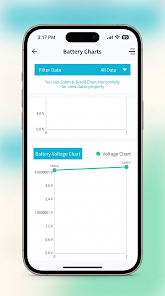
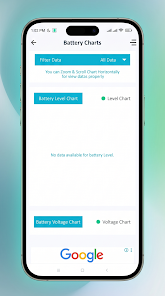
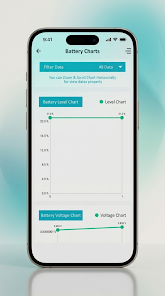
Interactive charts and visualizations use calendar-style overviews and daily trend lines so you can zoom in on specific sessions or view broader patterns. Touch gestures such as pinch-to-zoom and tapping individual points are supported so you can inspect exact values for a specific time window.
The interface is deliberately simple: a main status panel for live readings, a timeline for recent cycles, and a history view for long-term trends. Controls are focused on exploration — tap any chart element to reveal the underlying readings, drag time ranges to filter logs, and use on-screen toggles to switch between voltage, temperature and usage overlays. No complex permissions are required beyond standard battery and usage access, and all core functionality operates locally on the device.
Instead of a traditional game-like progression, progression here means longitudinal insight: as you use Battery Pulse: Status Monitor you build a record of how charging habits and app usage influence battery health. Regular review of trends helps you refine habits — for example, reducing overnight trickle charging or identifying specific days when certain apps spike consumption. The app supports personal milestones in the form of configurable goals and alerts so you can measure improvements over weeks and months.
The design emphasizes clarity: high-contrast charts, clear numeric readouts, and a dark-mode friendly palette to reduce eye strain. Graphs are color-coded for quick interpretation, and numeric values are shown with units and simple explanations to make the data approachable whether you are technically inclined or a casual user.
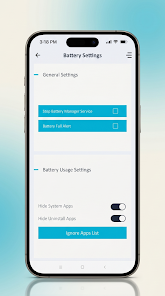
Battery Pulse: Status Monitor includes adjustable settings so you can tailor sampling interval, alert thresholds, and display units (mV, °C/°F, percent). Accessibility options include larger text sizes and high-contrast themes. Controls are reachable and organized to work well with screen readers and common accessibility tools.
The app is built to work offline: all sensor reads, logs and charts are generated locally on your phone and do not require an internet connection. This keeps data private and ensures diagnostics are available even without connectivity. Battery Pulse: Status Monitor focuses on accurate measurements from device sensors and avoids external dependencies that could compromise responsiveness.
Battery Pulse: Status Monitor is a diagnostic and analytics tool, not a battery saver or booster. It does not kill background apps automatically or claim to accelerate hardware charging. Instead, it provides the information and configurable alerts you need to make deliberate choices about charging patterns and app usage. Because recommendations require manual action, the most durable improvements come from habit changes guided by the app's historical data.
Whether you are maintaining an older device or simply curious about how usage patterns affect battery life, Battery Pulse: Status Monitor supplies accurate, contextual reporting and practical controls so you can take informed steps to protect battery health over time.
Battery Pulse: Status Monitor
Size:20.00M Toolsشوارعنا
Size:69.65M ToolsVoixa
Size:34.20M ToolsCardVault: Card Manager
Size:53.00M ToolsSimple Note
Size:20.00M ToolsWaveBoost
Size:61.00M ToolsHUB Financiero
Size:34.28M Tools安心舍
Size:50.60M ToolsRing Locator
Size:56.93M ToolsLiQ
Size:18.15M ToolsOnTrack
Size:27.83M ToolsMEGA FIBRA MG
Size:32.00M ToolsApril 2024 Clash of Clans Update: Unveiling a Fresh Companion, Enhanced Levels, Chat Tagging, and Be
2024-04-16Arrival of Genshin Impact 4.6 Update: 'Embers of Two Realms, Twilight of Crimson'
2024-04-16V2.2 of the Farlight 84 update introduces an overhauled Season structure, fresh in-game currency, an
2024-04-16Monster Never Cry is now accessible on both Android and iOS mobile devices.
2024-04-18PUBG Mobile Teams Up with Bentley Motors: Luxury Cars, Exclusive Collectibles, and Beyond
2024-04-18March 2024 Free Redemption Codes for Honkai: Star Rail
2024-04-18