English
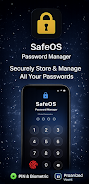
SafeOS is a compact password manager designed to keep your logins and sensitive information organized inside a single encrypted vault. SafeOS places convenience and privacy at the center of daily password management by combining PIN and biometric unlock options with automatic locking when idle, a built-in password generator, and simple tools to move or restore your data. The app is intended for users who want a focused, low-friction way to store website, app, and email credentials without memorizing dozens of passwords.
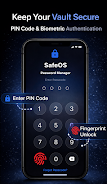
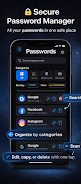
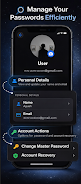
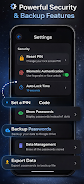
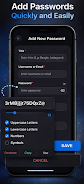
Encrypted storage protects credentials locally using device-grade encryption and an access PIN or biometric factor, so your vault remains secure even if a device is lost. The interface emphasizes quick one-tap actions for adding, editing, copying, or removing entries while minimizing on-screen clutter. A customizable password generator helps create strong credentials with options for length and character types, and a visual indicator shows basic strength qualities to guide safer choices. SafeOS supports secure cloud backup and restore for moving your encrypted vault between devices, and import/export tools provide straightforward file-based transfers when you need them.
When you first open SafeOS you create a master PIN and optionally enable biometric unlock; the vault is encrypted and decrypted on your device. To add an account entry you enter a title, username, password and any notes, then assign a category or apply a filter tag so you can find it later. The generator can populate a new password when creating an entry, or you can paste an existing password and let the strength indicator assess it. Copying login data to the clipboard is designed to be quick and ephemeral: clipboard data should be cleared or expire after a short interval according to your system settings, which helps reduce accidental exposure.
SafeOS uses a focused dark-mode interface by default to reduce eye strain and to keep frequent interactions unobtrusive. Navigation is intentionally simple: a main vault view lists entries with search and filter controls at the top, tapping an item opens details and edit controls, and a persistent add button creates new entries. The app respects system accessibility settings such as font scaling and high-contrast modes, and common gestures like swipe-to-delete are supported for faster management. These controls are designed to make routine tasks—locating a login, generating a secure password, or backing up your vault—fast and repeatable.
Instead of complicated menus, SafeOS encourages gradual organization through categories, search, and filters so your vault evolves with your usage. You can start with a few core categories and refine them over time as your list grows. The app’s search and filter tools let you narrow results by name, category, or custom tags, making it easier to maintain good password hygiene as the number of entries increases. Regularly replacing weak or reused passwords is the practical progression: the generator and strength indicators make it straightforward to upgrade credentials as needed.
SafeOS keeps your encrypted vault available offline so you can retrieve credentials without a network connection; local encryption ensures your data is protected on-device. For device changes or recovery, the app offers secure cloud backup and a restore process that lets you recover your vault. Note that cloud backup is intended for restore and migration rather than implying continuous real-time sync; users who need always-on cross-device synchronization should verify the backup behavior that best suits their workflow. Import and export options are included to provide file-based portability when manual transfer is preferred.
Accessibility features such as system font scaling and dark-mode support are part of the design, but SafeOS does not currently advertise a browser extension or desktop client; in-browser autofill may therefore be limited depending on your setup. Advanced team or shared-vault collaboration features are not described in the core feature set and may not be available. The app aims to reduce password reuse and friction, but users should assess whether the cloud backup approach matches their desired sync model.
SafeOS fits users who prefer a lightweight, privacy-minded password vault with strong local encryption, biometric convenience, and straightforward backup and export options. If you want a simple place to centralize logins, generate strong credentials, and keep your vault accessible on-device and via restoreable backups, SafeOS offers a practical balance of security and everyday usability without introducing complex team or enterprise features.
AVO TV
Size:10.00M ToolsSafeOS
Size:22.35M ToolsBattery Pulse: Status Monitor
Size:20.00M Toolsشوارعنا
Size:69.65M ToolsVoixa
Size:34.20M ToolsCardVault: Card Manager
Size:53.00M ToolsSimple Note
Size:20.00M ToolsWaveBoost
Size:61.00M ToolsHUB Financiero
Size:34.28M Tools安心舍
Size:50.60M ToolsRing Locator
Size:56.93M ToolsLiQ
Size:18.15M ToolsApril 2024 Clash of Clans Update: Unveiling a Fresh Companion, Enhanced Levels, Chat Tagging, and Be
2024-04-16Arrival of Genshin Impact 4.6 Update: 'Embers of Two Realms, Twilight of Crimson'
2024-04-16V2.2 of the Farlight 84 update introduces an overhauled Season structure, fresh in-game currency, an
2024-04-16Monster Never Cry is now accessible on both Android and iOS mobile devices.
2024-04-18PUBG Mobile Teams Up with Bentley Motors: Luxury Cars, Exclusive Collectibles, and Beyond
2024-04-18March 2024 Free Redemption Codes for Honkai: Star Rail
2024-04-18