English
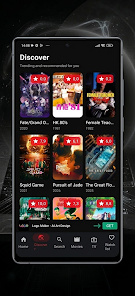
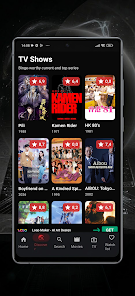
AVO TV helps you discover movies and TV shows through a clean, easy-to-use interface that surfaces recommendations, popular titles and curated genres in one place. The app is built around fast browsing and simple organization so you can find a trailer, add a title to a watchlist or preview a new series with minimal steps. Whether you are preparing for a movie night, tracking a growing list of favorites, or just exploring trends, AVO TV keeps discovery straightforward while avoiding clutter or complex menus.
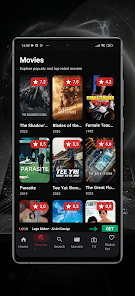
The core interaction model emphasizes simple controls: tap to open a title card, swipe through category rows, and long-press or use the contextual menu to add items to a watchlist or save them for later. Search and filters let you narrow results by genre, release year, or popularity, while curated collections and themed lists provide a guided path when you want inspiration. Recommendations adapt over time based on the titles you save and the previews you watch, so the app becomes more useful the more you use it.
AVO TV groups content into clear category layers — trending, new releases, curated genres, and staff picks — making it easy to scan broad sections or drill down to subgenres. Progression is not about levels or in-app rewards but about personalization: as you build watchlists and interact with previews, the system surfaces deeper suggestions and less obvious matches to broaden your options. Multiple watchlists and simple tagging let you plan different viewing occasions, and your saved items remain accessible across sessions for ongoing planning and reference.
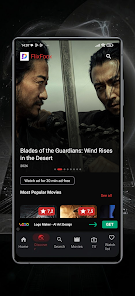
The visual design favors posters and concise metadata so you can evaluate a title at a glance: cover art, runtime, brief synopsis and a link to a trailer. The layout supports both compact grids for quick scanning and a focused detail view when you want more information. AVO TV is intentionally minimal to reduce friction, but it supports customization such as toggling list density and switching between light and dark display modes to match your viewing environment.
Controls are designed for touch-first devices: intuitive gestures for navigation, clear tap targets for actions, and accessible labels for assistive technologies. Accessibility options include adjustable text size, high-contrast color choices, and compatibility with screen readers so the app stays usable for a wide range of users. Basic settings let you control how discovery data is used and whether you want background preloading for faster browsing.
Trailers and short previews are central to the decision-making process in the app; they let you quickly assess tone and production values before adding something to your list. AVO TV is not a full streaming platform and does not present itself as a replacement for a playback service; instead it links you to trailers and metadata and helps you plan what to watch elsewhere. Where supported, the app can cache recently viewed previews and keep your watchlist descriptions available offline so you can browse your saved ideas without a continuous connection.
Customization focuses on organizing your personal collection and refining recommendations. You can create multiple watchlists, rename items within lists for quick recognition, and follow themed collections that change over time. The replay value comes from fresh editorial selections, rotating seasonal themes and recommendations that evolve as you interact with the app. Regular updates to curated lists and editorial highlights encourage return visits without relying on pushy notifications.
The app prioritizes discovery and previewing rather than in-app streaming, so users seeking integrated playback or advanced content filtering may notice a deliberately minimal feature set. AVO TV keeps the interface streamlined by limiting deep personalization options and avoiding an overload of settings; this design choice favors speed and ease of use over exhaustive configurability.
AVO TV is well suited for viewers who want a fast, focused way to explore new movies and TV shows, plan viewing sessions, and save discoveries for later. It is particularly helpful when you value a simple, predictable interface and curated guidance rather than a full-featured media player. The app is built to make discovery efficient, keep your favorites organized, and help you find entertainment that fits your current mood.
AVO TV
Size:10.00M ToolsSafeOS
Size:22.35M ToolsBattery Pulse: Status Monitor
Size:20.00M Toolsشوارعنا
Size:69.65M ToolsVoixa
Size:34.20M ToolsCardVault: Card Manager
Size:53.00M ToolsSimple Note
Size:20.00M ToolsWaveBoost
Size:61.00M ToolsHUB Financiero
Size:34.28M Tools安心舍
Size:50.60M ToolsRing Locator
Size:56.93M ToolsLiQ
Size:18.15M ToolsApril 2024 Clash of Clans Update: Unveiling a Fresh Companion, Enhanced Levels, Chat Tagging, and Be
2024-04-16Arrival of Genshin Impact 4.6 Update: 'Embers of Two Realms, Twilight of Crimson'
2024-04-16V2.2 of the Farlight 84 update introduces an overhauled Season structure, fresh in-game currency, an
2024-04-16Monster Never Cry is now accessible on both Android and iOS mobile devices.
2024-04-18PUBG Mobile Teams Up with Bentley Motors: Luxury Cars, Exclusive Collectibles, and Beyond
2024-04-18March 2024 Free Redemption Codes for Honkai: Star Rail
2024-04-18