English
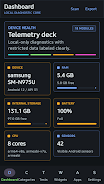
Android Info Master puts a powerful, privacy-minded diagnostic dashboard on your device, showing hardware, system and connectivity details without cloud syncing or accounts. If you want immediate answers about CPU, memory, storage, battery, display, camera, sensors, installed apps or nearby Wi‑Fi, Android Info Master provides an organized local report and exportable text/JSON summaries. The app targets power users, enthusiasts and technicians who need quick system health checks, app auditing and manual hardware tests while keeping all data on-device. Permissions are requested only when necessary and export files are created only when you choose to generate them.
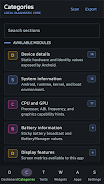
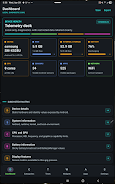
⭐ Comprehensive device dashboard with quick system health metrics and consolidated hardware/system readouts.
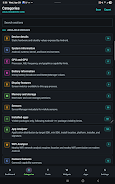
⭐ Deep diagnostic views for Android, CPU, GPU, memory, storage, display, battery, camera, sensors, thermal, USB, DRM and connectivity.
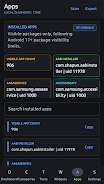
⭐ App Analyzer with filters for platform, installer, SDK target, install location and risk category to help audit installed apps.
⭐ Wi‑Fi Analyzer that scans nearby networks and reports signal strength, channels, standards, security and estimated distance.
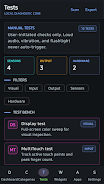
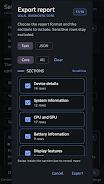
⭐ Manual hardware tests and live sensor checks (display, multitouch, flashlight, speaker, vibration, fingerprint, Bluetooth, accelerometer, magnetometer, light, proximity) plus exportable reports; Android Info Master keeps reports local until you export.
✅ Strong local-first privacy model: no accounts, no analytics and no background uploads — your information stays on the device.
✅ Fast access to detailed diagnostics and exportable reports ideal for troubleshooting, repairs and device comparisons.
✅ Practical tools for power users and auditors, including app filtering, Wi‑Fi environment checks and thermal/sensor live tests.
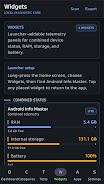
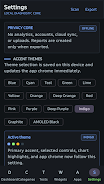
✅ Customization with accent themes, AMOLED-friendly styling and home-screen widgets for combined device status, RAM, storage and battery.
✅ Permission-aware design that clearly labels restricted data and requests access only when a feature requires it.
❎ Some detailed information requires Android permissions (camera, location, phone/network) and will be unavailable until the user grants access.
❎ Designed for power users and technicians, so casual users may find the level of detail overwhelming.
❎ No cloud sync or automatic backups — reports must be exported manually if you want to save or share them.

Colorimeter
Size:5.45M ToolsChatBoost
Size:19.33M ToolsRemote Fire TV
Size:48.04M ToolsgetConf - Hidden Settings
Size:16.66M ToolsTracker Detect Pro
Size:10.39M ToolsWiFi Speed Test Pro
Size:8.11M ToolsGG Mouse Pro 2
Size:45.82M ToolsResource Monitor Mini Pro
Size:3.19M ToolsSmart Keyboard Pro
Size:23.22M ToolsMyScript Math: Solve & Plot
Size:108.76M ToolsText Repeater
Size:11.73M Tools3Dcalc+
Size:12.59M ToolsApril 2024 Clash of Clans Update: Unveiling a Fresh Companion, Enhanced Levels, Chat Tagging, and Be
2024-04-16Arrival of Genshin Impact 4.6 Update: 'Embers of Two Realms, Twilight of Crimson'
2024-04-16V2.2 of the Farlight 84 update introduces an overhauled Season structure, fresh in-game currency, an
2024-04-16Monster Never Cry is now accessible on both Android and iOS mobile devices.
2024-04-18PUBG Mobile Teams Up with Bentley Motors: Luxury Cars, Exclusive Collectibles, and Beyond
2024-04-18March 2024 Free Redemption Codes for Honkai: Star Rail
2024-04-18