English
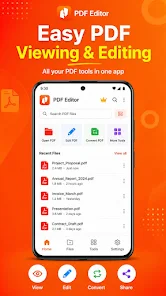
Nitro Pdf Editor is a compact Android toolbox designed for everyday PDF tasks, letting you open, edit, and export documents directly on a phone or tablet without relying on external servers. Nitro Pdf Editor uses the system file picker so all work happens locally through your device's Storage Access Framework; you decide where to save results and keep originals under your control. The app is intentionally focused: common operations are available as single-step exports so you can complete routine edits quickly while retaining the option to back up source files before making larger changes.
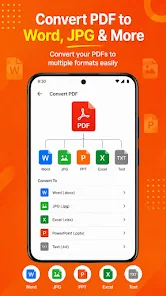
The editor supports a range of practical operations that match real-world document work. Open a PDF, preview and rotate the first page, and save a full copy. Convert a selection of photos into a single multi-page A4-style PDF with images scaled and centered for a clean printed layout. Remove unwanted pages, reorder content by dragging thumbnails, merge multiple PDFs into one consolidated file, split a document into parts and save each segment separately, and trim margins using percentage sliders for precise cropping. These features are presented in straightforward screens so a short sequence of taps completes most tasks.
Interaction is optimized for touch: tap to open and preview, long-press or drag thumbnails to reorder pages, pinch or rotate gestures are supported in previews where applicable, and sliders adjust crop margins with visual feedback. Save and export flows use the standard Android document UI, ensuring consistent access to cloud-mounted locations when available while preserving local handling. The interface emphasizes clarity over complexity so that users who need fast, repeatable edits can develop a simple workflow and apply it across different documents.
Students, professionals, and casual users will find Nitro Pdf Editor useful for iterative, on-device document work. Typical progression is project-based: collect source images or PDFs, perform light edits such as rotation or cropping, merge and reorder pages, then export a final file for sharing or printing. Because the tools are focused and offline, the app offers high replay value: the same sequence of steps can be repeated for homework bundles, meeting notes, scanned receipts, or multipage photo collections without needing to adjust to complex feature sets.
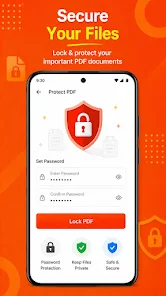
The app produces predictable visual output optimized for standard paper sizes. When converting images the app centers and scales content to fit A4-style pages; cropping uses precise percentage controls so you can remove margins consistently across pages. While customization is intentionally limited to keep the workflow efficient, export naming, page ordering and simple crop settings give you enough control to tailor outputs for printing or archiving. Additional home-screen tiles for compress, protect and watermark are present as planned extensions; their behaviour may vary while flows are being completed.
Nitro Pdf Editor runs on devices with Android 7.0 and later and performs all processing locally via the system picker to protect privacy and to let you select the exact save location. Offline playability means you can edit PDFs without network access and without uploading sensitive documents. Large or very complex files can use more memory and may run slower on older devices, so the app includes in-app guidance recommending backups of important originals before heavy edits and suggesting splitting large documents into smaller parts if memory becomes constrained.
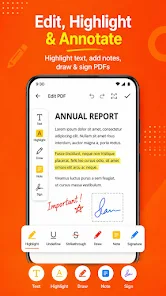
To set clear expectations, output pages are recreated from rendered visuals; this produces accurate-looking files but does not preserve editable text layers or form fields. If you need to keep searchable or selectable text, use tools that explicitly support text-layer preservation before importing into Nitro Pdf Editor. The app is focused on practical, on-device editing rather than full-featured PDF composition, so workflows that require OCR, incremental form editing, or advanced annotation features are outside the current scope.
The streamlined design makes the app approachable for users relying on standard Android accessibility services; clear labels, touch-friendly targets, and predictable workflows reduce the learning curve. For best results, create a short checklist for repetitive jobs, back up originals, use the system picker to organize export destinations, and prefer splitting very long documents before major edits to improve responsiveness. Nitro Pdf Editor aims to be a reliable tool for quick, repeatable PDF tasks while keeping your files where you choose.
LifeUp: Gamified To Do List
Size:17.35M ProductivityVPN Proxy Speed
Size:53.00M ProductivityAI Logo Generator (LogoWiz)
Size:41.50M Productivity3D Logo Maker
Size:39.30M ProductivityAI Chat: Ask AI Chat Anything
Size:42.20M ProductivityStars and Planets
Size:116.42M ProductivityImageMeter
Size:119.22M ProductivityHabitKit
Size:56.87M ProductivityMy Passwords Manager
Size:10.60M ProductivitymiMind
Size:48.30M ProductivityCute Note DDay Todo
Size:15.31M ProductivityCleverType AI Keyboard
Size:33.83M ProductivityApril 2024 Clash of Clans Update: Unveiling a Fresh Companion, Enhanced Levels, Chat Tagging, and Be
2024-04-16Arrival of Genshin Impact 4.6 Update: 'Embers of Two Realms, Twilight of Crimson'
2024-04-16V2.2 of the Farlight 84 update introduces an overhauled Season structure, fresh in-game currency, an
2024-04-16Monster Never Cry is now accessible on both Android and iOS mobile devices.
2024-04-18PUBG Mobile Teams Up with Bentley Motors: Luxury Cars, Exclusive Collectibles, and Beyond
2024-04-18March 2024 Free Redemption Codes for Honkai: Star Rail
2024-04-18