
English
Find A Car Service is a practical tool that helps drivers locate nearby repair and maintenance shops quickly using your device GPS and clear map views. Find A Car Service connects address details, phone contacts and user reviews into a single screen, making it simple to contact a garage or check on available services when you are away from home. Whether you are commuting, on a road trip or dealing with a sudden breakdown, Find A Car Service is built to reduce search time and get you moving again with minimal hassle.
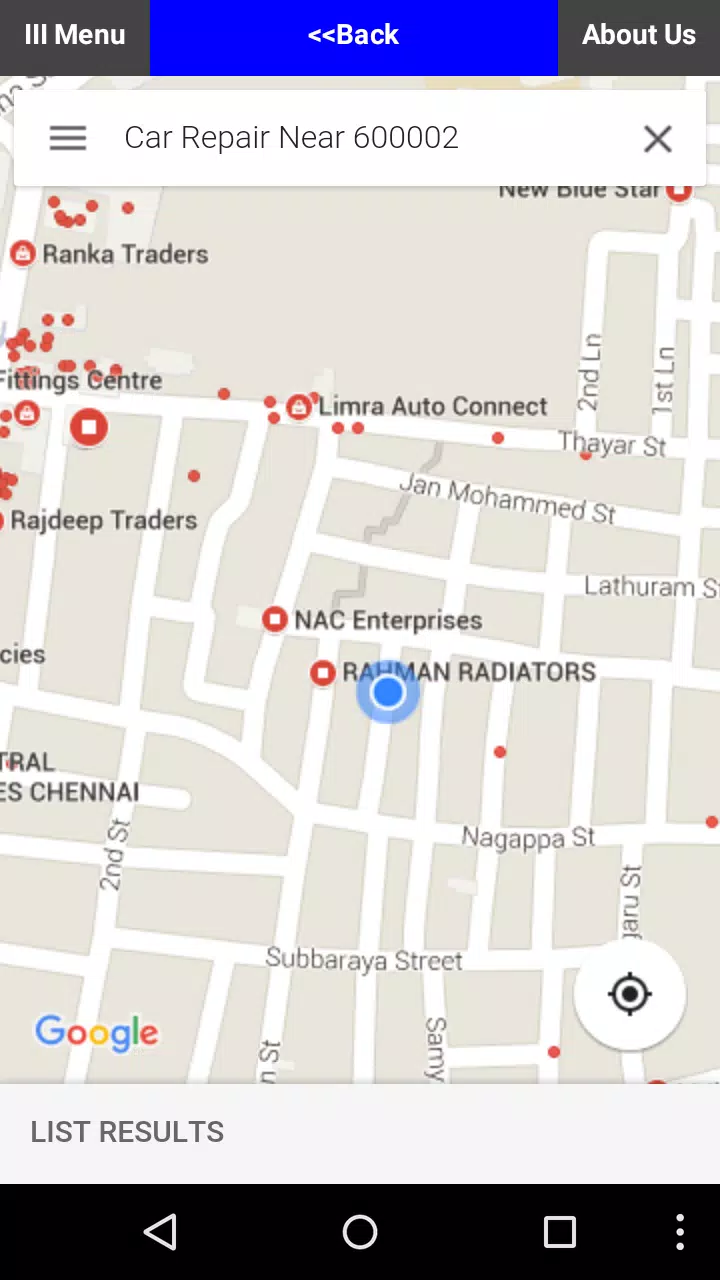
The app offers an interactive map that pins local repair shops and service centers based on real-time GPS position, plus a list view for quick scanning. Each entry bundles useful information such as phone numbers, street addresses, business hours and short service summaries so you can call ahead or compare options without switching apps. Filter tools let you narrow results by distance, customer rating and current availability, and the interface prioritizes one-tap actions like calling a shop or opening directions. Real-time updates refresh availability when connectivity permits, while preloaded data supports basic searches when you are offline.
Controls are kept intentionally simple to be usable from a vehicle or on the roadside: pinch-to-zoom the map, tap a pin to reveal details, and swipe through the list to review multiple entries. Search functions accept an address, landmark or current location, and the app maintains a straightforward call button and a directions action that hands off to your preferred navigation app. Text sizes and button spacing are designed for easy interaction while stationary, and visual cues indicate whether a listing has recent reviews or up-to-date availability information.
Find A Car Service adapts as you use it: commonly visited shops appear higher in list results, and a simple saved-locations feature lets you bookmark trusted mechanics for fast access. Your search history and favorites provide a lightweight progression system that reduces future lookup time, helping frequent travelers build a personal directory of reliable service providers. These local shortcuts are stored on-device so you can access them quickly, and they become more useful over time as you add notes or mark preferred services.
The visual design favors clarity and legibility with contrasting map markers, readable fonts and an uncluttered details panel. Map and list views are balanced so you can switch between a broad geographic overview and a focused contact card without losing context. Icons indicate services commonly offered at each location, and simple color coding helps identify high-rated options at a glance. The overall layout minimizes distractions, allowing you to find and act on critical information fast.
Offline mode stores a snapshot of nearby listings and basic contact information before you lose connectivity, which is especially useful in rural areas or tunnels. Accessibility options include scalable text, clear touch targets and high-contrast elements for low-light conditions. The app supports voice-over readouts of listing names and addresses on compatible devices, and map markers are annotated so users relying on screen readers can understand the relative location of services.
This utility offers ongoing value because local businesses change and drivers travel to new areas; repeated use improves the app’s usefulness through saved favorites and an evolving local snapshot. For commuters, it becomes a quick reference for scheduled maintenance options near home or work. For travelers, the app serves as a lightweight roadside companion that reduces the friction of finding help in unfamiliar towns. Regular short updates to preloaded data refresh the offline database so the app stays relevant between full network syncs.
Some features rely on an internet connection, so real-time availability and the most recent reviews may be limited when you are offline. GPS accuracy can vary by device and environment, which may slightly alter search radius results. To get the best results, preload offline data for planned routes, enable location services for accurate pinning and keep your favorites list updated with notes about service quality and price. If you find a shop that fits your needs, adding it to your saved locations will improve future searches and make the app more personalized over time.

Colorimeter
Size:5.45M ToolsChatBoost
Size:19.33M ToolsRemote Fire TV
Size:48.04M ToolsgetConf - Hidden Settings
Size:16.66M ToolsTracker Detect Pro
Size:10.39M ToolsWiFi Speed Test Pro
Size:8.11M ToolsGG Mouse Pro 2
Size:45.82M ToolsResource Monitor Mini Pro
Size:3.19M ToolsSmart Keyboard Pro
Size:23.22M ToolsMyScript Math: Solve & Plot
Size:108.76M ToolsText Repeater
Size:11.73M Tools3Dcalc+
Size:12.59M ToolsApril 2024 Clash of Clans Update: Unveiling a Fresh Companion, Enhanced Levels, Chat Tagging, and Be
2024-04-16Arrival of Genshin Impact 4.6 Update: 'Embers of Two Realms, Twilight of Crimson'
2024-04-16V2.2 of the Farlight 84 update introduces an overhauled Season structure, fresh in-game currency, an
2024-04-16Monster Never Cry is now accessible on both Android and iOS mobile devices.
2024-04-18PUBG Mobile Teams Up with Bentley Motors: Luxury Cars, Exclusive Collectibles, and Beyond
2024-04-18March 2024 Free Redemption Codes for Honkai: Star Rail
2024-04-18


















