English
לאומי is a mobile banking application designed to give you a clear, real-time view of your personal finances while keeping everyday tasks quick and practical. The app combines a concise dashboard of income and expenses with contextual insights to help you set budgets, monitor progress toward saving goals, and make better spending choices. לאומי also supports instant digital card issuance, consolidated account visibility across multiple institutions, and a simple way to book a live video meeting with a banker when you need personal assistance.
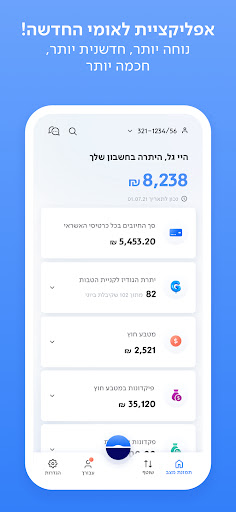
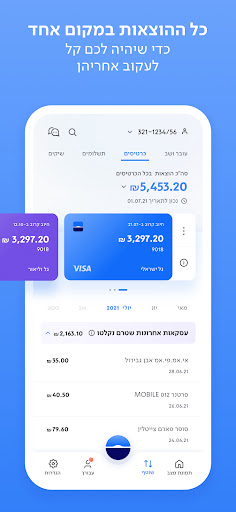
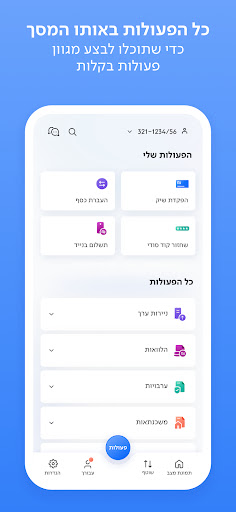
לאומי presents a single, readable home screen that surfaces recent transactions, upcoming payments, and a summary of your account balances. The dashboard uses color and spacing to make inflows and outflows easy to scan, with tappable items that expand into transaction details. Quick actions let you initiate transfers, freeze or manage digital card settings, and launch a scheduled video consultation without navigating deep menus. The app’s controls are gesture-friendly: swipe to archive or categorize transactions, tap to drill into details, and use clearly labeled buttons for common tasks.
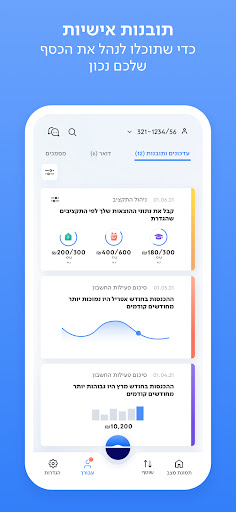
The app’s smart insights are designed to help you measure progress rather than just showing raw numbers. Spending is automatically categorized so you can see trends by category and by merchant; this categorization feeds simple progress bars and timelines that track how you are doing against monthly budgets or savings targets. Progression in לאומי is represented by stages such as planning, tracking and adjusting: set a goal, review periodic suggestions about where to trim costs, and track how small changes affect your projected balances. Insights are presented as actionable tips and historic comparisons rather than generalized marketing claims.
לאומי supports consolidated viewing of accounts and card charges from external banks when you grant permission to link those services, enabling all your activity to appear in one place. Within the app you can filter transactions by date, category or account, add notes to transactions, and correct mis-categorized items. Digital card controls include immediate issuance of a virtual card for online purchases, and options to pause or replace a card without waiting for a physical delivery. Transfer workflows are streamlined for routine payments and show confirmations and expected processing times so you know when funds will arrive.
When a task requires human assistance, the app lets you book a live video meeting with a real banker at a suitable time, reducing the need for branch visits. The appointment flow shows available time slots and a short summary of the topics you can address during a session. Accessibility is considered in the interface: scalable text sizes, high-contrast elements for clear differentiation, and compatibility with screen readers help make navigation easier for a wider set of users. The app is designed for short, focused sessions as well as longer tasks like planning a budget update.
לאומי uses a clean visual style with a neutral palette and clear typography to prioritize legibility over decoration. You can personalize basic aspects of the display such as default account views, preferred currency formats, and notification preferences. Customization focuses on making the interface match how you manage money rather than providing cosmetic themes; the goal is to reduce clutter and surface the actions you use most often.
Basic parts of the app remain usable with limited connectivity: recent account snapshots and cached transaction histories can be viewed offline, but actions that change account state — opening new products, executing transfers, or issuing cards — require an online connection. Privacy and security are communicated clearly: features that collect aggregated data from other institutions operate only after you grant explicit permissions and link accounts, and more advanced services typically require registration and identity verification. The app includes standard protections such as session timeouts and biometric sign-in where supported.
Some advanced features in לאומי require creating an account and completing identity checks before they become available. Aggregation of external cards and accounts depends on the third-party connections you approve, and processing times for transfers are subject to bank and network rules. The description aims to set realistic expectations about what the app provides: a practical, consolidated way to view and manage finances, with tools to help you plan and act, while relying on appropriate permissions and verification for full functionality.
Cover Letter
Size:11.77M FinanceCV Engineer
Size:16.85M FinanceSimple Invoice Manager
Size:25.30M Finance华融融达期货
Size:109.18M FinanceChurchNest
Size:83.00M FinanceYnotOne
Size:0.00M FinanceMoohan Taekwondo
Size:10.80M FinanceIBOIX
Size:76.00M FinanceMargin Guard: Risk Calculator
Size:69.00M FinanceLP Protidin
Size:47.00M FinanceMON 3
Size:47.00M FinanceExpo Wallet - Consumer
Size:29.10M FinanceApril 2024 Clash of Clans Update: Unveiling a Fresh Companion, Enhanced Levels, Chat Tagging, and Be
2024-04-16Arrival of Genshin Impact 4.6 Update: 'Embers of Two Realms, Twilight of Crimson'
2024-04-16V2.2 of the Farlight 84 update introduces an overhauled Season structure, fresh in-game currency, an
2024-04-16Monster Never Cry is now accessible on both Android and iOS mobile devices.
2024-04-18PUBG Mobile Teams Up with Bentley Motors: Luxury Cars, Exclusive Collectibles, and Beyond
2024-04-18March 2024 Free Redemption Codes for Honkai: Star Rail
2024-04-18