English
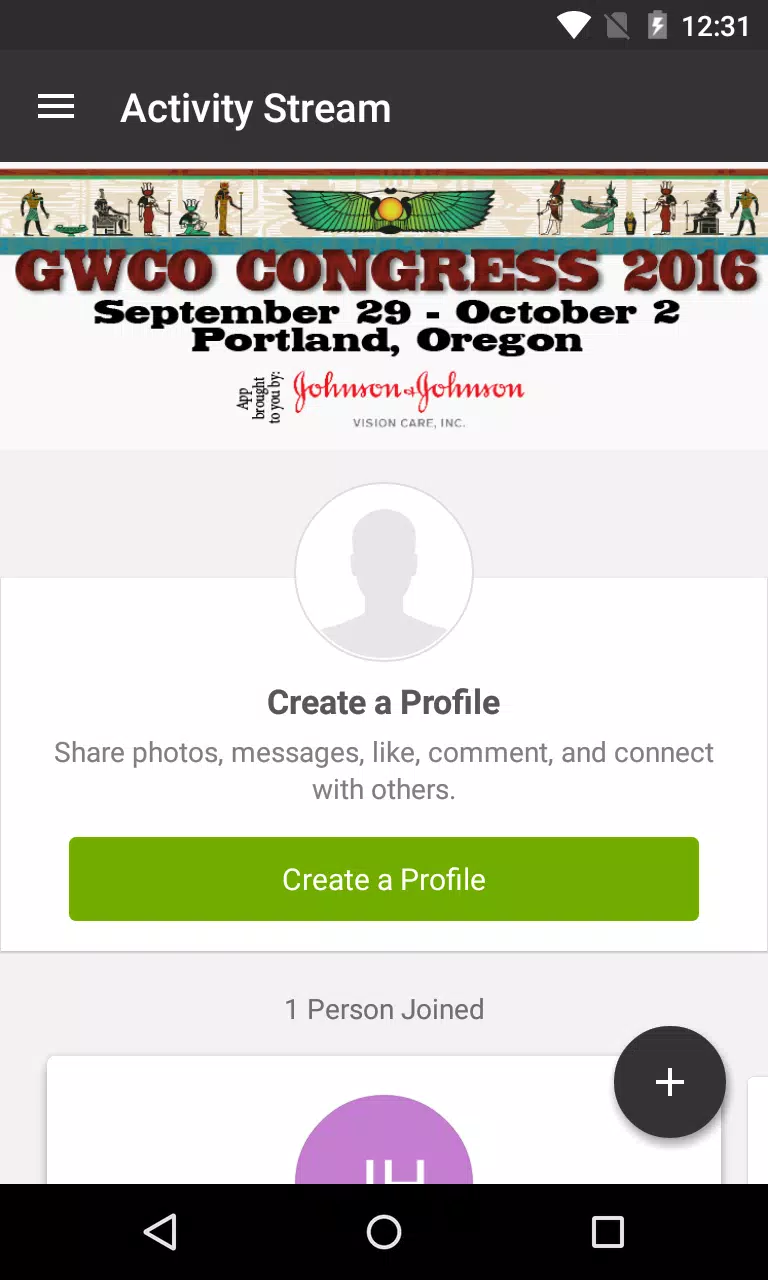
GWCO 2016 is a purpose-built event companion app that places the Great Western Council of Optometry's annual Congress program in your pocket. Designed for attendees in Portland, Oregon and remote participants worldwide, the GWCO 2016 app makes it easier to plan which talks to attend, review speaker backgrounds, and follow continuing education opportunities through a single, easy-to-navigate interface.
The app collects the complete event schedule, session descriptions, and presenter profiles so you can quickly find sessions that match your interests. Built-in networking features let you identify and connect with peers and industry representatives, while search and filter tools help you narrow the program by track, topic, date or speaker. Personal schedule tools allow you to bookmark sessions, create a customized agenda, and receive timely reminders so you do not miss important talks.
Navigation is oriented around simple taps and clear labels rather than complex menus: a persistent schedule view shows the day's sessions, a dedicated search field returns results by keyword or presenter name, and filters let you focus on clinical, research or industry programming. Adding a session to your personal agenda is a one-touch action; session details include location, time, speaker bios and descriptive notes so you always know what to expect before you arrive.
For clinicians and students focused on professional development, GWCO 2016 highlights sessions that qualify for continuing education credit and helps you keep track of the sessions you attended. The app records saved and completed items in your personal profile so you can monitor progress through specific learning tracks and identify follow-up sessions that build on prior content. These features make it simpler to plan a coherent education pathway through the congress program.
The visual style emphasizes readability and rapid scanning, with conference-branded colors used to distinguish tracks and session types. Tracks are presented like levels in a program hierarchy: main plenaries, concurrent breakout sessions, poster presentations and industry workshops are each labeled and grouped so you can assess where to spend your time. Speaker photos and short bios appear alongside session titles to help you evaluate content at a glance.
Personalization options let you tailor the app to your needs. Adjust display preferences such as text size and contrast for better readability, create a shortlist of favorite speakers, and maintain a running personal agenda that reflects only the sessions you plan to attend. The overall experience is designed to be low-friction, with fast load times and clear visual cues that reduce the time needed to find relevant sessions or contacts.
GWCO 2016 includes accessibility-minded features like adjustable text size and high-contrast color schemes to support users with different visual needs. Core schedule information and saved session details are available for offline viewing so you can consult your personal agenda without a constant internet connection, and remote participants can reference session descriptions and speaker backgrounds even when bandwidth is limited.
Networking tools are provided to help attendees discover colleagues with similar interests and exchange contact information in a professional setting. While the main value of the app centers on the event period, saved schedules, speaker materials and session summaries make the GWCO 2016 app a useful reference after the conference ends, supporting follow-up learning and maintaining connections built during the event.
The app centralizes congress information so you can plan, track and prioritize sessions without juggling paper programs or scattered emails. It supports professional development by spotlighting continuing education opportunities and makes peer connections easier through integrated networking tools. Keep in mind that the app's content is focused on the annual congress, so its utility is highest during the event and immediately afterward when program details and materials remain most relevant.

Daily Expenses 3 .G MOD Premium Unlocked
Size:35.30M FinanceFast CV Maker
Size:30.67M FinanceAutomated Expense Tracker
Size:12.53M FinanceMoney Tracker Expense Tracker
Size:24.21M FinanceFast Scan by CamScanner
Size:37.51M FinanceExpense IQ
Size:29.73M FinanceCover Letter
Size:11.77M FinanceCV Engineer
Size:16.85M FinanceSimple Invoice Manager
Size:25.30M Finance华融融达期货
Size:109.18M FinanceChurchNest
Size:83.00M FinanceYnotOne
Size:0.00M FinanceApril 2024 Clash of Clans Update: Unveiling a Fresh Companion, Enhanced Levels, Chat Tagging, and Be
2024-04-16Arrival of Genshin Impact 4.6 Update: 'Embers of Two Realms, Twilight of Crimson'
2024-04-16V2.2 of the Farlight 84 update introduces an overhauled Season structure, fresh in-game currency, an
2024-04-16Monster Never Cry is now accessible on both Android and iOS mobile devices.
2024-04-18PUBG Mobile Teams Up with Bentley Motors: Luxury Cars, Exclusive Collectibles, and Beyond
2024-04-18March 2024 Free Redemption Codes for Honkai: Star Rail
2024-04-18