
English
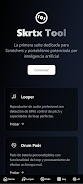
Skrtx Tool is a compact, performance-oriented suite for DJs and producers focused on scratch techniques and portable turntablism workflows, designed to capture ideas quickly and deliver hands-on control during live sets and studio sketching. Skrtx Tool combines a professional looper with accurate BPM detection, pitch control and seamless looping alongside a multi-track sequencer, customizable drum pads and an AI-assisted looper that helps generate new material from reference audio. The app is intended for musicians who build beats on the fly, practice turntablism, or want a reliable sketchpad for rhythmic ideas.
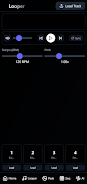
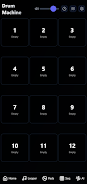
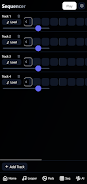
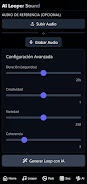
The typical session in Skrtx Tool begins with capturing audio or loading a sample, then using the looper to set loop points and lock tempo. BPM detection speeds up beat matching while pitch controls let you transpose loops without breaking timing. Loops can be layered into multiple tracks inside the sequencer to form patterns that evolve over time, and drum pads offer instant one-shot triggering or looped playback so you can finger-drum patterns and reassign sounds on the fly. The AI looper can analyze a reference clip and propose looped variations that you can edit or commit to the arrangement, enabling quick idea generation when inspiration runs short.
Skrtx Tool emphasizes touch-friendly controls and clear visual feedback to keep performance intuitive. Waveform displays and track meters provide immediate visual cues for timing and levels while tactile controls let you trim loop boundaries, nudge tempo and adjust pitch with gestures that are easy to use in noisy environments. The sequencer uses a straightforward pattern-based arrangement so you can build complexity by stacking patterns and tweaking parameters in real time, and the drum pads are fully remappable to match preferred workflows.
Rather than offering a linear progression system, Skrtx Tool supports a creative progression where users advance by building increasingly complex arrangements from simple loops and patterns. Projects are organized into sessions and patterns that can be recalled during a set, allowing performers to move from single-loop practice to multi-track arrangements. As users become more comfortable with the looper and sequencer, they typically expand their routines by layering percussive pads, varying pitch across tracks, and experimenting with the AI looper to produce fresh textures that keep sets dynamic.
Customization in Skrtx Tool centers on sound assignment and control behavior. Drum pads are customizable so you can load different kits or sample banks and decide whether pads latch or respond to hold gestures. Looping parameters such as loop length and crossfade are adjustable to achieve seamless transitions, and real-time effects processing lets you shape sounds while performing. These options let you tailor the app for short burst performances, extended live mixes, or focused studio sketching.
The interface favors high-contrast elements and clear separators for tracks and pads so information is legible under stage lighting. Color cues identify active loops and muted tracks, and scalable UI elements make the app usable on a range of screen sizes. Skrtx Tool also aims to reduce friction for new users with descriptive labels and immediate audio feedback so learning basic operations does not require diving into complex menus.
Skrtx Tool is optimized for low-latency performance to support live manipulation and tight timing. Most core features work offline so you can rely on the app during sets without network connectivity; however, real-time processing and the AI-assisted loop generation can place higher demands on the host device, so more capable hardware will provide smoother performance during complex sessions. Users should test their setup ahead of performances to confirm resource usage and latency.
Replay value comes from iterative experimentation: templates of loops and patterns can be reworked into new arrangements, and the AI looper provides continuing inspiration by suggesting alternate textures from existing material. The app’s niche emphasis on scratch and portablism means it excels at rhythmic capture and live manipulation but may not replace a full-featured DAW for deep studio editing or advanced linear mixing. There is a learning curve for some advanced features like multi-track sequencing and real-time effects, and users should expect the best results on modern devices with sufficient CPU headroom.
Begin by loading a sample or recording a short phrase, set loop points and let Skrtx Tool detect the BPM to lock tempo. Use the drum pads to add percussive elements, then move loops into the sequencer to create patterns and arrange a short set. Try the AI looper to generate alternate loop ideas from a reference clip and audition those variations within the same session. Over time you can develop a personalized set of patterns and pad mappings that speed up live performance and sketching workflows.
Compress Video - Resize Video
Size:48.75M Media & VideoMEME Maker: MEME Creator
Size:49.65M Media & VideoInstory Story Video Maker
Size:31.79M Media & VideoDrum Pads 24 - Beats and Music
Size:31.00M Media & VideoRadioTunes
Size:25.30M Media & VideoWiseplay
Size:38.13M Media & VideojetAudio HD Music Player Plus
Size:22.60M Media & VideoTABLA: India Mystical Drums
Size:27.35M Media & VideoOnePlayer
Size:128.00M Media & VideoDeep Bass Booster & Subwoofer
Size:4.30M Media & Videoedjing Mix
Size:70.40M Media & VideoWorld Radio FM Online
Size:24.00M Media & VideoApril 2024 Clash of Clans Update: Unveiling a Fresh Companion, Enhanced Levels, Chat Tagging, and Be
2024-04-16Arrival of Genshin Impact 4.6 Update: 'Embers of Two Realms, Twilight of Crimson'
2024-04-16V2.2 of the Farlight 84 update introduces an overhauled Season structure, fresh in-game currency, an
2024-04-16Monster Never Cry is now accessible on both Android and iOS mobile devices.
2024-04-18PUBG Mobile Teams Up with Bentley Motors: Luxury Cars, Exclusive Collectibles, and Beyond
2024-04-18March 2024 Free Redemption Codes for Honkai: Star Rail
2024-04-18


















