English
DevoFin - Expense Tracker helps you monitor spending, plan budgets, and save smarter with an intuitive interface and powerful tools. Built for individuals and small businesses, DevoFin - Expense Tracker centralizes transactions, categorizes expenses automatically, and delivers clear reports that highlight trends and opportunities to improve day-to-day financial decisions.
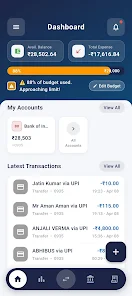
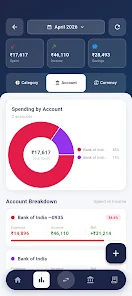
DevoFin organizes your money management into accessible tools so tracking becomes routine instead of a chore. Use custom categories, recurring expense templates, and quick-add transaction shortcuts to capture every payment. The app supports multiple accounts, wallet balances, and linked cards for a full view of cash flow.
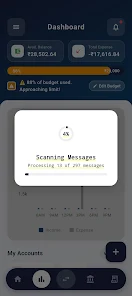
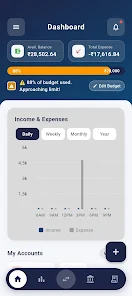
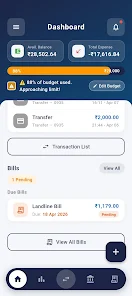
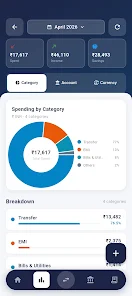
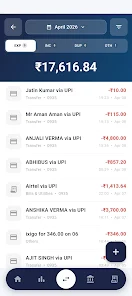
The interface prioritizes clarity: a dashboard summarizes balances, upcoming bills, and recent spending while swipe gestures provide fast editing. Colors and icons make it easy to spot categories at a glance, and filtering tools let you zero in on date ranges, tags, or accounts. DevoFin - Expense Tracker focuses on minimizing taps between opening the app and recording a transaction.
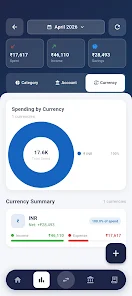
Beyond daily tracking, the app offers planning features that help you build realistic budgets and measure progress. Visual charts show spending by category, month-over-month comparisons, and cash flow projections. Exportable reports let you produce CSV or PDF summaries for personal archives or sharing with an accountant.
Reports include customizable date ranges and comparison modes so you can evaluate seasonal changes or the impact of a new savings strategy. Forecast tools show how recurring expenses will affect future balances, helping you avoid surprises.
Security is built into the app with optional biometric locking and a passcode gate for immediate privacy. Encrypted backups protect your data when syncing across devices or restoring to a new phone. DevoFin supports cloud synchronization so entries remain consistent on tablets and secondary devices without complex setup.
Designed to run smoothly on a broad range of Android devices, the app uses lightweight local storage and efficient synchronization calls to minimize battery and data usage. Regular updates optimize speed and address compatibility with the latest Android releases, ensuring responsive performance even with extensive transaction histories.
Begin by connecting one or more accounts or create manual ledgers for cash and cards. Import CSV files if you’re moving from another tracker, or link bank feeds where supported to auto-import transactions. Set up two or three core categories and a simple monthly budget to start seeing value within days. The onboarding workflow guides you through these steps and provides contextual tips while you explore features.
Consistency is the single best habit for improving finances. Check entries daily or set a weekly reminder to reconcile receipts. Use the tagging system to track project-related expenses or separate personal and business costs. If you have irregular income, enable forecast smoothing to create a more predictable budget plan. For teams or shared households, create a shared account to track joint bills and divide costs transparently.
DevoFin - Expense Tracker balances simplicity with depth: it is approachable for someone launching their first budget yet capable enough for more advanced needs like multi-account reconciliation and exportable reports. With thoughtful automation, clear visuals, and reliable syncing, it helps transform sporadic money notes into a coherent financial picture you can act on.
Cover Letter
Size:11.77M FinanceCV Engineer
Size:16.85M FinanceSimple Invoice Manager
Size:25.30M Finance华融融达期货
Size:109.18M FinanceChurchNest
Size:83.00M FinanceYnotOne
Size:0.00M FinanceMoohan Taekwondo
Size:10.80M FinanceIBOIX
Size:76.00M FinanceMargin Guard: Risk Calculator
Size:69.00M FinanceLP Protidin
Size:47.00M FinanceMON 3
Size:47.00M FinanceExpo Wallet - Consumer
Size:29.10M FinanceApril 2024 Clash of Clans Update: Unveiling a Fresh Companion, Enhanced Levels, Chat Tagging, and Be
2024-04-16Arrival of Genshin Impact 4.6 Update: 'Embers of Two Realms, Twilight of Crimson'
2024-04-16V2.2 of the Farlight 84 update introduces an overhauled Season structure, fresh in-game currency, an
2024-04-16Monster Never Cry is now accessible on both Android and iOS mobile devices.
2024-04-18PUBG Mobile Teams Up with Bentley Motors: Luxury Cars, Exclusive Collectibles, and Beyond
2024-04-18March 2024 Free Redemption Codes for Honkai: Star Rail
2024-04-18