English
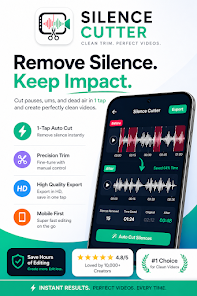
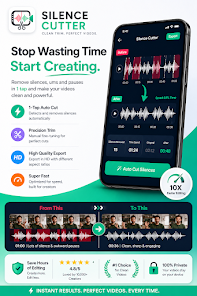
Auto Silence Remover for Video is a compact mobile utility that tightens talking-head footage by detecting pauses, filler words and dead air and trimming them out automatically. Designed for creators who record vlogs, lessons, interviews or podcasts on the go, this app removes silence and common speech tokens so you can turn long takes into watchable clips with minimal manual cutting. The interface centers on a single-tap workflow that analyzes audio locally, preserves a natural rhythm with adjustable crossfades, and exports standard H.264/AAC files for immediate sharing or archival.
The core feature set focuses on speed and simplicity rather than complex timeline construction: adaptive silence detection uses RMS energy thresholding to follow the background noise floor so you rarely need per-clip tuning, while an optional on-device transcription step locates filler words like "um" and "uh" for targeted removal. Exports are hardware accelerated where the device supports it, producing encoded MP4s quickly and with modest battery impact. Project state is retained per video so you can reopen and refine edits later, and the app can emit SRT sidecar files if you want separate captions or further subtitle work in other tools.
Auto Silence Remover for Video performs all analysis on the device: when you import or record a clip the audio is scanned to build an energy profile and detect speech segments. When the optional local transcription model is present the app aligns words to the waveform to mark common filler tokens for removal or replacement. For every cut the system applies a short crossfade that you can set between 0 and 200 milliseconds to avoid audible clicks. There are three silence-handling modes so you can remove gaps entirely, speed them up to a short jump-cut effect, or retain a brief pause for natural pacing.
The editing UI emphasizes quick results: a single timeline view shows detected speech blocks and silent gaps, and trimming is performed by tapping a mode or dragging markers to fine-tune cut points. Playback scrubbing is responsive and frame-accurate for matching lips to audio, and an undo history preserves recent changes. Presets for export resolution, quality and silence behavior let you apply consistent settings across a batch of clips, and batch processing runs queued jobs in sequence so you can queue overnight renders. The workflow is intentionally linear to reduce friction for creators who prefer a fast in-and-out process rather than a multi-track session.
The app is optimized to keep everything private: no network access is required for core features and nothing is uploaded to cloud servers unless you explicitly share an exported file. Hardware-accelerated encoding leverages the device codec to speed exports and minimize CPU load. The optional transcription capability requires downloading a local Whisper GGML model of roughly 75 MB, but that model stays on device. Auto Silence Remover for Video supports Android 7.0 and later and will report estimated free space requirements before rendering large files to help you manage storage.
This tool is useful for a broad set of creators: solo vloggers looking to tighten delivery, educators producing lecture highlights, podcasters preparing video episodes, and interviewers who want cleaner pacing without manual splice work. Accessibility features include adjustable silence sensitivity and crossfade timing so editors with hearing differences can tailor the audio transitions, and SRT exports plus visible waveforms assist caption creation. Replay value comes from the ability to store reusable presets, batch process many takes, and quickly iterate on different silence strategies to find the right rhythm for a channel or course.
Auto Silence Remover for Video is not a replacement for a full multitrack editor: it doesn't include a music library, color grading tools, or advanced transition templates. Users should expect some trade-offs in creative control in exchange for speed; complex sound design or multi-source mixing remains better suited to desktop software. Also note that enabling the optional transcription model increases required storage, and longer exports require adequate free space and time on older devices.
The app is developed by BinaryScript with a focus on private, efficient on-device processing and a simple, reliable trimming workflow. Regular updates address compatibility and performance improvements, and the support channel responds to bug reports and feature requests to help the tool fit into existing mobile production pipelines.

Compress Video - Resize Video
Size:48.75M Media & VideoMEME Maker: MEME Creator
Size:49.65M Media & VideoInstory Story Video Maker
Size:31.79M Media & VideoDrum Pads 24 - Beats and Music
Size:31.00M Media & VideoRadioTunes
Size:25.30M Media & VideoWiseplay
Size:38.13M Media & VideojetAudio HD Music Player Plus
Size:22.60M Media & VideoTABLA: India Mystical Drums
Size:27.35M Media & VideoOnePlayer
Size:128.00M Media & VideoDeep Bass Booster & Subwoofer
Size:4.30M Media & Videoedjing Mix
Size:70.40M Media & VideoWorld Radio FM Online
Size:24.00M Media & VideoApril 2024 Clash of Clans Update: Unveiling a Fresh Companion, Enhanced Levels, Chat Tagging, and Be
2024-04-16Arrival of Genshin Impact 4.6 Update: 'Embers of Two Realms, Twilight of Crimson'
2024-04-16V2.2 of the Farlight 84 update introduces an overhauled Season structure, fresh in-game currency, an
2024-04-16Monster Never Cry is now accessible on both Android and iOS mobile devices.
2024-04-18PUBG Mobile Teams Up with Bentley Motors: Luxury Cars, Exclusive Collectibles, and Beyond
2024-04-18March 2024 Free Redemption Codes for Honkai: Star Rail
2024-04-18